Finding the right educational tablet for children means balancing engaging content, parental controls, durability, and value. This guide highlights five solid options that combine kid-friendly interfaces with robust safety features, ensuring a productive screen time experience for children ages 3 through 12. Each entry includes core specs, standout features, and how it supports learning at home or on the move.
| Product | Brand | Screen | Key Benefit |
|---|---|---|---|
| Amazon Fire HD 10 Kids Pro tablet | Amazon | 10.1″ HD | Advanced parental controls and Kids+ access |
| Amazon Fire 7 Kids tablet (newest model) | Amazon | 7″ | Compact learning companion with a year of Kids+ |
| Amazon Fire HD 10 Kids tablet (newest model) | Amazon | 10.1″ HD | Extensive parental controls and Kids+ content |
| Amazon Fire HD 8 Kids Pro tablet (newest model) | Amazon | 8″ HD | Kid-friendly 2-year guarantee and age-appropriate content |
| CFVOCUY 2025 Kids Tablet | CFVOCUY | 10.1″ 1280×800 | Eye-protection mode with parental controls |
Below, each product is explored in a dedicated section with a linked Amazon listing, an image, and a concise overview of features relevant to education and safety. All sections stay focused on learning outcomes, screen time management, and durability to help families compare effectively.
Amazon Fire HD 10 Kids Pro Tablet

The Fire HD 10 Kids Pro targets growing readers and science learners with a large 10.1-inch display and strong performance. It includes built-in safeguards that protect privacy and prevent malware, delivering a safe online experience for kids. It has a robust parental controls suite via the Amazon Kids Parent Dashboard to remotely set screen time limits and monitor used content. A full year of Amazon Kids+ provides ad-free access to thousands of curated titles, videos, and apps tailored for varied ages. The device comes with a kid-friendly case and a long battery life, designed to support extended study sessions and multimedia learning opportunities.
Amazon Fire 7 Kids Tablet (Newest Model)
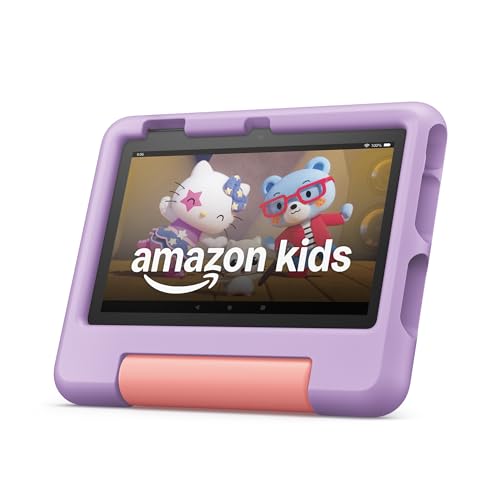
The 7-inch Fire 7 Kids tablet is a compact option designed for younger learners, offering ad-free content and easy-to-use parental controls. It includes one year of Amazon Kids+ for a broad library of books, games, and educational videos suitable for early elementary ages. The included Kid-Proof Case with a stand helps kids use the tablet hands-free for reading or video lessons. A two-year worry-free guarantee adds practical protection against accidents, making it a sensible choice for classroom-like activities conducted at home or on trips.
Amazon Fire HD 10 Kids Tablet (Newest Model)

Designed for larger hands and more involved projects, the Fire HD 10 Kids Tablet blends crisp visuals with extensive parental controls. It ships with 1 year of Amazon Kids+ access to educational apps, books, and videos, and a kid-proof case. The 2-year worry-free guarantee helps cover accidental damage during classroom-like exercises or home learning. The content is curated to include STEM activities, language learning, and age-appropriate entertainment—making it a versatile option for home schooling or enrichment activities.
Amazon Fire HD 8 Kids Pro Tablet (Newest Model)

The 8-inch Fire HD Kids Pro is built for big kids with a sharper display and a focus on longer study sessions. It includes a 6-month subscription to Amazon Kids+ and a slim Kid-Friendly Case. A 2-year worry-free guarantee protects against breakage, making it a practical choice for school projects and interactive learning apps. The Kids+ library contains science and math activities, language learning resources, and educational games—supporting diverse learning styles and pacing.
CFVOCUY 2025 Kids Tablet

This Android-based 10.1-inch tablet emphasizes eye protection with a dedicated display mode and a broad pre-installed educational app lineup. Parental controls enable screen-time limits, content filters, and app management, giving caregivers practical governance over learning sessions. The included protective EVA case with a built-in stand helps children view lessons hands-free and reduces the risk of damage during daily use. The device supports future app downloads and expands storage via microSD, which is beneficial for growing digital libraries and multisubject activities.
Buying Guide
Key purchase considerations help families select the best educational tablet for their children. Here are the core perspectives to weigh when comparing devices:
- Content and learning apps: Look for a substantial pre-installed library and access to a curated education ecosystem. Subscriptions like Amazon Kids+ or equivalent libraries can significantly boost ongoing educational value without extra purchases.
- Parental controls and safety: Prioritize platforms offering remote management, screen time limits, content filters, and privacy safeguards. A strong parental dashboard helps align learning with daily routines.
- Durability and accessories: Kid-friendly cases, screen protectors, and sturdy builds reduce damage from everyday use. Some models include built-in stands for hands-free viewing, which supports reading and guided lessons.
- Screen size and performance: Larger displays suit reading, writing, and science experiments; smaller tablets excel for travel and quick quizzes. Ensure the device has enough processing power and memory for smooth app performance and multitasking.
- Battery life: Long-lasting batteries minimize interruptions during study sessions, especially on long trips or during remote classes.
- Learning versatility: Tablets that support scribble or handwriting apps, language learning, math tools, and science simulations offer broader educational value beyond entertainment.
- Warranty and return policies: A 2-year guarantee or clear return options reduce risk for parents concerned about accidental damage or dissatisfaction with content alignment.
For families choosing across brands, consider how the ecosystem fits into daily routines: whether you prefer a single platform for multiple devices, or if you want the flexibility of independent devices per child. Evaluate the relevance of the included content to the child’s age, learning goals, and curiosity areas—mathematics, reading, science, or creative projects. Finally, confirm parental controls are easy to use on mobile devices and desktops to ensure consistent oversight across screen time and app usage.