Finding a phone that’s simple to operate and reliable can be a priority for seniors, caregivers, or anyone seeking a straightforward device. This guide highlights five easy-to-use phones that prioritize calling and texting, clear sound, and large controls over complexity. They’re best for buyers who want long battery life, simple interfaces, and dependable charging options. Each option is chosen for clarity, ease of use, and practical features like SOS or big buttons. The table below offers a quick snapshot of the selections.
| Product | Best For | Key Feature |
|---|---|---|
| Easyfone Prime-A6 Unlocked | Non-smartphone users who want basic calls/texts | Clear sound, easy charging dock |
| Easyfone Prime-A1 Pro | Seniors who need SOS and big displays | Flip design, big fonts, SOS button |
| Easyfone Prime-T6 | People who prefer picture-speed-dial | 4 large picture memory buttons |
| Easyfone T200 | Users who want basic features with FM radio | FM radio, simple UI, long standby |
Easyfone Prime-A6 Unlocked 4G Feature Phone

The Easyfone Prime-A6 is designed for straightforward calling and texting with an emphasis on loud, clear sound. It uses a classic bar-type design and does not include internet access or a camera, making it ideal for users who prioritize simplicity and reliability. It ships with a real 1050mAh battery and an easy charging dock for hassle-free power management. Best for users who want a no-frain, basic mobile experience with long standby.
Who this is best for: someone who wants a simple, non-smartphone experience focused on calls and texts, with easy charging and long battery life. Caution: lacks internet access and a camera, which may be a limitation for those who need basic online features or photography.
Easyfone Prime-A1 Pro Unlocked 4G Flip Phone for Seniors
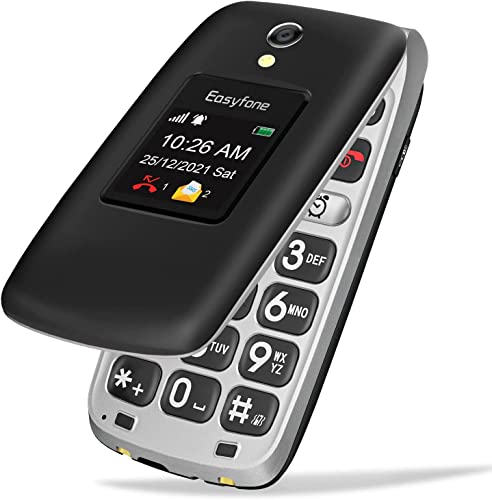
The Prime-A1 Pro uses a classic flip design with two displays: a 2.4″ main display and a 1.44″ external screen. It emphasizes big fonts and icons, along with a 1500mAh battery and an easy charging dock. It supports SOS and a dedicated button for speed dialing. Best for seniors who want a familiar flip-phone experience and large, legible controls. Caution: feature set remains basic; no high-speed data use while in calling mode.
Easyfone Prime-T6 4G Picture Button Phone

The Prime-T6 focuses on ease of calling with four large picture memory buttons. Its minimalist UI provides a straightforward experience, reducing the need to navigate a traditional contact list. The 1050mAh battery supports long standby, and the device includes an easy charging dock. Best for users who benefit from visual speed-dial prompts. Limitation: image-based dialing may require preloading photos for quick access.
Easyfone T200 4G Unlocked Feature Phone

The T200 offers a simple operating system with clear sound, a classic bar form focused on calls and texts, no internet access, and a camera-free experience. It features Type-C fast charging and a 1050mAh battery for extended standby times. Best for users who want a straightforward, no-distractions device with reliable charging. Caution: no camera or internet features, which might be a drawback for users seeking basic online access.
Buying Guide
What defines an easy-to-use phone?
Ease of use centers on a clean interface, large text and icons, simple navigation, and physical features like big buttons or a flip design. Consider whether you need picture-speed-dial, SOS assistance, or a charging dock for convenience.
How important is battery life?
Long standby ensures the phone remains ready without frequent charging. Look for devices with battery capacities around 1050–1500 mAh and a dedicated charging dock if you value quick, hassle-free power recharges.
Should you prioritize a flip design or a bar form?
Flip phones provide a tactile experience with a physical hinge and external display, which some users find easier to manage. Bar phones tend to be compact and straightforward with a single-on interaction flow for calls and texts.
What accessibility features matter most?
Big fonts, high-contrast icons, loud speakers, and dedicated SOS or emergency features are core accessibility considerations. A large-speed-dial or memory button can simplify daily use for seniors or those with dexterity challenges.
Is internet access a must?
If you want zero web distractions and a single-purpose device, choose a phone that offers no internet access. If you need occasional features beyond calls and texts, ensure the device supports basic apps without overwhelming complexity.
How should you compare these models?
Compare based on: display size and readability, button size and spacing, battery life, charging dock availability, SOS features, and whether the phone supports essential features like FM radio or Bluetooth for occasional headset use.
Frequently Asked Questions
- What makes these phones “easy-to-use”? These models emphasize simple interfaces, large text/icons, and focus on calling/texting rather than online features.
- Do these phones have camera access? Most listed models avoid cameras to reduce distraction and complexity.
- Can these phones connect to Bluetooth devices? Some options include Bluetooth, but capability varies by model.
- Are these phones suitable for seniors? Yes, with features like big displays, SOS buttons, and simple navigation designed for easy operation.
- Do these devices require internet access? Most are designed without internet access to maintain simplicity; some offer optional data features.