E-paper tablets offer a paper-like writing experience with dedicated note-taking features and distraction-free interfaces. This guide highlights top e-paper tablets for 2025-2025, focusing on writing feel, display quality, and portability. Explore five strong picks, compare their strengths, and review a practical buying guide to help you choose the best fit for studying, planning, or professional use.
Summary of chosen products
| Product | Brand | Key Feature | Amazon Link |
|---|---|---|---|
| reMarkable Paper Pro Bundle | reMarkable | 11.8” color display, Marker Plus with eraser, color writing | View |
| reMarkable Starter Bundle | reMarkable | 10.3” black-and-white writing tablet, Marker Plus | View |
| reMarkable Paper Pro Move | reMarkable | 7.3” color display, ultra-portable, handwriting search | View |
| reMarkable Paper Pro Bundle – Mosaic Weave | reMarkable | 11.8” color display, Book Folio cover, color writing | View |
| Amazon Kindle Scribe | Amazon | 64GB, AI-assisted notebook features, premium pen | View |
Best Overall Color E-Paper Experience: ReMarkable Paper Pro Bundle
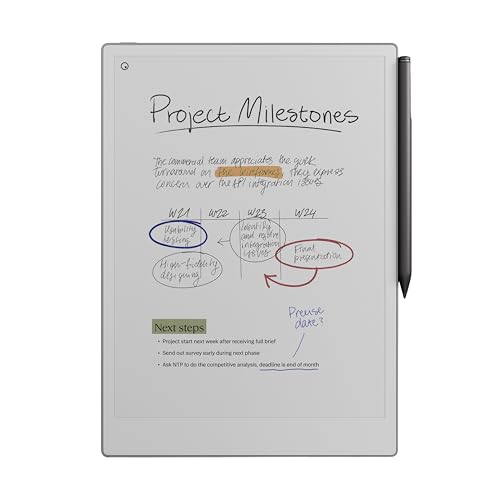
The reMarkable Paper Pro Bundle combines a near-paper writing feel with an 11.8” color Canvas display, making it ideal for those who want to sketch, annotate, and read in color. The box includes the Marker Plus pen with an eraser, six spare tips, and a USB-C cable. The device emphasizes a paper-like friction and precise control for extended writing sessions, supporting color notes and offline reading with cloud sync when connected.
Key features include an ultra-slim design, an adjustable reading light, and a focus-friendly interface that minimizes distractions. This bundle targets professionals and students who value a dedicated writing surface and the ability to switch between note-taking and color reading without popping up notifications or apps.
Best Starter Paper Tablet for Focused Writing: ReMarkable Starter Bundle

The original reMarkable 2 experience remains a benchmark for paper-like writing on a digital device. At just 4.7 mm thick, it is highly portable, with a 10.3” black-and-white display and a Marker Plus pen with an eraser. The Starter Bundle includes 9 spare marker tips and a USB-C cable. With no app store, notifications, or social media, it prioritizes deep work, long battery life, and a distraction-free environment for note-taking, reading, and document review.
Best Ultraportable Color Note-Taking: reMarkable Paper Pro Move
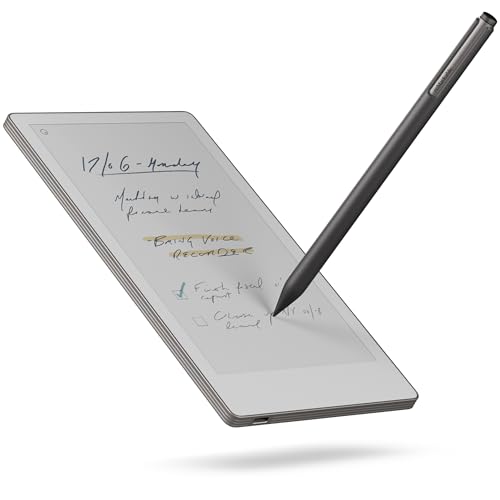
The Paper Pro Move is designed for on-the-go use, offering a 7.3” color display with the same Marker Plus toolset and cloud-synced notes. It emphasizes a distraction-free environment with a compact footprint, making it a practical option for fieldwork, meetings, or quick sketches. The device supports converting handwriting to typed text and offers cloud-backed access across devices with a Connect subscription plan.
Best Color Tablet Bundle With Cover: Mosaic Weave Edition

The Mosaic Weave Bundle pairs an 11.8” Canvas Color display with a stylish Mosaic Weave Book Folio cover. The bundle includes a Marker Plus pen with eraser, six spare tips, and a USB-C cable, delivering a comprehensive color writing and reading experience in a portable package. The integrated cover provides protection while maintaining a premium look and feel for professional settings and travel.
Best AI-Enhanced Reading and Note Tools: Amazon Kindle Scribe

Kindle Scribe combines a digital notebook with an expansive reading experience. The 64GB model supports writing, note-taking, and document annotation with the Premium Pen. Built-in AI notebook summarization tools help transform notes, while the device remains focused on a distraction-free environment. This option is well-suited for readers who also want robust note capabilities integrated with a large e-book ecosystem.
Buying Guide
- Display and writing feel: For authentic handwriting, prioritize devices with a paper-like friction and a large, legible display. Color displays add value for diagrams and highlights, but may affect battery life and glare in certain lighting.
- Writing tools and accessories: Look for a responsive stylus with eraser options, spare tips, and comfortable grip. Some bundles include protective covers or folios that fit your style and travel needs.
- Note organization and search: Consider whether the tablet offers handwriting-to-text conversion, cloud syncing, and cross-device access. Subscription plans can enable advanced search and organization features.
- Battery life and charging: If you work remotely or travel often, compare battery life and charging speed. USB-C is common, which helps with universal charging compatibility.
- Reading features and formats: If reading is part of your workflow, evaluate supported formats and any built-in AI tools for summarization or annotation. Standalone e-reader capabilities can complement note-taking well.
- Portability vs. screen size: Larger screens (11.8”) are great for drafting and diagrams, but smaller devices (7.3”) excel at pocketability. Choose based on your typical use case and transport needs.
- Price and value: Bundles with pens, covers, and extra tips can offer better long-term value, especially if you anticipate frequent replacements or accessories.
In selecting an e-paper tablet, contemplate whether color display, note conversion, or reading integration best aligns with your goals. For pure paper-like writing and distraction-free study, the reMarkable line remains a strong standard. If reading and AI-assisted note tools are a priority, Kindle Scribe provides a broad ecosystem, while Mosaic Weave and Pro Move offer compact, color-capable options for on-the-go note-taking.