For students, professionals, and readers alike, e ink tablets offer a focused writing experience with low glare displays and long battery life. This guide highlights five standout options that balance note taking with reading and light editing. Each entry includes key specs, standout features, and how it compares for real-world use.
| Product | Brand | Display | Notes |
|---|---|---|---|
| XPPen 3 in 1 Color Digital Notebook | XP-Pen | 10.95″ AG Nano-Etched LCD | Color modes, 90Hz, battery-free pen |
| AINOTE 2 E-Ink Paper Tablet | iFLYTEK | 10.65″ E Ink | AI assistance, multilingual transcription |
| VIWOODS AiPaper Carta 1300 | VIWOODS | 10.65″ Carta 1300 Mobius | Paper-like writing, AI features |
| AINOTE 2 10.65″ AI Paper Tablet | iFLYTEK | 10.65″ E Ink | Voice, translation, multiple languages |
| BOOX Note Air 4C | BOOX | 10.3″ Kaleido 3 Colour Screen | Android 13, color ePaper |
Below you’ll find five in-depth product sections. Each section includes a succinct overview, notable features, and practical notes to help you decide which device best fits your note-taking workflow and reading habits.
XP-Pen 3 in 1 Color Digital Notebook

The XP-Pen 3 in 1 Color Digital Notebook offers a 10.95-inch AG nano-etched LCD display with TCL NXTpaper 3.0 technology, delivering a paper-like visual experience while reducing ambient light interference. It supports three color modes (Monochrome LCD, Light Color, Nature Color) via an X-paper key, making it easy to tailor the screen for writing, reading, or meetings. A 90Hz refresh rate minimizes lag during writing and scrolling, and the color depth (16.7 million colors) plus 400-nit brightness enhance readability. The device is designed for note-taking, reading, and collaborative meetings with a stylus that’s responsive yet battery-free, helping to keep focus on content rather than the device. Note that while it resembles e-ink in feel, it is an Android-based display and not a true e-ink panel.
Pros:
– Flexible color modes for different tasks
– Paper-like display with reduced glare
– High refresh rate supports smooth writing
Cons:
– Not a traditional e-ink screen, which affects contrast in bright outdoor light
iFLYTEK AINOTE 2 E-Ink Paper Tablet

The iFLYTEK AINOTE 2 combines AI-powered features with a 10.65-inch E Ink display. Built-in AI assistance enables real-time solutions via ChatGPT-5 by circling text, transforming how you work through notes and documents. It excels in transcription across 16 languages, offering precise real-time notes for meetings, lectures, and interviews. The paper-like writing feel is supported by 8 brush styles and ultra-low latency, providing a smooth handwriting experience. The device is compatible with Kindle, Kobo, and Google Play apps, broadening content access for reading. This model targets professionals and students who want efficient AI-assisted note taking and language support.
Pros:
– Strong AI integration for quick insights
– Real-time transcription in multiple languages
– Realistic writing feel on an E Ink screen
Cons:
– More emphasis on AI features; storage and app ecosystem vary by region
VIWOODS AiPaper Carta 1300

The VIWOODS AiPaper Carta 1300 uses advanced Carta 1300 Mobius technology for improved contrast and energy efficiency, delivering a paper-like writing experience with a 750 µm pen-to-ink distance. The device emphasizes a realistic texture that mimics traditional pen-and-paper, making long note sessions more comfortable. It supports AI-powered features to summarize and organize notes, boosting productivity. The slim, lightweight design (4.5 mm, about 370 g) makes it highly portable for daily carry and travel use, ideal for students and professionals who need to alternate between reading and writing while on the go.
Pros:
– Superior paper-like feel and fast response
– AI-assisted note organization
– Lightweight for travel
Cons:
– E Ink color rendering can vary by lighting; performance depends on apps used
VIWOODS Upgraded AiPaper Bundle
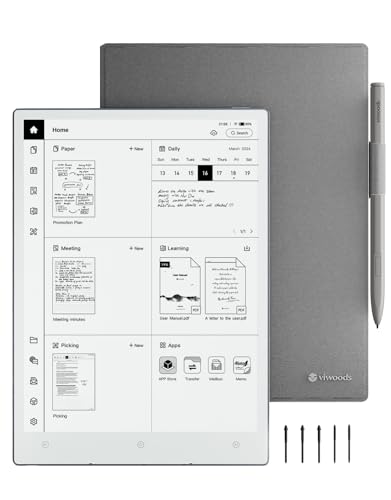
This upgraded bundle adds the W2 stylus Pro and five nibs to the AiPaper Carta 1300, expanding precision options for drawing and handwriting. The Carta 1300 Mobius screen continues to deliver quicker responses and lower power consumption, paired with a paper-like feel that reduces fatigue during long writing sessions. It’s a strong choice for users who value a ready-to-use package with extra stylus tips and a robust notebook experience. The added accessories can help maintain accuracy across different writing tasks, from diagrams to dense notes.
Pros:
– Comprehensive accessory bundle
– Maintains paper-like writing experience
– Consistent performance for extended sessions
Cons:
– Bundle pricing may be a consideration for budget-focused buyers
BOOX Note Air 4C Color E Ink Tablet

The BOOX Note Air 4C brings a 10.3-inch Kaleido 3 color ePaper display with a flat cover-lens, delivering rich color representation for reading and note-taking. It runs Android 13, enabling access to a broad app ecosystem and 3rd-party tools. The device supports BOOX’s stylus technology with 4,096 pressure levels and both BOOX InkSpire and capacitive touch. With 6GB RAM and 64GB storage, it balances performance and capacity for long reading sessions, annotated PDFs, and handwritten notes. The color ePaper capability makes it suitable for documents that benefit from color emphasis, diagrams, and highlighted notes.
Pros:
– Color ePaper display for highlighted content
– Android 13 access to apps and tools
– Flexible note and reading capabilities
Cons:
– Heavier than some pure E Ink devices; color display can affect battery life
Buying Guide: Key Purchase Considerations
When choosing the best e ink tablet for note taking, consider how you plan to use the device most often. If you prioritize a natural handwriting feel and minimal eye strain, a Carta 1300 or similar Mobius screen offers a closer paper-like experience. If you need AI-assisted writing, real-time transcription, or multilingual support, models with integrated AI features can boost productivity. Battery life, weight, and portability matter for students and travelers, while access to content ecosystems and third-party apps can determine long-term usefulness.
- Display type and readability: E Ink panels excel in eye comfort and outdoor readability, while LCD-based displays with color modes provide vivid visuals but may require more power.
- Writing feel: Check the pen-to-surface distance and latency. A shorter distance and lower latency create a more natural writing experience.
- AI and transcription: If you need real-time transcription or AI-assisted note processing, review language support, latency, and the availability of compatible AI services.
- Software and ecosystem: Consider whether the device supports your preferred apps (Kindle, Google Play, PDFs, etc.) and whether you can install third-party notes apps.
- Portability and durability: For on-the-go use, favor slim profiles, light weights, and sturdy folio or case options.
- Storage and expandability: Look for adequate internal storage and the option to expand via microSD or cloud storage if needed.
In sum, the best choice depends on your balance of writing realism, AI features, color needs, and portability. The five options highlighted here provide a spectrum from color LCD-like experiences to advanced AI-enabled E Ink notebooks, each tailored to note taking, reading, and light editing tasks.