Finding a reliable external DVD burner for a PC means balancing speed, compatibility, and ease of use. This guide highlights five strong options that work well with Windows PCs, Macs, and Linux systems, helping you back up data, install software, or enjoy media. Each pick targets common buyer needs—compact portability, power-free operation, or broad device support—so you can choose with confidence. The following Buying Guide and quick product snapshot help you compare at a glance.
Quick Product Snapshot
- Amicool External DVD Drive — Best for plug-and-play setup on laptops and desktops; dual USB 3.0 / Type-C for fast transfers.
- Rioddas External CD/DVD Drive — Best for reliable, straightforward use with a back-of-the-PC USB port for power stability.
- ORIGBELIE External CD DVD Drive (Ultra Slim) — Best for slim laptops needing USB-C and USB-A compatibility plus SD/TF card reading.
- JKNJX External CD/DVD Drive — Best all-round value with USB Type-A/C, wide OS compatibility, and simple plug-and-play operation.
- GODBPNYMU 5-in-1 External Drive — Best for multifunction use (CD/DVD writing, USB hub, SD/TF card reader) and eco-friendly design.
Amicool External DVD Drive Review

The Amicool external DVD drive uses dual interfaces (USB 3.0 and Type-C) for data transfer up to 5Gbps. It supports DVD+R, DVD-R, CD-R, and CD-RW, with a read speed up to 8x for DVDs and 24x for CDs. Best for: users who need fast, direct plug-and-play operation on both laptops and desktops without extra drivers. Caution: not compatible with Blu-ray discs or TV/game console playback, and power reliability is best when connected directly to a rear USB port on desktops.
Lite-On 24x Dual-Layer DVD±RW (Internal) Review
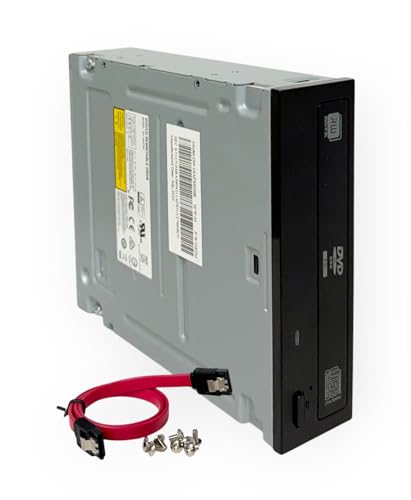
Note: This is an internal drive option for desktop builds where an internal SATA connection is available. It supports DVD±R/RW and Dual-Layer discs, with standard SATA compatibility. Best for: users upgrading an existing desktop with a spare internal bay. Caution: not a standalone external drive; requires installation in a PC case and SATA power/data connections.
Rioddas External CD/DVD Drive Review

The Rioddas drive emphasizes plug-and-play use with USB 3.0 (backward compatible with USB 2.0). It offers up to 5Gbps transfer speeds, a physical eject button, and copper mesh for stable data transmission. Best for: users who want a reliable, straightforward external drive with strong fault tolerance. Caution: ensure the back of the PC provides a high-power USB port for desktop use to avoid power shortfalls.
ORIGBELIE External CD DVD Drive (Ultra Slim)

The ORIGBELIE Ultra Slim model adds USB 3.0 with USB-C and USB-A compatibility, plus SD/TF card slots, making it a versatile hub for laptops. It supports CD/DVD reading and burning up to 24x for CDs and 8x for DVDs. Best for: travelers or students who need a compact drive with added card reader functionality. Caution: some older Mac systems may require media playback settings to recognize the device icon when a disc isn’t mounted yet.
JKNJX External CD/DVD Drive Review

The JKNJX drive offers both USB 3.0 Type-A and Type-C interfaces with fast 8x DVD and 24x CD speeds. It emphasizes broad OS compatibility, including Windows, macOS, and various Linux distributions. Best for: users who want a straightforward plug-and-play external drive with wide device support. Caution: not compatible with certain Chromebooks or Chromebox devices that lack full USB control over optical drives.
GODBPNYMU 5-in-1 External Drive Review

The GODBPNYMU drive stands out as a 5-in-1 hub: it reads/writes CD and DVD discs, plus provides two USB 2.0 ports and one TF/SD card slot. It is marketed as carbon-neutral with eco-friendly packaging. Best for: users who want an all-in-one portable solution for data transfer and media work while prioritizing sustainability. Caution: power and performance can vary depending on USB port quality, and some devices may experience slower transfers on older USB standards.
Buying Guide: How To Choose The Right USB DVD Burner For PC
- What connection type do you prefer? If you switch between devices, USB-C and USB-A compatible drives offer the best flexibility. Look for dual-interface models like USB 3.0 and Type-C for fast transfers.
- Is portability a priority? Ultra-slim and light drives excel for laptops, students, and travelers, while larger enclosures may stay put on a desktop.
- What disc formats do you need? Most drives support DVD±R/RW and CD±R/RW. Some models omit Blu-ray or DVD-RAM support; verify if you require higher-end formats.
- OS compatibility: Ensure the drive works with Windows, macOS, and Linux if you use multiple systems. Some may require minimal system settings on certain versions.
- Power considerations: Desktop PCs benefit from rear USB ports or dedicated power, while laptops can rely on USB-powered operation. Hubs can cause power instability.
- Extra features: Card readers, eject mechanisms, and built-in hubs add value for photographers, students, or professionals who handle multiple media types.
- Durability and warranty: Look for robust housings and confirm that the product includes basic driver-free setup for immediate use.
Frequently Asked Questions
- Do external DVD drives require drivers? Most modern external drives are plug-and-play and install automatically without separate drivers.
- Will these drives work with Macs and PCs? Yes, most listed models support Windows, macOS, and Linux with varying setup notes.
- Can I burn Blu-ray discs with these drives? No, most units in this guide do not support Blu-ray discs.
- Is it better to connect to a back USB port on desktops? Yes, back-panel USB ports provide more stable power and data connections for optical drives.
- What is the typical read/write speed range? Common speeds are up to 8x for DVDs and 24x for CDs, with USB 3.0 delivering faster transfers.
- Are these drives good for data backup? Yes, many drives are well-suited for data backup and software installation tasks when paired with reliable media.