The following guide highlights five top-rated drawing monitors for PC, chosen for color accuracy, pen performance, and overall value. Each option supports professional artwork, illustration, and design work with reliable display quality and responsive styluses. Use the buying guide below to compare key factors such as resolution, color gamut, full-lamination screens, and compatibility with Windows, macOS, or Linux setups.
| Product | Brand | Key Feature |
|---|---|---|
| VEIKK VK1200 V2 | VEIKK | Full-laminated 1920×1080 LCD with tilt pen |
| XP-Pen Artist 13.3 Pro | XP-Pen | Fully laminated FHD display, 60° tilt, strong color gamut |
| HUION Kamvas Pro 13 (2.5K) | HUION | 2560×1600 QHD, Quantum Dot colors, anti-glare |
| XP-Pen Artist Ultra 16 4K OLED | XP-Pen | 4K OLED, 99% Adobe RGB, superb color accuracy |
| GAOMON PD1161 | GAOMON | 11.6″ screen, battery-free pen, tilt |
VEIKK VK1200 V2 Drawing Tablet with Screen

The VEIKK VK1200 V2 is a compact 11.6-inch drawing monitor designed for PC creators who want a full-laminated display with natural drawing feel. The screen uses full-lamination technology to minimize parallax and improve cursor accuracy, while anti-glare glass protects the surface and reduces reflections. It delivers a 1920×1080 IPS panel with 72% NTSC color coverage, offering reliable color reproduction for everyday digital illustration. The included battery-free pens provide 8192 levels of pressure sensitivity and tilt recognition up to 60 degrees, ensuring expressive line work without the need for charging. A single USB-C connection handles data, power, and display signals, with HDMI and USB-C adapters for non-C USB devices. Compatible with Windows 7+, macOS 10.12+, and Linux.
XP-Pen Artist 13.3 Pro Drawing Tablet with Screen

XP-Pen Artist 13.3 Pro offers a 13.3-inch fully laminated display with 1920×1080 resolution and a wide color gamut for vivid artwork. It supports up to 60 degrees of tilt for natural shading and brush control, and delivers 8192 levels of pen pressure with a responsive pen. The display emphasizes color accuracy with high color gamut and wide viewing angles (178°). A 3-in-1 cable set ensures straightforward connection to a computer via USB-C/HDMI, simplifying setup for PC users. Note that this model requires a computer to operate, aligning with a traditional pen display workflow.
HUION Kamvas Pro 13 (2.5K) Graphics Monitor
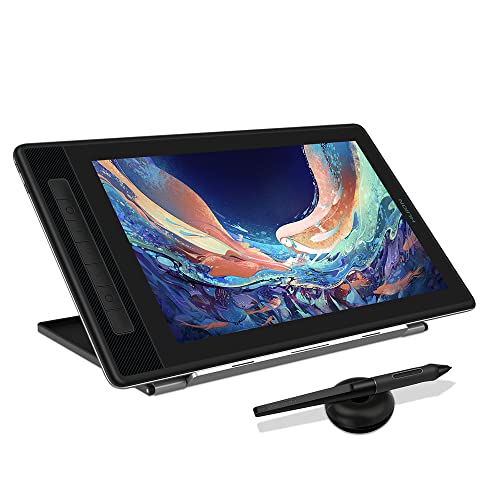
The Kamvas Pro 13 (2.5K) elevates color precision with a 2560×1600 QHD display and 226ppi, powered by Quantum Dot technology for true-to-life colors. It features full lamination and anti-glare glass to minimize parallax and glare, delivering accurate pen-to-screen response. The battery-free PW517 stylus offers 8192 pressure levels and 60° tilt with a high report rate for smooth lines. While a built-in color gamut reaches 120% sRGB and expansive color coverage, the monitor emphasizes a balanced workflow for illustrators and designers seeking high-resolution detail in a compact form factor.
XP-PEN Artist Ultra 16 4K OLED

XP-Pen Artist Ultra 16 4K OLED delivers a 15.6-inch 4K OLED screen with 3840×2160 resolution, offering exceptional contrast and color depth. The display supports 1.07 billion colors, 99% Adobe RGB, 99% sRGB, and 98% Display P3, delivering cinema-like color accuracy. It features full-lamination, anti-glare etched glass, and a very fast response time to minimize lag. The device supports pen input with high precision, making it suitable for professionals in illustration, concept art, and photo editing who require ultra-sharp detail and vibrant color. A robust color pipeline is ideal for clients demanding consistent calibration.
GAOMON PD1161 Drawing Tablet with Screen

GAOMON PD1161 combines a compact 11.6-inch display with a full HD resolution and a battery-free pen. The PD1161 emphasizes direct screen drawing, with a pre-installed matte film to reduce glare and simulate a paper-like drawing surface. Its 72% NTSC (100% sRGB) color gamut ensures brighter and more accurate color output for digital artwork. The pen is pressure-sensitive and tilt-enabled, providing expressive line control. It’s designed for artists who want on-screen drawing without external tracing or additional devices, suitable for students and professionals seeking a portable, affordable option.
Buying Guide
Key aspects to consider when choosing a drawing monitor for PC include display quality, pen performance, and connectivity. Full-lamination and anti-glare glass reduce parallax and glare, improving accuracy. Color gamut and resolution determine how faithfully artwork appears on screen; higher color coverage and 4K or QHD panels offer richer palettes. Pen sensitivity and tilt support influence line control, shading, and brush dynamics; battery-free pens simplify setup and maintenance. Connectivity options (USB-C, HDMI, and adapters) affect compatibility with desktop PCs and laptops. Portability versus screen size matters for on-the-go creators.
Color accuracy and calibration are critical for professional work. Look for monitors with 99% Adobe RGB or sRGB coverage, 2K/4K resolution when possible, and advanced display technologies like full lamination. While some models emphasize portability, others prioritize color fidelity, response time, and accessory ecosystems (stand, keyboard shortcuts, or express keys). Assess your typical workflow: illustration, 3D design, video editing, or photography, and choose a monitor that balances these needs with your hardware setup.