Finding a reliable draw pad that works seamlessly with macOS can boost your digital art, design, and teaching workflows. The following five tablets are selected for Mac compatibility, pressure sensitivity, ease of use, and value. Each entry includes key specs to help you compare at a glance and pick the right tool for your creative needs.
| Product | Brand | Pressure Sensitivity | Size | Special Feature |
|---|---|---|---|---|
| XPPen Deco 01 V3 | XP-Pen | 16,384 levels | 10×6 in | 8 hotkeys, Android support |
| VEIKK A30 V2 | VEIKK | 8192 levels | 10×6 in | Touch pad and 4 hot keys |
| UGEE S640 | UGEE | 8192 levels | 6.5×4 in | Compact and portable |
| XPPen Deco 640 | XP-Pen | 16,384 levels | 6×4 in | OSU mode Ready |
| One by Wacom | Wacom | 2048 levels | Active area 8.5×5.3 in | Plug-and-play with Chromebooks |
XPPen Updated Deco 01 V3 Drawing Tablet

The Deco 01 V3 from XP-Pen combines a compact 10×6 inch drawing area with 16,384 levels of pressure sensitivity and tilt support up to 60 degrees. The battery-free stylus provides a natural drawing experience without interruptions from charging. Eight customizable shortcut keys are accessible for both right- and left-handed users, enabling quick tool access and workflow efficiency. It integrates smoothly with Mac environments and remains a solid choice for beginners and seasoned artists alike, especially for teaching or mixed-media projects.
VEIKK A30 V2 Drawing Tablet

The VEIKK A30 offers a versatile 10×6 inch working area with 8192 pressure levels and a battery-free pen for uninterrupted drawing. Its unique touch pad and four hot keys, along with a gesture pad, support efficient navigation. Compatibility spans Windows, Mac, Android, Linux, and a broad range of creative software such as Photoshop, Illustrator, and Clip Studio Paint. This tablet is well-suited for students, educators, and professionals seeking a capable Mac-friendly option with a modern, minimal footprint.
UGEE S640 Graphics Drawing Tablet

The UGEE S640 emphasizes portability with a slim 6.5×4 inch working area and a battery-free pen offering 8192 levels of pressure sensitivity. Its lightweight design makes it ideal for Mac users who need to sketch on the go or fit drawing into limited desk space. While not a large drawing area, its compatibility with Mac and Android devices makes it a convenient choice for casual artists, students, and educators who value simplicity and reliability.
XPPen Deco 640 Drawing Tablet

The Deco 640 updates the classic Deco line with 16,384 pressure levels and 60-degree tilt support, offering nuanced control for shading and line variation. An ultra-narrow body with an ergonomic curve provides a comfortable drawing space, complemented by eight shortcut keys. This model is designed for Mac users who want a compact but capable tablet that supports OSU gameplay and robust creative work in a single device.
ienRon IES1060 Drawing Tablet

The ienRon IES1060 is a feature-rich option with 12 customizable shortcuts and 10 multimedia keys, a 60° tilt-sensing pen, and 8192 pressure levels. Its wide compatibility includes Windows, Mac, Android, and popular design software. The adjustable stand and large working area support detailed projects, while the left-handed usability makes it versatile in shared setups such as classrooms or studios linked to Mac-based workflows.
One by Wacom Drawing Tablet
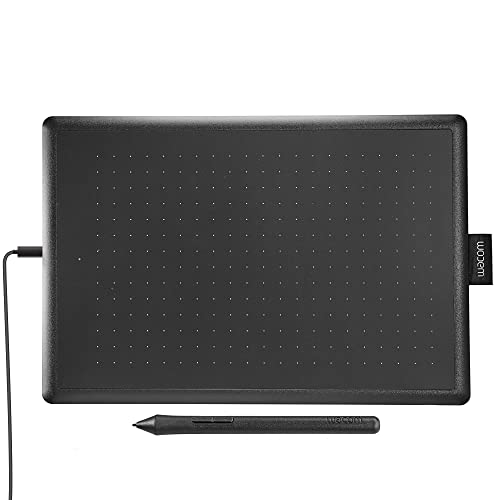
The One by Wacom presents a compact beginner-friendly option with an 8.5×5.3 inch active area and 2048 levels of pressure sensitivity. Known for plug-and-play compatibility with Chromebooks and Mac systems, this tablet emphasizes ease of use for students and educators, making it a practical entry point for Mac users who prioritize simple setup and reliable performance in education or entry-level digital art tasks.
Buying Guide: Key Purchase Considerations for Mac Users
- Operating system compatibility: Ensure the tablet drivers support macOS and any macOS version you use. Look for native Mac drivers or broad OS compatibility (Windows, Android, Linux) to future-proof your setup.
- Pressure sensitivity and tilt: Higher pressure levels (e.g., 16,384) and tilt support enable finer shading and line variation, which matters for illustrators and designers. Evaluate whether your preferred software benefits from tilt integration.
- Pen type and battery life: Battery-free pens reduce maintenance and interruptions. Confirm nib availability and ease of replacement to sustain long project sessions.
- Input options: Consider tablets with multiple shortcut keys or touchpads. These improve workflow efficiency when using Mac software like Photoshop, Illustrator, Clip Studio, or Affinity Designer.
- Size and portability: Larger active areas suit detailed work, while compact models fit tight desks or on-the-go sketching. Balance your space with your typical drawing style and comfort.
- Software ecosystem and drivers: Some tablets come with bundled software or drivers tuned for creative apps. Look for compatibility with your favorite Mac apps and whether the driver UI is beginner-friendly or advanced.
- Left-handed use and ergonomic design: If you work with both hands or share a workstation, pick models offering left-handed shortcuts or ergonomic features to reduce fatigue during long sessions.
- Price-to-performance: Compare feature sets like shortcut keys, screen vs. non-screen, and size against your budget. A mid-range model often provides the best balance for Mac users who need reliable performance without over-investing.
Across these selections, Mac users gain access to pressure-sensitive input, quick navigation, and portable designs that fit home studios, classrooms, or office spaces. When choosing, align the tablet’s capabilities with your primary work—concept art, photo editing, digital painting, or design iterations—and your preferred macOS software suite.