Seeking a reliable Mac dock that expands ports, supports multiple displays, and delivers ample power delivery? This guide highlights five standout docks designed for MacBook Pro, MacBook Air, Mac mini, and Apple Silicon Macs. Each option balances compatibility, performance, and ease of use, helping you create a streamlined workspace whether you’re a photographer, video editor, or multitasker. Below, you’ll find a quick summary and in-depth sections for each product to aid your decision.
| Product | Ports & Features | Best For |
|---|---|---|
| 1. MOKiN 9-in-1 Dock | 2x HDMI, 2x USB 3.0, 1x USB 2.0, SD/TF, Ethernet, 100W PD, TB3 | Dual external displays, fast data, wired network |
| 2. Plugable Thunderbolt 4 Dock (TBT4-UD5) | Dual 4K/Single 8K, 100W PD, 40Gbps | Maximum display flexibility, Mac and Windows |
| 3. Plugable USB C Docking (UD-6950PDH) | 2x 4K 60Hz HDMI/DP, 100W PD, USB, SD, Ethernet | Mac compatibility with DisplayLink note |
| 4. MOKiN 12-in-1 USB C Hub | 2x 4K 60Hz HDMI, VGA, Ethernet, 4x USB, SD/TF, 100W PD | Broad I/O for MacBook Pro/Air up to 2020 |
| 5. Baseus 9-in-1 Dock | 2x HDMI up to 4K@120Hz, Ethernet, 85W PD, USB | High-refresh, stable wired connection |
Note: All products are designed to attach to modern Macs via USB-C or Thunderbolt ports. Check compatibility with your model and macOS version before purchasing. The following sections outline each dock’s strengths, supported configurations, and what to consider when choosing a Mac dock for your setup.
MOKiN 9-in-1 Docking Station for MacBook Pro/Air
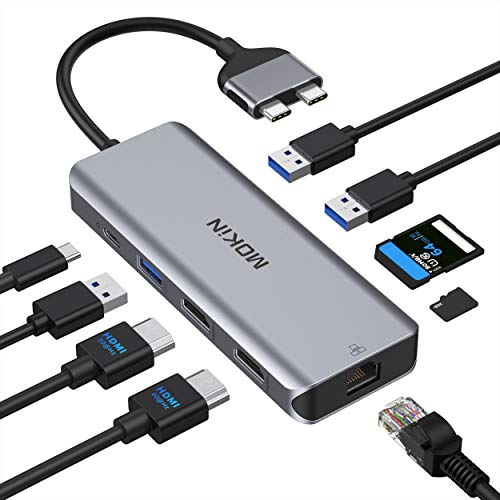
The MOKiN 9-in-1 Docking Station is designed for the latest MacBook Pro and Air, including 2020–2021 models. It expands a single USB-C port into nine connections: two HDMI outputs, four USB ports, SD/TF card readers, a Gigabit Ethernet port, 100W Power Delivery, and a Thunderbolt 3 port. It supports mirror and extend modes for dual external displays, delivering up to 4K at 60Hz when a single HDMI is used and up to 4K at 30Hz when both HDMI ports run simultaneously. It’s a practical choice for creators who need large-screen productivity and fast data transfer, though users should note it does not support Apple’s external SuperDrive. The SD/TF card reader supports SD and microSD cards at high speeds (up to 104 MB/s), which is helpful for photographers and editors transferring media. Overall, this dock combines ample ports with reliable power delivery, making it a solid all-in-one solution for MacBook users who want a simple desktop upgrade.
Plugable Thunderbolt 4 Dock with 100W Charging

This Dock is a top-tier option for users seeking certified Thunderbolt 4 performance. It delivers up to 100W Power Delivery, supports dual 4K displays at 60Hz, and can drive a single 8K monitor when used with compatible laptops. The dock offers 13 ports in total, including USB-A and USB-C, Ethernet, and other essentials, making it ideal for a high-performance Mac setup or mixed-OS environments. On macOS, dual-display support may depend on the particular Mac model and graphics capabilities. The dock’s combination of high bandwidth and versatile display options makes it well-suited for advanced workflows like video editing, 3D design, and multi-monitor productivity.
Plugable USB C Docking Station UD-6950PDH

The Plugable UD-6950PDH is a 14-in-1 dock designed for Mac users who need a robust set of connections. It supports two video outputs (two HDMI or DisplayPort options depending on host), dual 4K displays at 60Hz, a 100W USB-C power delivery, and a mix of USB-A, USB-C, SD/TF readers, a 3.5mm audio jack, and Ethernet. A key feature is the DisplayLink requirement for extended displays on some MacBook models, which means drivers may be needed for certain macOS versions. This dock targets multitaskers who want reliable external displays and versatile connectivity, with the potential trade-off of software setup for Mac optimizations.
MOKiN 12-in-1 USB C Hub Dock for MacBook Pro/Air (12-in-1)
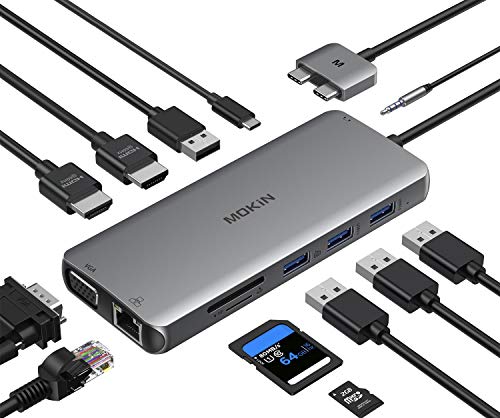
The 12-in-1 MOKiN hub provides a broad suite of ports, including two 4K 60Hz HDMI outputs, VGA, USB 3.0 and USB 2.0, SD/TF card readers, a USB-C downstream port, and a single 100W Power Delivery pass-through. It supports 5Gbps USB data transfer rates and a wired Ethernet connection for stable networking. Note that this dock is not compatible with M1/M2/M2x MacBook models, so it’s best suited for older MacBook Pros or Air models that match the listed compatibility. This makes it a practical upgrade for users with compatible hardware who want more screen real estate and fast media transfers.
Baseus 9-in-1 Dock for Mac

This Baseus docking station offers 4K@120Hz output via two HDMI ports, enabling dual-monitor setups with mirror or extend modes. It includes a 1000Mbps Ethernet port for stable wired networking, and a PD charging port to keep devices powered during use. The hub’s 15W draw by the hub itself is noted, with up to 85W available to the laptop when using a 100W charger. It’s a strong option for users prioritizing high-refresh-rate visuals, reliable networking, and straightforward plug-and-play use with compatible Macs.
Ascrono Docking Station for 14″ MacBook Pro

The Ascrono vertical docking station is tailored for the 14″ MacBook Pro (2021 and later). It emphasizes a sleek, clutter-free workspace and offers a dedicated dock that promotes a seamless transition between on-the-go efficiency and desktop productivity. The design focuses on elegant aesthetics and space-saving configuration, with a green status indicator and cable management benefits. While primarily marketed for 14″ Pros, users should verify compatibility with their specific model and ports. It suits users who value a visually clean setup and quick docking for daily tasks and presentations.
Buying Guide: Key Considerations For Mac Docks
When choosing a dock for your Mac, consider the following factors to align with your workflow:
- Display capabilities: Check the maximum resolution and refresh rate supported by the dock and your Mac model. Some docks support dual 4K displays; others may limit to single 4K on certain Macs.
- Power delivery: Ensure the dock provides enough PD to charge your Mac while connected to peripherals. High-demand setups often benefit from 90–100W chargers.
- Display technology compatibility: macOS may behave differently with HDMI, DisplayPort, or Thunderbolt connections. Some Macs require DisplayLink drivers for multiple external displays.
- Port variety: Balance USB-A, USB-C, SD/TF card readers, Ethernet, audio, and video outputs based on your typical tasks (video editing, photography, coding, or general productivity).
- Thermals and build quality: Aluminum housings tend to dissipate heat better and feel sturdier for desk setups.
- Upgrade and compatibility: Verify that the dock works with your exact Mac model and macOS version. Newer Apple Silicon Macs may have specific display and power considerations.
- Driver requirements: Some USB-C docks rely on DisplayLink or other drivers to enable full functionality on Macs, especially for extended displays.
In choosing a dock, map your typical day-to-day tasks to the ports you actually need. If you routinely work with two monitors, a dock offering two HDMI or HDMI/DisplayPort outputs with robust PD support will maximize productivity. For photographers or video editors, SD/TF card readers, fast USB speeds, and reliable Ethernet can streamline workflows. By weighing display capabilities, power delivery, and peripheral needs, you can select a Mac dock that minimizes desk clutter and enhances performance without compromising portability.