For professionals, students, and creatives who run multiple apps across three displays, a reliable docking station is essential. The options below focus on triple-monitor support, 4K clarity, robust charging, and broad compatibility with Windows and popular laptop brands. Each pick emphasizes easy setup, strong port variety, and stable performance for multi-task workflows—from video editing to data analysis and design work.
The following table highlights five top triple-monitor docking stations, summarizing key strengths to help you compare at a glance.
| Product | Brand | Ports & Display | Power Delivery | Notes |
|---|---|---|---|---|
| TobenONE 18-in-1 Docking Station | Tobenone | 3x HDMI, 9 USB, Gigabit Ethernet, PD3.0 | PD for host (power adapter not included) | Triple 4K@60Hz, versatile all-in-one hub |
| Anker Nano Docking Station | Anker | 2x HDMI + 1 DP, 13-in-1 with detachable hub | Up to 100W | Flexible main dock plus removable hub |
| Selore/S-Global USB C Dock | Selore | 3x HDMI/DP, USB-C, USB-A, SD/TF | 100W PD | Triple display capable depending on host |
| HODO USB C Docking Station 8-in-1 | HODO | 2x HDMI, DP, VGA, 3x USB 2.0 | Up to 100W PD | Quadruple outputs with mixed resolutions |
| Plugable USB-C Triple Monitor Dock | Plugable | 3x HDMI, 1x DP, 100W PD | Up to 100W | DisplayLink-based triple monitor support |
Below are five carefully selected docking stations that align with the “three-monitor” requirement. Each product section includes succinct specs, practical usage notes, and a breakdown of what makes it suitable for triple-display setups, helping you pick the best fit for your workstation.
TobenONE 18-in-1 Docking Station: Triple 4K Plus Robust Ports

The TobenONE docking station bundles 18 ports, including 9 USB ports, PD, and three HDMI outputs for triple-display capability. It enables 4K@60Hz triple displays, supporting multitasking across professionals who run design software and data-heavy apps simultaneously. The design emphasizes reducing cable clutter and maximizing desk organization, a practical consideration for busy home offices or shared workspaces. While it provides extensive connectivity, note that a power adapter is not included, requiring you to supply compatible power separately.
Anker Nano Docking Station: Detachable Hub for Flexible Setups
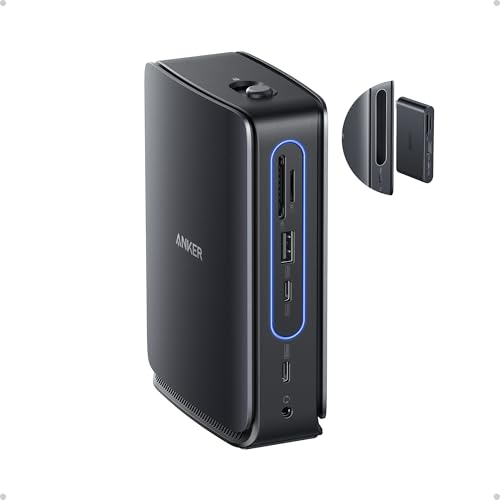
The Anker Nano Docking Station offers a 13-in-1 solution with a detachable hub, enabling a triple-screen workstation when the main dock is used. It supports up to four displays via HDMI and DisplayPort, with the hub adding on-the-go accessibility. On macOS, video output behavior is limited to mirroring through certain connections, so this is best used on Windows or Windows-based laptops for full triple-display extending. The combination of two USB-C data ports, multiple USB-A ports, and 100W PD makes this a balanced choice for daily productivity and mobility.
Selore 12-in-1 Dock: Triple Display With 4K Output

This Selore USB-C docking station expands a single USB-C/Thunderbolt port into 12 ports, including three HDMI outputs for triple-monitor setups. It emphasizes 4K output and a broad port set (USB-A, USB-C data, SD/TF, Ethernet) suitable for classrooms, offices, and engineering workflows. Users should verify DP Alt Mode or Thunderbolt support on their laptops to achieve full 4K triple display capabilities, and remember that macOS environments may mirror rather than extend across all outputs.
HODO USB C Docking Station: 8-in-1 With 4K Outputs

The HODO docking station features dual HDMI plus DisplayPort and an optional VGA port to support multiple displays, including triple 4K-capable configurations when the host hardware allows. It includes a 100W USB-C PD charging port, which helps keep laptops powered during intense workloads. Mac users should be aware of display mirroring in certain configurations, and some outputs may reduce resolution if VGA is active. This makes it a versatile option for Windows-based multi-display desks.
Plugable USB-C Triple Monitor Dock: 13-in-1 With 100W PD

Plugable’s dock emphasizes three-monitor support via DisplayLink technology, enabling multi-monitor expansion even on laptops with limited native video outputs. It provides up to 4K at 30Hz on the main display and up to 1080p on the other two, with 100W charging through the USB-C port. It’s especially suitable for MacBooks with DisplayLink-installed drivers and Windows machines, offering broad compatibility and a straightforward setup for triple-monitor workflows.
Buying Guide: Key Considerations for Three-Monitor Docking Stations
- Display outputs and bandwidth: Confirm that the dock supports three independent displays at the resolutions you need (4K@60Hz or 4K@30Hz with MST/DSC on Windows). Check if the outputs are HDMI, DisplayPort, or a mix, and whether your laptop supports DP Alt Mode or MST for triple-4K output.
- Power delivery: Look for docks offering up to 100W PD to charge your laptop while in use. If the dock requires an external power adapter (not included), verify compatibility with your laptop’s charger wattage to avoid undersupply.
- Hub vs main dock design: Some products feature a detachable hub for mobility, while others are a single integrated unit. Detachable hubs can be convenient for travel, but ensure the hub ports align with your typical peripherals.
- Mac vs Windows behavior: Several docks mirror displays on macOS rather than extending, especially with certain outputs. If triple extended displays are essential on macOS, choose models explicitly supporting macOS multi-monitor extension or plan for tailored software setups.
- Driver requirements: Some triple-monitor setups rely on DisplayLink or DSC features. Check whether drivers are required and whether your OS version supports the chosen technology without frequent updates.
- Port variety and upgradability: Consider USB-A and USB-C data ports, SD/TF readers, Ethernet, audio jacks, and whether the hub offers charging for peripherals beyond the main laptop. A rich port mix reduces the need for additional adapters.
- Desk ergonomics and cable management: Several models emphasize reduced cable clutter and desk organization. If a tidy workspace is a priority, weigh the dock’s footprint, cable routing options, and included accessories like cable wraps or mounting options.
- Compatibility with devices and brands: While all models claim broad compatibility, verify with your laptop’s exact model and required power/DP configurations. Some brands (e.g., Apple Silicon) have specific behavior with video output modes that affect triple-monitor performance.
In selecting the best docking station for three monitors, balance display requirements, laptop compatibility, and your workspace needs. If you routinely run demanding apps on three screens, prioritize a model with robust 4K support, reliable power delivery, and a clear path to seamless multi-monitor extension on your operating system of choice.