Finding the right docking station can streamline your desktop experience, expand display setups, and keep devices charged while preserving performance. Below are five top options that balance port variety, charging power, and multi-monitor support for Windows, macOS, and ChromeOS ecosystems. The quick reference table at the end of this introduction summarizes key specs to compare at a glance.
| Product | Display Capabilities | Ports & Data Speeds | Power Delivery |
|---|---|---|---|
| Anker Prime Docking Station | Dual 4K displays | 11 data ports up to 10 Gbps | 160W total output |
| WAVLINK Docking Station (3 Monitors) | 3 monitors (DP/HDMI) up to 4K@60Hz | Multiple USB-C/USB-A 10Gbps, Ethernet | 130W adapter (100W PD capable) |
| Plugable USB C Triple Monitor Docking Station (UD-ULTCDL) | Triple HDMI displays | 3x HDMI, 6x USB 3.0, Fast networking | 100W charging via USB-C |
| Anker Laptop Docking Station 14-in-1 | Triple display capable (2x HDMI) | 14 ports total, 5Gbps+ | Supports 100W PD via USB-C |
| TobenONE DisplayLink Docking Station | Triple 4K displays via HDMI/DP | 3x HDMI, 3x DP, 2x USB-C, 4x USB 3.2, more | Up to 120W power adapter |
Note: Availability and compatibility vary by host device and OS. Always confirm that your laptop’s USB-C/Thunderbolt port supports video output and charging where needed.
Anker Prime Docking Station: 14-Port Powerhouse

The Anker Prime Docking Station consolidates charging, data transfer, and display output into a single hub. It offers a 14-in-1 layout with a total output of 160W, supporting up to three USB-C ports at 100W each and a USB-A port at 12W. Data throughput reaches up to 10Gbps across 11 ports, and it is designed to handle dual 4K displays along with audio options for a streamlined workstation.
WAVLINK Docking Station For 3 Monitors

This WAVLINK docking station is designed to power three-monitor setups with dual DisplayPort outputs and an HDMI port. It includes a cable and 130W charger, offering 100W PD charging and multiple USB-C/USB-A ports with up to 10Gbps transfer speeds. It supports 4K@144Hz on single DP connections and 4K@60Hz when multiple monitors are used, making it a versatile choice for meetings, media editing, and data analysis.
Plugable USB-C Triple Monitor Docking Station UD-ULTCDL

Plugable’s UD-ULTCDL provides triple-monitor support via three HDMI outputs with DisplayLink technology. It includes a 100W USB-C power delivery option, making it suitable for enterprise environments and hot-desking. The dock supports Windows, macOS, and ChromeOS, leveraging DisplayLink drivers for extended multi-monitor setups and robust peripheral connectivity, including six USB 3.0 ports and integrated audio.
Anker Dual-Display 8-in-1 USB C Hub
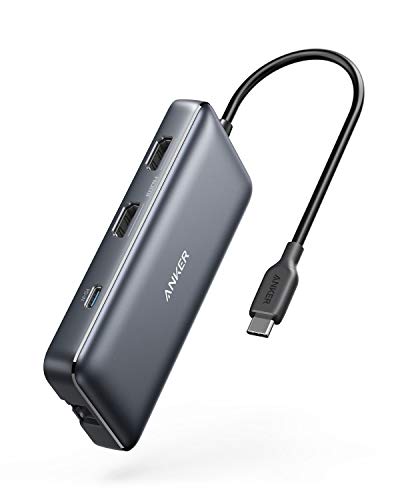
This Anker 8-in-1 hub emphasizes expanded display capabilities, delivering two 4K HDMI outputs and a host of USB-A/C ports, including a 100W USB-C PD-IN for laptop charging. It is designed for users who require flexible multi-display arrangements and reliable data transfer in a compact, travel-friendly form factor. Note that macOS users should expect identical output on both external displays in some configurations.
Anker 14-in-1 Docking Station (Charger Not Included)

This Anker model bundles 14 connectivity options, including two 4K HDMI ports, a 1080p VGA port, USB-C 5 Gbps data, a USB-C 100W PD-IN, multiple USB-A ports, an Ethernet jack, SD/microSD slots, and an auxiliary audio line. Triple display extensions are supported, with multi-monitor configurations suited for multitasking across three screens. macOS configurations typically mirror displays across connected monitors.
TobenONE DisplayLink Docking Station

The TobenONE docking station emphasizes comprehensive port access with up to 18 ports and triple-monitor support. It is compatible with Thunderbolt 3/4, USB4, and full-featured USB-C laptops, including Mac and Windows platforms. It supports triple or quad 4K@60Hz configurations through HDMI/DP outputs, though macOS environments may limit monitor counts compared to Windows. A current DisplayLink driver is required for optimal operation.
Buying Guide: Key Purchase Considerations
- Display goals: If you need two or three 4K monitors, verify the dock supports multiple video outputs at the desired resolutions and refresh rates. Some docks deliver 4K@60Hz only when a subset of ports is used, while others offer higher performance with DisplayPort or HDMI combinations.
- Power delivery: Check total wattage and USB-C PD support. High-demand laptops may require 60–100W per device; select a dock with sufficient total power (and the right PD profile) to avoid unplugging peripherals for charging.
- Port mix and speeds: Consider the balance of USB-C, USB-A, Ethernet, SD/MicroSD, audio, and display ports. Faster data paths (10Gbps or higher) improve transfers for external drives and peripherals.
- Platform compatibility: Ensure the dock works with your operating system (Windows, macOS, ChromeOS) and note any driver requirements, especially DisplayLink-based solutions that may require software installation.
- Deployment environment: For shared workspaces or hot-desking, enterprise-grade docks with stable driver support and a broad range of ports reduce IT overhead and provide consistent performance.
- Cable and accessory needs: Some docks include charger bricks and cables; others require separate power supplies. Confirm included items and plan for any extra cables or adapters you may need.
- Future-proofing: If you anticipate upgrading your laptop or adding displays, choose a dock with higher port density and flexible video support to minimize future replacements.
These options present a spectrum of configurations—from high-capacity 14-in-1 hubs to triple-monitor DisplayLink stations—useful for desks, home offices, and professional workstations. Assess your display requirements, charging needs, and OS compatibility to pick the best-fit docking station for your PC setup.