Gamers using laptops often need more screen real estate, faster data transfer, and reliable power delivery to keep gameplay smooth. A capable docking station can unlock triple-monitor setups, high-refresh-rate outputs, and seamless peripheral connectivity with a single cable. This guide compares top USB-C and USB 3.0/Thunderbolt docks that pair well with gaming laptops, highlighting performance, compatibility, and value. Below you’ll find five strong options designed to boost productivity and immersive gaming experiences without breaking the bank.
Summary table of chosen products:
| Product | Brand | Video Outputs | USB Ports (Total) | Power Delivery | Notes |
|---|---|---|---|---|---|
| Laptop Docking Station (WAVLINK) | WAVLINK | 3x Display Outputs (2 DP, 1 HDMI) | 7 USB ports | 130W PD | Triple monitor setup; high refresh support |
| Baseus 17-in-1 Docking Station | Baseus | 3x HDMI/DP outputs | 7 USB ports | 100W PD | Triple monitor capable; strong data transfer |
| Plugable UD-3900 | Plugable | 2x HDMI | 6 USB ports | Wired Ethernet | Driver required for some configurations |
| Anker 8-in-1 Docking Station | Anker | 2x HDMI | 4 USB ports (plus card reader) | Power delivery 85W | Solid performance with single host USB-C |
| Plugable Triple-Display USB-C Dock | Plugable | 3x HDMI (incl. 4K output) | 6 USB ports | 100W PD | Enterprise-ready multi-monitor support |
WAVLINK Laptop Docking Station

The WAVLINK docking station provides three monitor outputs—two DisplayPorts and one HDMI—plus a 130W power adapter to support 100W charging for laptops. It also includes dual USB-C 10Gb ports, a USB-A 10Gb port, and a mix of USB-A 5Gb ports to handle mice, keyboards, storage, and other peripherals. A Gigabit Ethernet port ensures stable wired networking, which can be vital for competitive online play or streaming. This dock highlights a high-refresh-capable multi-monitor setup and broad compatibility with Windows systems. User experience hinges on host laptop video output capability via USB-C and the stability of DisplayPort connections during gameplay.
Key features include: triple-monitor support with DP1.4, 4K@60Hz across two monitors when using multiple outputs, 100W charging via PD, built-in audio jack, and an assortment of USB-C and USB-A ports for accessories. Note that performance may depend on the host laptop’s USB-C port video output and the graphics pipeline. For gamers connecting intensive displays, verifying that GPU and laptop firmware support multi-monitor setups is recommended before purchase.
Baseus 17-in-1 Docking Station

Baseus combines three 4K-capable outputs with a wide selection of USB ports and Ethernet, making it a compelling choice for gaming setups that require multiple displays and fast data transfer. The dock emphasizes immersive visuals across three monitors, ideal for strategy games, flight sims, or professional multitasking that benefits from large screen real estate. With 100W PD support, it can handle charging for many modern laptops while running external displays and peripherals. However, MacOS users should be aware that triple-display mode is not supported, and overall display behavior can differ based on OS and GPU configuration.
Highlights include: 4K-compatible HDMI/DP outputs on three ports, 10Gbps USB-C and USB-A data transfers, a Gigabit Ethernet port, and a 100W PD input for host charging. The card reader is a useful addition for content creators and gamers who transfer large media files. The combination of triple-monitor support and robust USB options makes this dock well-suited for gaming stations and creative workflows. Prospective buyers should confirm OS-specific multi-display behavior and ensure their laptop’s DP/HDMI outputs can drive high refresh rates across multiple screens.
Plugable Universal Docking Station (UD-3900)

The Plugable UD-3900 focuses on broad compatibility and solid dual-HDMI output capabilities, with a Gigabit Ethernet port and multiple USB ports. Driver availability for Windows makes it a straightforward choice for many Windows-based gaming laptops. The dock is commonly used for dual-monitor setups, and it can be extended with additional USB peripherals via its USB-A ports. It’s a practical option for gamers who want reliable external displays without requiring Thunderbolt support. Note that some features may require driver installation, and performance depends on the host’s GPU output capabilities and DisplayLink integration.
Core features include: dual HDMI outputs, a 2.0/3.0 USB mix, 6 total USB ports, audio in/out, and Ethernet. It offers a dependable, cost-conscious path to multi-monitor gaming setups and office productivity alike. Users should verify compatibility with their laptop’s USB-C/USB-A port configurations and any DisplayLink driver requirements before purchasing for a full three-monitor experience.
Anker 8-in-1 USB-C Docking Station
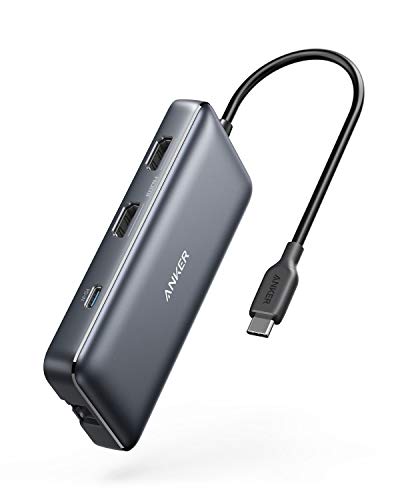
The Anker dock emphasizes a compact, feature-rich option for USB-C laptops. It includes dual HDMI outputs for extending a pair of displays, an Ethernet hub for reliable online play, an SD card reader, and up to 85W of power delivery to keep laptops charged while gaming. This dock is well-suited for gamers who rely on a single USB-C connection to a laptop and want to keep desk clutter low while still enjoying multi-monitor setups. As with all USB-C hubs, performance relies on the host laptop’s capability to drive two external HDMI displays and handle power delivery concurrently.
Key points to consider are: 4K60Hz dual HDMI support, PD charging, a built-in SD card reader, and a straightforward plug-and-play experience with Windows and macOS (with driver considerations for certain setups). It’s a balanced option for gaming desks that value portability and ease of use, though triple 4K display arrangements may require more robust solutions or multiple docks in some configurations.
Anker Prime Docking Station (DL7400)

The Anker Prime Docking Station stands out with a broad 14-port configuration, including multiple high-speed USB-C ports, two HDMI outputs, a DisplayPort, 5Gbps USB-A ports, a 2.5Gb Ethernet port, and SD/TF card readers. It supports triple display scenarios and even 8K output, making it a strong choice for enthusiasts who want maximum expansion and future-proofing. A built-in cooling fan and a 140W power budget help maintain performance during long gaming sessions. The recommended driver setup for DisplayLink ensures stable multi-monitor output on supported operating systems.
Considerations include: high port count for complex rigs, triple-monitor capability, and the need to install the latest DisplayLink driver for macOS and Windows. The DL7400 is ideal for users seeking top-tier expansion with robust cooling and a focus on long-term versatility, though its extensive feature set may be more than needed for simple dual-monitor setups.
HODO USB C Docking Station 8-in-1

HODO’s 8-in-1 docking station provides a mix of HDMI, DisplayPort, VGA, USB 2.0, and a 100W PD charging port. It aims to deliver versatile display options, allowing up to four video outputs with a combination of HDMI, DP, and VGA. While MacOS behavior may show mirror rather than extended displays in some scenarios, Windows users typically experience straightforward multi-monitor support. It’s a practical option for laptops needing a variety of legacy and modern video ports, especially in mixed-device environments where VGA still plays a role for compatibility.
Considerations include: ensuring DP1.4 support on the host for the best triple-monitor experience, managing MacOS limitations, and being mindful that resolution across all displays can be affected when using the VGA port. This dock is a flexible choice for gamers who also need compatibility with older displays or legacy projectors, while keeping a single-cable approach to the desktop.
Buying Guide: Key Purchase Considerations
- Display configuration: If triple-monitor setups are essential for gaming, verify the dock supports multiple outputs (HDMI, DisplayPort, or VGA) simultaneously at your preferred resolutions and refresh rates. Not all docks handle 4K at 60Hz on all outputs when used together.
- Power delivery: Check the laptop’s requirements and ensure the dock’s PD (Power Delivery) rating matches or exceeds the laptop’s charger wattage. Insufficient PD can cause decreased performance under load or prevent charging during gaming.
- Host compatibility: Some docks rely on DisplayLink drivers or specific USB-C alt-mode features. Confirm your laptop’s USB-C/Thunderbolt port supports video output and adequate bandwidth for the desired display count.
- Data transfer: Consider the number of USB-A and USB-C ports you need for peripherals, external drives, and headsets. Higher USB bandwidth helps with external storage and gaming accessories.
- Networking stability: A wired Gigabit Ethernet port can reduce latency and improve online gaming reliability compared with Wi-Fi. This is particularly valuable in competitive titles and streaming.
- OS considerations: Some docks require driver installations on Windows or macOS (DisplayLink or similar). If you’re using macOS, ensure compatibility for your intended monitor arrangement and driver needs.
- Future-proofing: If you plan to upgrade to a more powerful laptop or add more displays later, choose a dock with a broad port assortment, including multiple USB-C/PD options and at least one 2.5Gb or 5Gb Ethernet if possible.
- Desk setup and cooling: A multi-monitor gaming station can generate heat and cable clutter. Consider docks with good cooling, robust build quality, and a layout that minimizes cable tangles for smoother gameplay sessions.
In sum, the best docking station for a gaming laptop balances display flexibility, reliable charging, and broad peripheral support. For users prioritizing triple-monitor configurations and high data throughput, WAVLINK and Baseus stand out, while Plugable and Anker options offer strong reliability and broad OS compatibility. When selecting, align the dock’s video outputs and power delivery with your laptop’s specifications to ensure a smooth, stable gaming experience across multiple displays.