Find the right digital recorder for dictation with clear voice capture and easy file transfer. This guide highlights five reliable options, each suited to different needs—from compact USB-rechargeable models to high-capacity units with noise reduction. Choose this if you need long battery life; pick that if you require advanced noise filtering. The list helps buyers compare memory, recording formats, and transfer methods for smooth workflows.
| Product | Brand | Key Benefit |
|---|---|---|
| Sony ICD-PX370 Mono Digital Voice Recorder | Sony | Long battery life; USB transfer |
| Tonfarb 136GB Digital Voice Recorder | Tonfarb | High capacity; noise reduction |
| Tonfarb 64GB Digital Voice Recorder | Tonfarb | Compact; solid battery life |
| Sony ICD-UX570 Digital Voice Recorder | Sony | Enhanced sound; slim design |
| EVISTR 64GB Digital Recorder | EVISTR | Easy two-button operation; PCM options |
Sony ICD-PX370 Mono Digital Voice Recorder

Best for: professionals who need simple, reliable dictation with long battery life. This model records MP3 audio quickly and offers up to 57 hours of operation on a single charge at 128 Kbps. It includes a built‑in USB connection for fast file transfers to a PC, making it ideal for executives, students, or journalists who require a dependable, portable dictation tool.
Why selected: The combination of MP3 recording, USB direct transfer, and straightforward controls supports fast, unrehearsed dictation sessions with minimal setup.
Limitation: Lacks multi-microphone or advanced noise reduction features found in higher-end units; best used in quieter environments.
Tonfarb 136GB Digital Voice Recorder

Best for: users who need extensive storage for long sessions such as lectures, meetings, or interviews. This device offers 136GB of memory plus a long 1100mAh battery, supporting up to 68 hours of continuous recording on a single charge and playback via USB-C transfer.
Why selected: It combines large capacity with noise-reduction and PCM recording options, reducing background distractions during dictation-heavy days.
Caution: The feature set emphasizes raw storage and file transfer; users should verify compatibility with their computer’s USB-C workflow.
Tonfarb 64GB Digital Voice Recorder

Best for: students, journalists, and professionals who want a compact, easy-to-operate recorder with solid memory and strong noise-reduction. This unit stores up to 4,600 hours of MP3 at 32 kbps and up to 68 hours of battery life on a single charge, depending on usage.
Why selected: The one-click record-and-save workflow and PCM recording with automatic noise reduction make it a practical daily dictation tool for on‑the‑go recording.
Limitation: The battery life varies with recording settings; high-quality PCM modes can reduce run time compared to basic MP3 modes.
Sony ICD-UX570 Digital Voice Recorder

Best for: users who want enhanced sound quality in a slimmer form factor. The ICD-UX570 features a built-in stereo microphone and voice-activated recording for hands-free operation in meetings or fieldwork.
Why selected: The updated, slimmer design improves portability while maintaining solid audio capture, making it a strong choice for everyday dictation needs.
Limitation: May offer fewer high-capacity storage options compared with some Tonfarb models; consider your session length requirements before choosing.
Sunlan Digital Voice Recorder 16GB
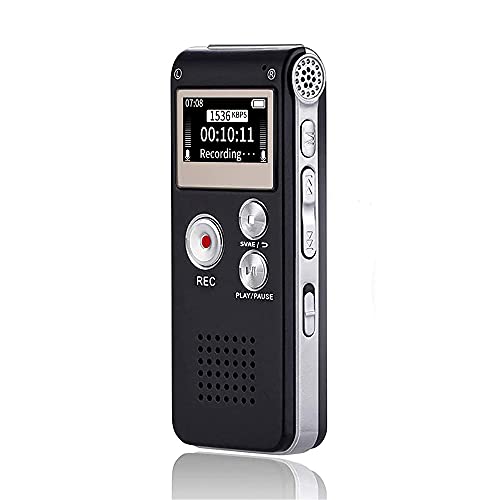
Best for: budget-conscious buyers who still need simple, reliable dictation with USB recharge and playback. This model emphasizes straightforward operation with a dedicated REC button and a clear playback interface.
Why selected: Its compact size, easy controls, and USB recharge support quick setup for daily dictation tasks and classroom use.
Caution: The 16GB capacity is modest for long sessions; consider models with larger storage if you frequently record extended interviews or classes.
Tonfarb 136GB Pink Digital Recorder

Best for: users who want high capacity with a distinctive pink finish and PCM noise reduction. This unit stores up to 9000 hours and supports playback with a USB-C transfer path for efficient file management.
Why selected: The large memory, robust noise reduction, and one-click recording make it suitable for long sessions and archival projects.
Limitation: The color choice may not appeal to all buyers; verify color preference before purchase.
Buying Guide
What features matter for dictation use?
- Memory capacity: Evaluate how long you record daily. Higher capacity reduces the need to transfer files often.
- Recording format and quality: PCM/WAV options provide higher fidelity; MP3 offers compact files and broad compatibility.
- Noise reduction: Important in noisy environments or when dictating in public spaces.
- Battery life: Look for devices with extended hours to cover long sessions without frequent recharging.
- Ease of transfer: USB or USB-C connections simplify moving files to a computer or cloud storage.
- One-click recording: A quick start helps capture spontaneous thoughts or ideas without fumbling.
- Portability and durability: A compact form and sturdy build suit fieldwork and commuting.
What should you consider for big‑session dictation?
Choose a device with 128GB or more if you run long meetings or lectures and want to minimize transfers. PCM or WAV recording improves clarity, especially for later transcription and review. If you work in quiet settings, MP3 at moderate bitrates can balance quality and file size.
How important is a built‑in microphone vs. external options?
Built‑in microphones are sufficient for straightforward dictation, but external mics can improve range and reduce ambient noise in professional settings. Check whether the device supports accessories if you plan to upgrade audio capture.
Which connectivity helps workflow?
USB or USB-C transfers are fastest for Windows and Mac. Some models allow direct USB connections for quick file moves to a PC, which can speed up transcription workflows.
Are there any durability considerations?
Metal shells or reinforced plastics increase durability for travel and field recording. Ergonomic button layouts help minimize mis-taps during on-the-go use.
What about price and value?
Mid‑range devices balance features like noise reduction and larger memory with budget constraints. Prioritize features that match your daily dictation needs to maximize long-term value.
FAQ
- What’s the best recorder for long dictation sessions? Look for models with 64GB or more and long battery life, plus PCM or WAV recording for higher quality.
- Can I transfer files to a PC easily? Yes, many models include USB or USB-C connections for quick transfers and file management.
- Is noise reduction essential for dictation? It helps in busy environments and improves transcription accuracy by suppressing background hum and chatter.
- Should I buy a compact or high-capacity recorder? Compact units are portable for daily use; high-capacity models suit extended sessions and archival work.
- Do these recorders require special software? Most support standard audio players and basic file transfer; some support direct USB streaming or transcription workflows.
- Is one-click recording enough for professional use? For fast capture, yes; for complex sessions you may prefer a model with more control without sacrificing ease of use.