In today’s fast-paced business world, digital notebooks blend hands-on writing with cloud storage, AI features, and seamless collaboration. This guide highlights five standout options that cater to executives, students, and teams seeking to capture ideas, organize notes, and stay productive on the go. Each choice balances paper-like writing with digital advantages such as transcription, search, and cross-device syncing.
| Product | ||
|---|---|---|
| Penstar eNote 2 | Pen-Only E Ink | Real paper feel with AI note conversion |
| XP-Pen 3 in 1 Color Digital Notebook | AG Nano-Etched LCD | Multiple color modes, high refresh |
| Rocketbook Pro (Blue) | Reusable, NFC app sync | Cloud-ready archival and reuse |
| HUION Note 2-in-1 | Battery-free pen, paper pad | Handwritten to digital with audio sync |
| Mloas Smart Sync Pen | Dedicated app, OCR | Real-time sync and offline storage |
Note: The following sections present each product with a concise overview, features, and practical business applications. All links point to the official Amazon product pages for additional details.
Penstar eNote 2 – The Whitest Paper Tablet
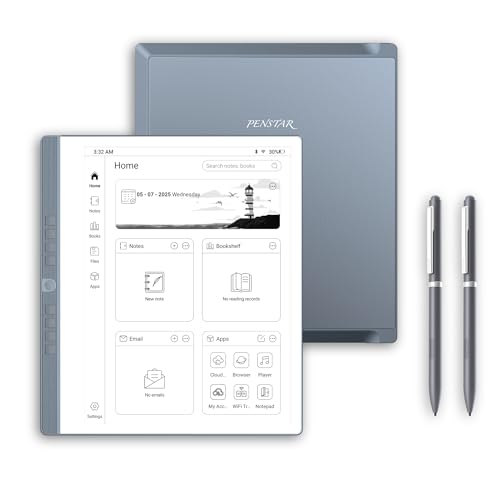
The Penstar eNote 2 delivers a paper-first E Ink experience with a 10.3″ PureView display at 300 PPI. It emphasizes a natural handwriting feel with minimal eye strain and no backlighting, making it suitable for focused note-taking during meetings or solo planning sessions.
Powered by MyScript handwriting-to-text conversion, handwritten notes become editable digital text, enabling fast organization and search. This is ideal for professionals who draft proposals, minutes, or summaries and need quick edits without retyping.
Real-time AI voice-to-text supports 52 languages, turning meetings into draft summaries automatically when connected. Use this for structured notes, action items, and follow-ups, improving meeting productivity and documentation quality.
XP-Pen 3 in 1 Color Digital Notebook

This 10.95-inch digital notebook uses an AG nano-etched LCD with TCL NXTpaper 3.0 to deliver a paper-like texture and anti-glare performance. It supports color modes (Monochrome LCD, Light Color, Nature Color) for varied note-taking styles and presentations.
The 90Hz refresh rate reduces lag during writing and page turns, while 16.7 million color support and 400 nit brightness offer clear viewing for reading and annotating documents. It’s a strong choice for teams needing flexible visuals and smooth handwriting capture.
Rocketbook Pro Smart Reusable Notebook (Blue)
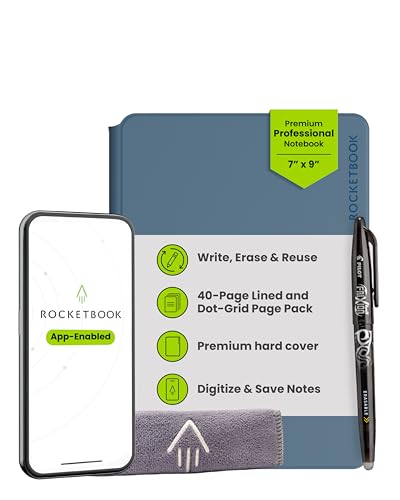
Rocketbook Pro 2.0 offers interchangeable page packs with 40-page options for lined and dotted grids. It emphasizes flexibility for work meetings and planning with additional packs available separately for planners and trackers.
Write with the included FriXion erasable gel pen, scan and store notes digitally in cloud destinations like Google Drive or OneNote, and wipe clean to reuse. Its NFC chip automatically opens the Rocketbook app for quick scans, promoting efficient digital organization across platforms.
HUION Note 2-in-1 Digital Notebook

HUION Note 2-in-1 combines a refillable A5 notepad with a battery-free pen and an app-based workflow. It captures handwritten content in real time to a connected device, preserving the tactile feel of drawing or note-taking while enabling digital storage and sharing.
The device supports audio recording to accompany notes, helping ensure nothing is missed during lectures, meetings, or brainstorming sessions. It’s well-suited for creatives and professionals who rely on both handwriting and digital archiving.
Mloas Smart Sync Pen for Note Taking

The Mloas Smart Sync Pen pairs with a dedicated app to support real-time sync, offline storage, and OCR to convert handwriting into editable text. Notes can be shared easily as Word documents, and keyword search enables quick retrieval of previous ideas and meeting points.
Offline storage is a notable benefit for travelers or field teams without reliable connectivity. The package emphasizes workflow efficiency and collaboration, useful for business professionals managing multiple projects and meetings.
Buying Guide
- Writing experience: If you prefer a paper-like feel, consider Penstar eNote 2 or HUION Note for tactile accuracy and reduced eye strain. For true display versatility, the XP-Pen model offers color modes and a high-refresh experience.
- Digital conversion and search: Look for systems with OCR or handwriting-to-text (Penstar, Mloas) to transform notes into editable documents, speeding drafting and reporting tasks.
- Cloud integration: Rocketbook Pro’s NFC-driven app workflow supports quick sending to cloud services, which is ideal for teams already using Google Drive, Dropbox, or OneNote.
- Offline capability: If you travel frequently, offline storage (Mloas, HUION) ensures you can capture ideas without immediate connectivity.
- Device ecosystem: Consider compatibility with your existing devices and software—iOS, Android, or cross-platform needs affect setup and syncing simplicity.
- Durability and form factor: Portability matters for business travel. Notebooks with refillable pads or robust folios (Penstar, Rocketbook) can reduce long-term costs and bulk.
- Future-proof features: Real-time voice-to-text and AI-assisted summaries (Penstar) can streamline meeting workflows, but assess data privacy and cloud requirements.
In choosing a digital notebook for business, align features with your workflow: handwriting fidelity, text conversion speed, cloud connectivity, and offline resilience. The options above offer diverse strengths to support note-taking, idea capture, and collaborative planning in modern workplaces.