Desktop printing calculators streamline everyday financial tasks, receipts, and tax work. This guide reviews five top models that balance reliability, speed, and compact design. Each option supports two-color printing, tax and margin calculations, or currency features to help keep records clear. Read on to compare capabilities, ease of use, and key considerations for selecting a calculator that fits your workflow and budget.
| Product | Brand | Key Features |
|---|---|---|
| Canon P23-DHV-3 Printing Calculator | Canon | Double check function, currency conversion, built-in clock/calendar |
| Casio HR-10RC Mini Desktop Printing Calculator | Casio | Portable, 12-digit display, one-color print, tax & currency |
| Casio HR-170RC Plus | Casio | Fast two-color print, check/reprint, tax and currency options |
| Sharp EL-1801V Ink Printing Calculator | Sharp | 12-digit display, color printing, durable design |
| Canon MP11DX-2 Desktop Calculator | Canon | Currency conversion, clock/calendar, double-check functionality |
Canon P23-DHV-3 Printing Calculator

The Canon P23-DHV-3 brings professional-grade desktop operation with user-friendly paper loading and practical time tracking. It includes a built-in clock and calendar to support time-stamped records, essential for bookkeeping and expense reporting. The calculator also integrates tax and business calculation functions to assist in common financial workflows, including receipts and invoices that require quick tax adjustments. Its design focuses on reducing paper jams and improving daily reliability in busy home offices or small teams.
Casio HR-10RC Mini Desktop Printing Calculator
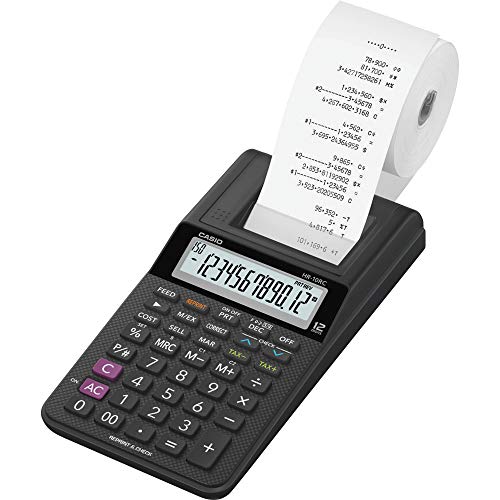
Casio’s HR-10RC emphasizes portability without sacrificing essential features. Its compact, mini desktop footprint fits tight workspaces while offering a 12-digit display for accurate data entry. The unit prints in a single color with date and time automatically included, making it suitable for quick recordkeeping, budgeting, or on-the-go accounting tasks. The lightweight design is ideal for temporary stations, tax prep, or field offices that require dependable calculations with receipts.
Casio HR-170RC Plus
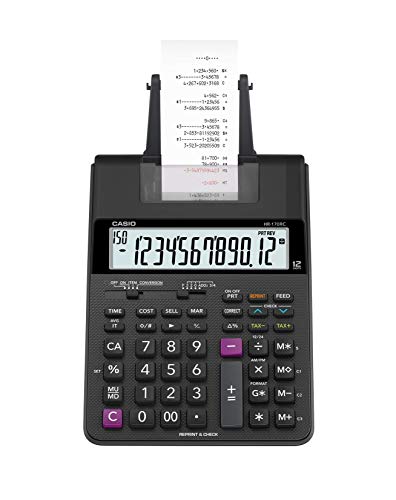
The HR-170RC Plus adds faster two-color printing and robust check, correct, and re-print features. This model supports tax calculations, cost/sell/margin analysis, and currency exchange tools for quick international operations. Its dual-color output helps distinguish positives from negatives at a glance, which can improve accuracy when negotiating discounts or margins. It’s well-suited for small offices with frequent invoices, pricing decisions, and audit-ready documentation.
Sharp EL-1801V Ink Printing Calculator

Sharp’s EL-1801V offers a durable, AC-powered solution with an easy-to-read 12-digit display. Its color-ink printing combines reliability with legibility for ledgers and receipts. The design emphasizes user comfort, with well-spaced keys and a broad viewing angle to minimize errors during fast entry. This model is suitable for everyday business use where steady performance and clear records matter most.
Canon MP11DX-2 Desktop Calculator

The Canon MP11DX-2 combines a compact footprint with currency conversion and calendar features. It features a Double Check Function to verify calculations, aiding accuracy in pricing, taxes, or discount calculations. This two-color printing calculator is designed for busy professionals who require dependable performance in a small office setting. The currency conversion capability supports international dealings and cost comparisons across markets.
Buying Guide: Key Considerations When Choosing a Desktop Printing Calculator
When selecting a printing calculator, consider the following factors to match your workflow and space.
- Printing in Two Colors: Red and black printing helps distinguish debits from credits, profits from costs, and negative values. This feature supports quick reviews during audits or reconciliation.
- Display Size and Layout: A larger 12-digit display reduces entry errors. Ensure keys are well-spaced and tactile for comfortable long sessions.
- Power and Portability: Decide between AC-powered models for steady use or battery/USB options for mobility. For small offices, a compact footprint saves desk space.
- Tax and Currency Tools: Tax keys, cost/sell/margin, and currency exchange can streamline pricing, invoicing, and international transactions.
- Double Check and Reprint Features: These functions minimize mistakes by allowing you to verify calculations before printing final results.
- Paper Loading Reliability: Look for intuitive loading mechanisms to reduce jams and downtime, especially in high-volume environments.
- Build Quality and Durability: A sturdy keypad and print mechanism extend the calculator’s life in busy offices or retail settings.
- Connectivity and Compatibility: If you need digital records, ensure the device can export or integrate with accounting software or receipts.
- Price-Performance Balance: Compare feature sets against the price to identify models that offer the best value for your needs.
Users should balance feature sets with workflows. For tax-heavy work, a unit with robust tax keys and currency capabilities can save time. For recordkeeping, a fast printer, reliable paper loading, and legible two-color output minimize post-entry corrections. In shared office environments, compactness and durability become decisive factors. This guide presents a cross-section of models to help you weigh these trade-offs and choose a calculator that aligns with daily tasks and long-term efficiency.