Choosing the right desktop Bluetooth adapter can dramatically improve wireless audio, peripherals, and data transfers. This guide highlights five top options, covering Bluetooth versions from 4.0 to 6.0, long-range capabilities, and easy plug‑and‑play setups. Each pick offers solid compatibility with Windows PCs and a range of devices like keyboards, mice, headphones, and printers.
| Product | Brand | Key Benefit |
|---|---|---|
| TP-Link USB Bluetooth Adapter (UB500) | TP-Link | Bluetooth 5.4 with high compatibility |
| UGREEN USB Bluetooth 5.3 Adapter | UGREEN | Stable connections with multiple devices |
| TP-Link USB Bluetooth Adapter (UB500 Plus) | TP-Link | Long range and improved performance |
| Techkey Long Range USB Bluetooth 5.3 Adapter | Techkey | Very long-range capability for open spaces |
| TP-Link USB Bluetooth 4.0 Adapter (UB400) | TP-Link | Ultra‑compact nano design and broad backward compatibility |
The selections emphasize compatibility with Windows systems, plug‑and‑play setup, and a mix of newer Bluetooth standards and long-range designs. The following sections provide concise overviews of each option, followed by a practical buying guide.
TP-Link UB500: Bluetooth 5.4, Wide Compatibility

The TP-Link UB500 delivers Bluetooth 5.4 with EDR and backwards compatibility to older Bluetooth versions. This dongle supports faster data transfer and broader coverage, making it ideal for stable audio streaming, wireless peripherals, and smooth file transfers. Its compact nano design minimizes desk clutter, while the USB interface ensures quick plug‑and‑play setup on Windows 11/10/8.1/7 devices. It is suitable for connecting keyboards, mice, headphones, speakers, and other Bluetooth accessories, with improved range helping reduce dropouts in busy environments.
UGREEN UBOLT 5.3 Adapter: Stable Multi‑Device Connectivity

UGREEN’s USB Bluetooth 5.3 adapter uses BR+EDR technology to boost connection stability and data transfer speed, while reducing interference. It supports up to five devices simultaneously, such as a keyboard, mouse, headphones, and speakers, without significant cross‑device disruption. The device is designed for Windows systems and offers true plug‑and‑play functionality without driver installation on Windows 11/10/8.1. Note that Windows 7 and other OSes are not supported, making it a solid option for modern PCs with a diverse Bluetooth ecosystem.
TP-Link UB500 Plus: Long Range, Enhanced Coverage

The UB500 Plus builds on the UB500 by emphasizing longer range and more robust coverage, powered by Bluetooth 5.3 plus EDR technology. It remains backward compatible with older Bluetooth standards and includes an adjustable antenna design for targeted improvements in signal reach. Like other TP-Link adapters, it supports Windows platforms with straightforward setup, making it suitable for users seeking reliable connections for keyboards, mice, headphones, and other peripherals without complicated configuration.
Techkey Long Range USB Bluetooth 5.3 Adapter

This Techkey model emphasizes long‑range performance with Class 1 radio technology and a substantial antenna, advertising up to 328 feet (100 meters) in open spaces. It uses Bluetooth 5.3 plus EDR, delivering improved data transfer speeds and energy efficiency. The plug‑and‑play design requires no driver installation for supported Windows versions, enabling quick setup for desktops and laptops. It’s suitable for connecting a wide array of devices, from mice to speakers, where distance and interference are considerations.
TP-Link UB400: Ultra‑Compact, Wide Compatibility
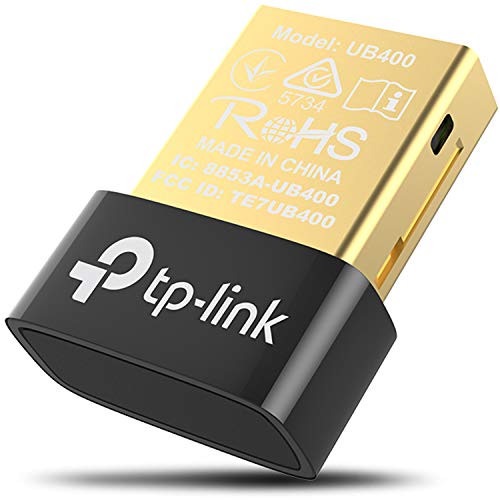
TP-Link’s UB400 brings a nano-sized, ultra‑compact form factor with Bluetooth 4.0 technology and backward compatibility to versions 3.0/2.1/2.0/1.1. It offers either a plug‑and‑play experience for Windows 8/8.1/10 or driver installation for older Windows versions, with a note that it’s not compatible with Mac or Linux. The tiny design makes it easy to leave in a USB port without protrusion, ideal for laptops and desktops where space is at a premium. It provides reliable connectivity for everyday peripherals like keyboards, mice, and basic audio devices.
Avantree DG45: Windows‑Only Bluetooth 4.0 Adapter

Avantree DG45 targets Windows systems (11/10/8.1/8) with a focus on Bluetooth devices such as headphones, speakers, keyboards, and mice. It explicitly does not support macOS, Linux, or 2.4G wireless devices, ensuring a straightforward setup for compatible hardware. The device provides a compact option with a dedicated Bluetooth 4.0 radio, suitable for basic wireless peripherals and light usage in a Windows environment where newer Bluetooth versions aren’t required.
Buying Guide: Key Purchase Considerations
- Bluetooth version and speed: Newer versions (5.x/6.x) offer faster data transfer, better reliability, and longer range. If you primarily need audio streaming or gaming peripherals, consider 5.0+ with EDR/BLE support.
- Range and antenna design: Long‑range adapters with external or larger antennas can improve coverage in open spaces or apartments with thick walls. Realistic ranges vary by environment.
- Device compatibility: Check Windows versions supported (11/10/8.1/7) and whether drivers are required. Some adapters are fully plug‑and‑play on new Windows builds, while older systems may need drivers.
- Simultaneous connections: If you plan to use multiple devices at once (keyboard, mouse, headset, printer), look for adapters rated to handle multiple pairings without interference.
- Form factor: Nano or compact designs reduce desk clutter but may have shorter antennae. Consider whether you need a discreet dongle for a laptop or a more robust option for a desktop PC.
- Backward compatibility: Most modern adapters support older Bluetooth versions; confirm this if you have legacy peripherals (e.g., Bluetooth 4.0 or 3.0 devices).
- Driver availability: Some brands provide drivers for Windows only; others are fully driverless on supported systems. Factor in maintenance and future OS updates.
In evaluating options, align your choice with the devices you own and your usage patterns—whether you need ultra‑low latency for audio, reliable multi‑device connectivity, or extended range for a larger workspace. The five adapters covered here balance compatibility, performance, and ease of use for typical American desktop setups.