Looking to upgrade your PC cooling with premier water blocks? This guide highlights five high-quality CPU water blocks from trusted brands, designed for Intel and AMD sockets, with features ranging from micro-channel fins to LCD displays. Each option balances cooling efficiency, compatibility, and build aesthetics to help you choose the right component for a powerful, quiet, and visually striking system.
| Product | Brand | Socket Compatibility | Notable Feature |
|---|---|---|---|
| CORSAIR iCUE Link XC7 RGB Elite | Corsair | Intel LGA 1700, AMD AM5 | Hexa-Flow cooling engine with iCUE LINK |
| Alphacool Core 1 CPU Water Block | Alphacool | Intel LGA 1700, AMD AM4/AM5 | Black, broad socket compatibility |
| CPU Water Cooling Block (Aveks) | Aveks | AMD AM4/AM5, Intel LGA 775/1155/1156/1366/1150/2011 | Large copper contact area |
| CORSAIR XC7 RGB Elite LCD | Corsair | Intel LGA 1700, AMD AM5 | 480×480 IPS LCD, 31 RGB LEDs |
| TRYX Panorama WB | TRYX | Intel LGA 1851/1700, AMD AM4/AM5 | 2K AMOLED display, curved panel |
Below are five carefully chosen CPU water blocks that balance cooling performance, compatibility, and visual appeal for American builders aiming to optimize both benchmarks and aesthetics.
CORSAIR iCUE Link XC7 RGB Elite CPU Water Block

The CORSAIR iCUE Link XC7 RGB Elite features a Hexa-Flow cooling engine designed to reduce laminar flow issues and evenly cool all CPU cores. A nickel-plated copper cold plate with over 120 micro-fins provides enhanced heat transfer for demanding workloads and overclocking. The block integrates with the iCUE LINK ecosystem for daisy-chaining components, reducing cable clutter and enabling a cohesive system. This model supports Intel LGA 1700 and AMD AM5, with a transparent flow chamber that showcases internal cooling dynamics and 24 RGB LEDs for dynamic illumination.
Alphacool Core 1 CPU Water Block

The Alphacool Core 1 CPU Water Block provides broad compatibility with Intel LGA 1700 and AMD AM4/AM5 sockets. Its black finish offers a sleek aesthetic while a precision-machined copper base delivers efficient heat transfer. This block is designed for enthusiasts seeking reliable performance across multiple platforms without sacrificing build style or compatibility.
Aveks CPU Water Block With Copper Base

Aveks offers a CPU water block with a large copper contact area and inner water channel, designed for rapid heat transfer from the CPU. It features a 10 mm external diameter copper plate with a 5 mm base height and includes four screws for installation. This block is compatible with a wide range of Intel and AMD sockets, making it suitable for DIY builds that prioritize heat dissipation and straightforward assembly.
CORSAIR XC7 RGB Elite LCD CPU Water Block

This version features a brilliant 480×480 IPS LCD display, enabling real-time CPU temperature readouts, memes, or team logos at 30 FPS: 24-bit true color depth and ultra-bright lighting. Alongside 31 RGB LEDs, the Hexa-Flow cooling engine continues to provide even cooling across cores. The LCD model is ideal for users who want both high performance and a bold, customizable visual centerpiece in their build, with Intel LGA 1700 and AMD AM5 support.
TRYX Panorama WB CPU Water Block
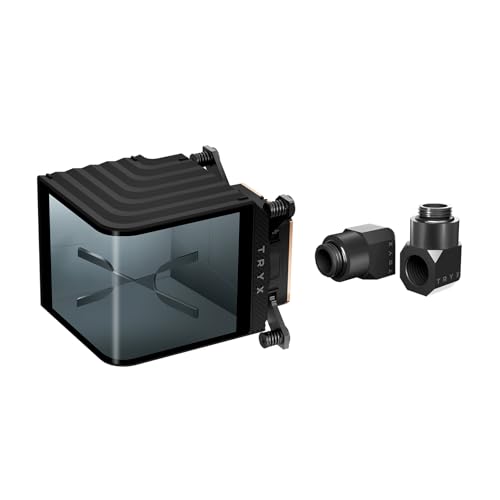
The TRYX Panorama WB pairs cutting-edge cooling with a visually striking 2K AMOLED display. The 6.67-inch curved panel provides a bold focal point for any build, while microchannel fins and a copper base enable efficient heat transfer. It supports Intel LGA 1851/1700 and AMD AM4/AM5 sockets, with a VRM-focused design and a G1/4” threaded outlet. The product emphasizes aesthetics alongside performance, appealing to enthusiasts who want a showpiece cooling block.
Buying Guide
Key purchase considerations for CPU water blocks include compatibility, cooling performance, and ease of installation. Consider socket support to ensure AMD and Intel compatibility with your motherboard (e.g., LGA 1700, AM5). Look at the cooling mechanism, such as micro-fin copper bases and multi-channel channels, which influence heat transfer efficiency. Display and lighting features add aesthetic value, especially if you build for show or streaming setups.
- Performance vs. aesthetics: Decide whether you prioritize raw cooling efficiency or visually striking elements like LCD displays and LED lighting.
- Compatibility: Verify socket support and whether the block fits your CPU’s thermal design power (TDP) and cooler loop topology.
- Installation convenience: Some blocks offer tool-less mounting, pre-applied thermal interface materials, or standardized G1/4” fittings for flexible tubing.
- Connectivity: Ecosystem features (e.g., Corsair iCUE Link) may simplify management and cable organization, but require compatible hubs and software.
- Maintenance: Copper bases and nickel-plating can influence corrosion resistance and maintenance frequency; check for included accessories and mounting hardware.
For best results, match a high-efficiency water block with a compatible pump and radiator setup that suits your case, noise preferences, and overclocking goals. Consider future upgrades within the same platform family to maximize your investment and simplify maintenance.