Answering the question of how to convert analog videos and burn them to DVD, this guide highlights five practical programs and devices that make digitizing and authoring simple. These picks are best for people with VCR tapes, Hi8/V8 camcorder footage, or other analog sources who want durable DVD archives or shareable digital files. The guide notes who each product is best for, plus a short buying checklist to compare features at a glance.
Product snapshot:
| Product | Best For | Key Benefit | Format |
|---|---|---|---|
| Roxio Easy VHS to DVD for Mac | Mac users with analog footage | Effortless transfer to DVD from VCR/Hi8 in a few clicks | DVD, Digital |
| Roxio Easy VHS to DVD 3 Plus | PC users needing built-in edits | Includes quick edits and enhancements before burning | DVD, Digital |
| Diamond Multimedia VC500 | PC users wanting simple capture | One-touch digitization from multiple analog sources | Digital |
| Portta VD22P | Hands-on record-and-preview enthusiasts | 5″ HD screen for live preview while capturing | MP4, Digital |
| Portta VD20P | Compact, portable solution | Built-in screen with 1080p capture | MP4, Digital |
Roxio Easy VHS To DVD For Mac
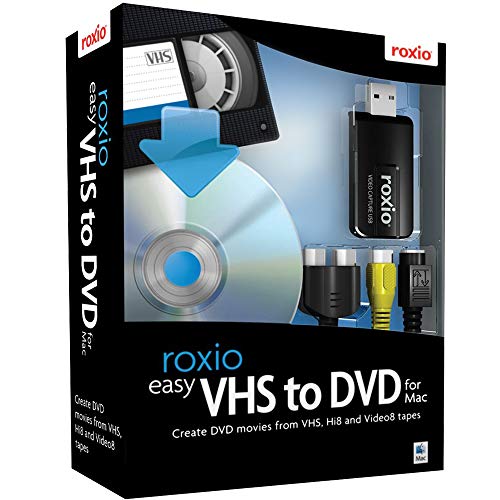
The Roxio Easy VHS to DVD for Mac is designed for Mac users who want to capture video from analog sources and convert it to digital formats for burning to disc. It emphasizes a straightforward workflow from VCR or analog camcorders to DVD in a few clicks. It’s best for households that primarily work on Macs and want to import footage into iMovie for later editing, titles, and transitions. A potential limitation is that the feature set centers on Mac compatibility; Windows users may prefer the Windows version of the product.
Who this is best for: Mac owners with analog footage looking for a simple, direct path from capture to DVD. If you plan to edit in iMovie before burning, this solution aligns with that workflow.
Why selected: It directly targets the core need—digitizing analog footage and burning or saving to digital formats—without requiring third-party software. The ability to import into iMovie for edits is a plus for Mac-centric creators.
Limitations: No built-in Windows compatibility; may require separate software for more advanced non-Mac workflows.
Roxio Easy VHS to DVD 3 Plus

Roxio Easy VHS to DVD 3 Plus targets users who want to convert VHS tapes and other analog video to DVD or digital formats with editing features. It’s a strong pick for Windows environments and includes simple video trimming, color enhancements, transitions, and noise reduction to rejuvenate older tapes before finalizing a DVD or digital file. The software is ideal for people who want quick, deployable edits without learning complex video software. A consideration is that it may be most beneficial for those who also intend to burn to DVD rather than simply archive to digital files.
Who this is best for: Windows users seeking built-in editing tools to improve and finalize footage before burning or sharing.
Why selected: Combines capture, enhancement, and burning in a single package, enabling a smoother end-to-end workflow from analog to disc or digital formats.
Limitations: Primarily Windows-centric; Mac users may need the Mac-specific version or alternative workflow.
VHS To Digital Converter With 4″ HD Screen (Lvrzng)

The Lvrzng VHS to Digital Converter with a 4″ HD screen offers a self-contained capture option that does not require a computer, software, or drivers. It records to digital formats up to 1080p and provides a built-in preview screen for on-the-spot monitoring. This device is best for users who want a plug-and-play, portable method to digitize tapes without tying up a computer. Note that it cannot playback tapes or DVDs independently, and output formats are typically digital video files rather than direct DVD burning.
Who this is best for: Individuals seeking a standalone converter for quick digitization without a computer.
Why selected: It emphasizes simplicity and portability, making it ideal for occasional digitization tasks or for family-focused archiving on the go.
Limitations: No built-in DVD authoring; you’ll need to burn to DVD or edit digitally elsewhere.
Diamond Multimedia VC500 One Touch VHS To Digital Converter
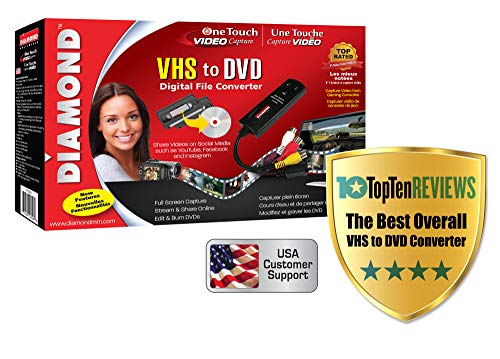
The Diamond VC500 offers a simple, one-touch approach to digitizing VHS, Hi8, and Video8 tapes. It connects to your PC via USB, uses composite or S-Video inputs, and comes with software intended to help capture and convert to digital files suitable for archive or DVD authoring. This option is best for users who want an inexpensive, straightforward capture device that can pair with standard PCs and their existing software. A potential drawback is that included software may not be as fully featured as standalone editing suites.
Who this is best for: PC users seeking a low-friction, plug-and-play digitization path from analog video to digital files.
Why selected: It emphasizes quick digitization with universal inputs, enabling fast preservation of old tapes for later burning or sharing.
Limitations: The capture software may feel basic compared to modern, feature-rich editors; may require additional software for advanced editing.
Portta VD22P VHS To Digital Converter With 5″ HD Screen

The Portta VD22P combines a 5″ HD preview screen with a built-in video capture recorder, designed to convert VHS, Hi8, Mini DV, DVD, or camcorder footage to MP4. It supports HDMI output to a TV or monitor for real-time viewing and lets you store recordings on USB drives or TF cards. Best for buyers who want to preview as they capture and plan to share or store digital footage easily. Limitations include the need for compatible storage media and the fact that the device is a dedicated converter rather than a full-fledged editing suite.
Who this is best for: People who value real-time preview and on-device storage while digitizing tapes.
Why selected: The built-in screen helps ensure you capture the right moments without repeatedly checking a computer monitor.
Limitations: Requires external storage media and may not include advanced editing features on-device.
Portta VD20P VHS To Digital Converter With 5″ HD Screen

The Portta VD20P is a compact version that offers similar features to the VD22P with a 5″ HD display for live preview. It captures to MP4 at 1080p/60fps and provides convenient on-device editing controls for basic adjustments. Choose this if you want a portable option with straightforward on-device control. A caveat is that, like other standalone converters, it lacks robust on-device editing features; plan to edit on a computer if you need advanced effects.
Who this is best for: Users wanting a portable, easy-to-use capture device with a built-in screen for immediate review.
Why selected: It balances portability with a usable display, making it a good companion for on-site digitization.
Express Burn Disc Burning Software

Express Burn is a dedicated burning software option that focuses on fast burning to CD, DVD, or data discs. It is included here as a complementary choice when your source material has already been digitized and your goal is to finalize and burn to disc with minimal setup. It is best for users who already have video files ready and simply need reliable, streamlined burning capabilities. It’s not a converter itself, but it pairs well with the digitization workflow described above.
Buying Guide: Key Considerations For Choosing A Convert And Burn To DVD Solution
- Source Type: Are you digitizing from a VCR, Hi8/V8 camcorder, or another analog device? Some devices handle specific inputs (RCA, S-Video) more smoothly.
- Platform Compatibility: Do you primarily use a Mac or Windows PC? Some products are platform-specific, while others are cross-platform.
- Output Format: Do you want DVD discs, or digital files (MP4, AVI) for archiving or sharing online?
- Editing Needs: Are you seeking built-in trimming, color correction, and transitions, or will you edit in separate software?
- On-Device Preview: Is a built-in screen useful for real-time viewing and avoiding mis-captures?
- Ease Of Use: Do you prefer plug-and-play devices or a more feature-rich software suite?
- Storage And Media: Will you burn to discs, or store digitally on USB drives or cloud storage?
Common Scenarios And Recommendations
- Mac-based digitization with quick DVD burning: Roxio Easy VHS to DVD for Mac is a strong fit for users who want a straightforward Mac workflow and optional iMovie integration.
- Windows users who want built-in editing before burning: Roxio Easy VHS to DVD 3 Plus provides editing features alongside capture and burning.
- Standalone, computer-free digitization: Portta VD22P or VD20P offer on-device capture with a built-in screen, ideal for quick transfers without a computer.
- Low-cost, simple capture on a PC: Diamond VC500 offers a basic plug-and-play approach for digitizing tapes with standard inputs.
- Portable, compact digitization with live previews: Portta’sVD22P and VD20P are good for on-site family projects or classroom use where quick previews matter.
FAQ
- What is the easiest way to convert VHS to DVD?
Use an all-in-one solution that captures analog video and writes directly to DVD, such as Roxio Easy VHS to DVD 3 Plus, or a capture device like Diamond VC500 paired with DVD authoring software.
- Do these tools require a computer?
Some options are plug-and-play (standalone converters with built-in screens), while others require a PC or Mac to capture and burn.
- Can I edit footage before burning to DVD?
Yes, some software offers trimming, color correction, and transitions prior to burning; choose a package that includes editing features if this matters to you.
- Is a built-in screen on a converter useful?
Yes, it helps verify you’re capturing the right moment and reduces failed captures, especially when recording from multiple sources.
- What file formats do these devices export?
Many export to MP4 or other digital formats suitable for archiving or streaming; DVD-friendly options are available when the software supports DVD authoring.
- Are there risks with aging analog tapes?
Digitizing preserves memories by converting to digital formats, but long-term storage should include multiple backups and formats.