Discover top console capture cards designed to stream, record, and share gameplay from PS5, Xbox, Switch, and more. This guide highlights five highly capable options, explaining how each model handles high-resolution video, low latency, and broad compatibility with streaming software. Whether you’re building a pro setup or starting a simple live stream, these picks offer reliable performance and easy plug‑and‑play use for American creators.
| Product | Brand | Key Benefit |
|---|---|---|
| Capture Card Nintendo Switch, 4K HDMI Video Capture Card | Rybozen | 1080p capture with 4K30/60 input, USB 3.0 |
| Elgato 4K S – External Capture Card | Elgato | 4K60 capture with HDR10, 1440p120/1080p240 passthrough |
| 4K HDMI Capture Card USB 3.0 – 1080P 60FPS | Dcyfol | Plug‑and‑play, broad device compatibility |
| Elgato HD60 X | Elgato | 1080p60 HDR10 or 4K30 HDR10 with ultra‑low latency |
| XIIXMASK 4K USB 3.0 Capture Card | XIIXMASK | 4K loop‑out, 1080p60/2K30, mic‑in |
Rybozen Console Capture Card Review

Rybozen’s Capture Card Nintendo Switch model offers 1080p recording with a capable 4K30/60 HDMI input and 2K30 output. It uses USB 3.0 for low latency streaming and works across Windows and Mac systems. The device is plug‑and‑play, identified automatically as a webcam, and is designed to minimize CPU load while supporting optional audio capture. This makes it suitable for Twitch, YouTube, OBS, and other popular streaming platforms.
Elgato 4K S Capture Card Highlights

Elgato’s 4K S External Capture Card emphasizes cinematic 4K60 capture with high‑quality visuals and high frame rate options like 1440p120 or 1080p240 passthrough. HDR10 support ensures vibrant tone mapping on Windows, making it a strong choice for creators who prioritize image fidelity and future‑proofing for HDR content. It’s designed for quick setup and works well with OBS, Streamlabs, and more for PC and Mac users.
Dcyfol 4K USB 3.0 HDMI Capture Card

Dcyfol’s 4K HDMI Capture Card focuses on a plug‑and‑play experience with USB 3.0, enabling smooth 1080p60 or higher capture for PS5, PS4, Xbox, Switch, and more. It emphasizes low latency and broad software compatibility (OBS Studio, Streamlabs, XSplit) to support quick streaming setup for beginners and seasoned creators alike, while maintaining a simple USB connection to your PC or laptop.
Elgato HD60 X Streaming Capabilities

Elgato HD60 X provides premium capture with ultra‑low latency and versatile passthrough. It supports 4K30 HDR10 or 1080p60 HDR10, with additional options for 1440p120, 1080p120, and VRR passthrough. It is a driverless setup on Windows and Mac, and it integrates with major streaming apps like OBS, Streamlabs, Vmix, and Zoom, enabling broad content distribution across platforms.
XIIXMASK 4K USB 3.0 Capture Card Overview
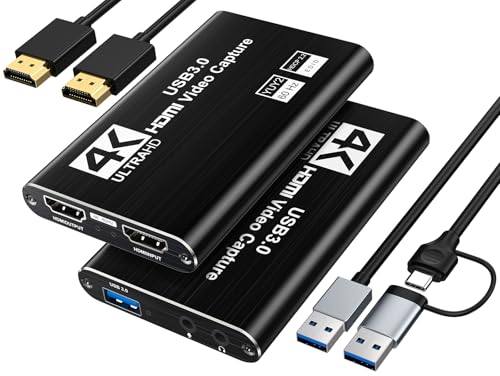
XIIXMASK’s 4K USB 3.0 capture card offers 4K loop‑out with 1080p60 or 2K30 output. It supports YUY2, with a robust aluminum body for heat dissipation and low latency during recording or live streaming. The model includes a mic‑in option for adding voice commentary directly in your streams, ideal for creators who want integrated audio control without separate hardware.
XIIXMASK 4K Loop‑Out Capture with Audio

This XIIXMASK model emphasizes 4K loop‑out and 2K30 capture with USB 3.0 output. It supports 4K60 input and 4K60 loop‑out, with compatibility for YUY2. The aluminum build aids heat management, delivering stable performance for real‑time capture, recording, and streaming, while including mic‑in for commentary for a more complete broadcast experience.
NearStream 4K Capture Card Essentials

NearStream offers a 4K HDMI capture card with USB 3.0 output, focusing on 4K60 input and 1080p60 pass‑through for smooth streaming and recording. It supports both Windows and Mac, making it flexible for diverse setups. The device emphasizes low latency and easy plug‑and‑play operation, suitable for gamers and content creators who want reliable performance without complex configuration.
Buying Guide: Key Purchase Considerations
- Resolution and frame rate: Determine whether you primarily need 1080p60 for streaming or 4K capture for future‑proof content, and check passthrough capabilities to avoid added latency.
- Latency and passthrough: Look for devices with ultra‑low latency and reliable passthrough to ensure smooth gameplay while streaming or recording.
- Compatibility: Verify compatibility with your operating system (Windows or Mac), streaming software (OBS, Streamlabs, XSplit), and console devices (PS5, Xbox, Switch, etc.).
- Ease of setup: Prioritize plug‑and‑play models that require minimal drivers or external power, especially if you’re building a simple setup.
- Audiocapability: If you need commentary, consider models with a built‑in mic input or easy integration with external audio gear.
- Build quality and cooling: Aluminum housings help dissipate heat during long sessions and reduce the risk of thermal throttling.
- Output options: Check for loop‑out or passthrough features that allow you to play on a monitor while streaming, preserving your viewing experience.
- Portability: If you stream on the go, lighter, compact options with robust build quality can be advantageous for travel setups.
When choosing a console capture card, align the device’s capabilities with your content goals, whether it’s high‑fidelity 4K content, ultra‑low latency multiplayer streams, or simple 1080p broadcasts. The models above cover a range of needs, from beginner to advanced, with broad ecosystem support for popular streaming software.