Answering the need for tendonitis-friendly mice, these selections prioritize neutral wrist positions, low strain designs, and reliable tracking. The best picks are suited for office workers, designers, and students who spend long hours at the computer and need to prevent or mitigate tendonitis symptoms. Below, find five ergonomic mice chosen for comfort, support, and daily usability, followed by a practical buying guide and quick FAQs.
Quick Product Overview
| Product | Best For | Key Benefit |
|---|---|---|
| Anker 2.4G Wireless Vertical Ergonomic Optical Mouse | General office use, long sessions | Neutral handshake position improves comfort |
| ProtoArc Ergonomic Mouse EM11 NL | Multi-device work across PC and Mac | Triple-device connectivity for seamless switching |
| Logitech Lift Vertical Ergonomic Mouse | Smaller-to-medium hands, daily productivity | Soft grip and 57° vertical design for posture |
| LEKVEY Ergonomic Vertical Wireless Mouse | Budget-friendly, long sessions | Page Back/Page Forward and 3 DPI levels |
| Uineer Ergonomic Wireless Vertical Mouse | Multi-device needs, color accents | 7-color ambient light and 3-device support |
Anker 2.4G Wireless Vertical Ergonomic Optical Mouse
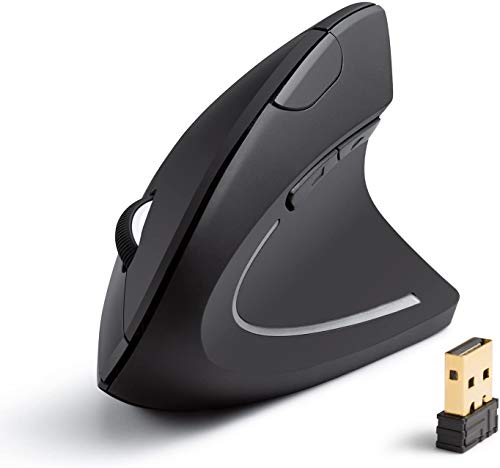
The Anker Ergonomic Mouse emphasizes a neutral “handshake” wrist posture to reduce strain during long work sessions. It offers selectable DPI settings—800/1200/1600—enabling precise control on various surfaces. With extra forward/back buttons, it supports efficient web navigation, making it suitable for office workers and frequent internet users who spend many hours at the desk. Choose this if you want a straightforward, comfortable vertical design with reliable basic features.
Best for: Users seeking a comfortable, entry-level vertical option for daily computing and web browsing. Better for: Right-handed users who value a simple, ergonomic shape over advanced multi-device features.
Caution: Some users may prefer higher-end customization or additional programmable buttons found on premium ergonomic mice.
ProtoArc EM11 NL Ergonomic Mouse

The ProtoArc EM11 NL is a rechargeable vertical mouse that supports up to three devices via Bluetooth 5.0 and a 2.4G USB-A connection. This multi-device capability makes it well-suited for users who switch between Windows, Mac, and Android devices throughout the day. The included USB-A receiver and rechargeable battery reduce ongoing costs and downtime. Choose this if you need a versatile, rechargeable option with flexible device pairing.
Best for: Multi-device professionals who alternate between several machines. Better for: Those who want a rechargeable solution without frequent battery replacements.
Caution: The setup can be more complex for users who primarily need a single-device mouse or Bluetooth-only setups.
Logitech Lift Vertical Ergonomic Mouse

Logitech Lift emphasizes a natural forearm posture with a 57-degree vertical shape and a soft grip, designed for daily comfort and productivity. Quiet clicks help minimize distraction, and the compact footprint makes it a good match for users with smaller to medium hands. Choose Lift for consistent long-term comfort and a trusted ergonomic brand. A potential limitation is its slightly higher profile compared to some ultra-compact models.
Best for: Office workers seeking a comfortable, brand-backed vertical option for all-day use. Better for: Right-handed users with medium hand sizes who prioritize quiet operation.
Caution: May feel bulky for very small hands; consider size fit before buying.
LEKVEY Ergonomic Vertical Wireless Mouse

The LEKVEY vertical mouse features a rechargeable battery and three DPI levels (800/1200/1600), offering a balance of responsiveness and comfort. It includes a convenient Back/Forward button layout for web navigation. This option is notable for users prioritizing a budget-friendly ergonomic solution without sacrificing essential controls. Best for those who want a simple, reliable vertical design with extended battery life. Limitation: Some users may find the three DPI levels insufficient for high-precision tasks.
Best for: Budget-conscious buyers who want a straightforward vertical ergonomic option. Better for: Everyday document work and browsing with reduced wrist strain.
Caution: Not ideal for high-precision gaming or design work requiring ultra-high DPI beyond 1600.
Uineer Ergonomic Wireless Vertical Mouse

The Uineer vertical mouse focuses on reducing wrist strain with a natural handshake grip and features 3-device support, plus a 4-way DPI range including 2400 DPI for more precise tasks. The 7-color ambient light is an aesthetic perk but does not impact performance. This model suits users who want a visually appealing option that can connect to multiple devices. Limitation: The ambient light may be unnecessary for some work environments and can affect battery life slightly.
Best for: Multi-device users who appreciate a colorful, configurable design. Better for: Those who value a higher DPI range for precision tasks on varied surfaces.
Buying Guide: How To Choose An Ergonomic Mouse For Tendonitis
- Wrist posture matters: Vertical or angle-varied designs promote a neutral wrist position, reducing forearm pronation and tendon strain.
- DPI and tracking: Higher DPI lets you move the cursor with less hand movement, which can reduce repetitive strain. Look for adjustable DPI settings (e.g., 800–1600 or more).
- Device connectivity: For mixed-device use, consider mice that support Bluetooth and USB dongles or multi-device pairing. This reduces switching friction and downtime.
- Size and comfort fit: Ensure the model fits your hand size and grip style (palm, claw, or fingertip). A poorly fitting ergonomic mouse can negate the benefits.
- Buttons and navigation: Extra buttons can reduce repetitive movements, but ensure they are easy to reach without overreaching the fingers.
- Battery and charging: Rechargeable options minimize ongoing costs. Check claimed battery life and charging time for your work pace.
- Build quality and surface texture: A textured grip and smooth glide reduce hand fatigue and improve control over long periods.
- Ambience and aesthetics: Ambient light or color accents may be appealing but are secondary to ergonomics and performance.
Frequently Asked Questions
- What makes a mouse good for tendonitis? A good tendonitis-friendly mouse emphasizes a neutral wrist position, reduced forearm twist, and smooth scrolling with minimal force.
- Is a vertical mouse always better for tendonitis? Not always. Vertical designs suit many users by promoting a natural posture, but comfort varies by hand size and personal preference.
- How important is DPI for tendonitis relief? Moderate DPI settings reduce the amount of hand movement needed, potentially lowering strain during long tasks.
- Should I choose Bluetooth or USB for my setup? Bluetooth offers wireless flexibility and device switching, while a USB dongle can provide a more stable connection in busy environments.
- Can a trackball or alternative input device help tendonitis? Trackballs minimize wrist and arm movement, which can be beneficial for tendonitis, though they require a different learning curve.
- How long does it take to adapt to a new ergonomic mouse? Most users experience noticeable comfort within 3–14 days, depending on usage and hand size.