When you need reliable computer audio for work, school, gaming, or chatting, a good headset with a quality microphone is essential. This guide highlights five top USB/USB-C or 3.5mm wired headsets and Bluetooth options that balance comfort, sound quality, and mic clarity. It’s best for home offices, students, and remote teams who value clear voice pickup and easy inline controls. Below, you’ll see a quick comparison table and detailed product sections to help you pick the right model for your setup.
| Product | Best For | Communication Type |
|---|---|---|
| Logitech H390 | People who want reliable USB-A stereo sound with a folding microphone | Wired USB-A |
| JIAMQISHI USB Headset | Students and home office users needing versatile USB + 3.5mm | USB + 3.5mm |
| Logitech H391 | PC users needing USB-C compatibility and comfort | Wired USB-C |
| Yealink BH71 Pro | Teams-heavy users needing wireless versatility and long talk time | Bluetooth (with USB-C/A dongle option) |
| Amazon Basics On-Ear Headset | Budget-conscious buyers seeking a compact, reliable wired option | Wired 3.5mm / USB-A |
All five options offer noise reduction or noise-canceling elements to improve call clarity, though the exact mic performance varies by model. If you need a headset for daily video calls, online classes, or long workdays, consider how much wireless freedom you want, how comfortable the ear cushions feel, and whether you prefer a boom mic that can retract or stay attached for quick stowing.
Logitech H390 Wired Headset: USB-A Comfort And Clarity

The Logitech H390 delivers digital stereo sound with fine-tuned drivers for calls, music, and meetings. A rotating noise-canceling microphone reduces background noise for clearer conversations, and the in-line controls let users adjust volume or mute without disruption. This model is best for PC or laptop users who prefer USB-A connectivity and a straightforward, pull-the-boom mic design. Note a longer cable and wired setup may limit movement compared to wireless options.
Best for: Office workers, students, and remote teams who want plug-and-play USB-A compatibility with dependable mic clarity. Limitations: Not wireless; mic boom is less flexible for near-field positioning when the mic isn’t in use.
JIAMQISHI USB Headset With Microphone

This headset combines USB and 3.5mm connectivity, offering an adaptable solution for home offices, online classes, and flexible work environments. It features a unidirectional boom microphone designed to pick up voice clearly while reducing ambient noise. The earpads use breathable materials, and the headband is adjustable for all head shapes. The 40mm drivers support clear conversation and multimedia playback. The overall design emphasizes comfort for longer sessions.
Best for: Students and remote workers who need flexibility with both USB and 3.5mm connections, plus emphasis on comfort for extended wear. Limitations: Noise reduction is mic-focused; room acoustics still influence perceived call quality.
Logitech H391 Wired Headset: USB-C For Modern Setups

The H391 is a USB-C wired headset designed for modern PCs and laptops. It offers digital stereo sound and a rotating noise-canceling mic, with inline controls for quick volume and mute adjustments. It is compatible with Chromebooks and other USB-C devices, making it suitable for newer laptops, tablets, and workstations. The retractable mic ensures a low-profile look when not in use.
Best for: Professionals using USB-C devices or Chromebooks seeking a stable wired option with simple controls. Limitations: Not as versatile for non-USB-C devices unless an adapter is used.
Yealink BH71 Pro Bluetooth Headset: All-Day Wireless Collaboration

The Yealink BH71 Pro offers a wireless solution with a Teams-certified profile for smooth conferencing. It supports connection to multiple devices via Bluetooth 5.3 and a USB-C/A dongle, enabling flexible use with PCs, laptops, and mobile devices. Four beamforming microphones and noise-canceling technology help keep calls clear in noisy environments. It’s best for professionals who value mobility and robust conferencing features.
Best for: Remote workers and frequent conference callers who need wireless flexibility and strong mic performance. Limitations: Wireless devices can require more charging planning and potential latency concerns in busy environments.
Amazon Basics On-Ear Headset: Budget Wired Reliability
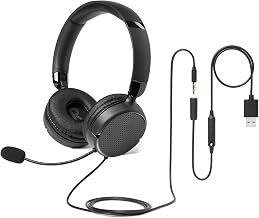
This basic on-ear headset offers a foldable design and a flexible boom mic. It supports both 3.5mm and USB-A connections, giving users a choice based on device compatibility. The unidirectional microphone helps minimize background noise to ensure clear calls, especially in education and casual office settings. Comfort improves with proper adjustment and breaks during long sessions.
Best for: Budget-conscious buyers needing a dependable wired option with multiple connection choices. Limitations: May feel snug initially for some users; long-term comfort varies by head size.
Buying Guide
Key purchase considerations for computer headsets and microphones include comfort, compatibility, microphone quality, and portability. Consider the following questions to narrow down your choice:
- What devices will you use most often (PC, Mac, Chromebook, phones, tablets)?
- Do you prefer USB-A, USB-C, USB dongles, or 3.5mm connections?
- Is wireless freedom a priority, or is a wired setup more reliable for your environment?
- How important is mic directionality (unidirectional vs. omnidirectional) for reducing background noise?
- Will you wear the headset for long sessions, so comfort and padding matter?
For a balance of mic clarity and ease of use, wired USB headsets like the Logitech H390 or H391 are reliable plug-and-play choices for office or study work. If you need USB-C compatibility or future-proofing for newer devices, the H391 or Yealink BH71 Pro offer good options, with the latter adding wireless flexibility. For multi-device environments and flexible conferencing, the JIAMQISHI headset provides USB and 3.5mm options, making it adaptable for various setups. The Amazon Basics on-ear model serves well as a budget-friendly, compact alternative.
Frequently Asked Questions
- What is the main difference between USB and 3.5mm headsets?
USB headsets generally include built-in sound processing and a digital mic interface, while 3.5mm relies on your device’s audio input. - Are wireless headsets worth it for video calls?
They offer mobility and fewer cables, but require regular charging and may introduce small latency in some cases. - How do I know if a mic is noise-canceling?
Look for directional or noise-canceling microphone descriptions in the features; reviews may also reveal real-world performance. - Can I use a headset with a Chromebook?
Yes, many USB-C or USB-A headsets work with Chromebooks, but verify compatibility in the product notes. - What should I consider for long calls?
Choose a headset with soft, breathable ear cushions and an adjustable mic; consider weight and headband comfort for hours of use.