Looking for compact, plug-and-play sound for your computer setup? This guide highlights five small, USB-powered or USB-C–ready options that deliver clear dialogue, better bass, and easy clip-on or monitor-mounted designs. Each pick suits different buyers: students needing portability, multitaskers wanting desk clutter reduction, gamers seeking punchy sound, or professionals prioritizing simple controls. Below is a quick comparison plus practical buying considerations to help you decide which compact speaker best fits your computer and workflow.
| Product | Best For | Key Benefit |
|---|---|---|
| Computer Speakers for Desktop PC Monitor, XKX | Windows, macOS, Linux users needing USB-C compatibility | Adaptive-channel-switching with deep bass |
| Creative Pebble 2.0 Channel | Budget desk setups needing simple USB powered sound | Solid bass with far-field drivers |
| Cyber Acoustics CA-2890 | Monitors or compact setups needing clamp-on convenience | Clamps to monitor, straightforward controls |
| [Upgraded] USB Computer Speaker (LIELONGREN) | Windows PCs and laptops needing one-cable audio/power | Dual 3W drivers plus USB power sharing |
| Amazon Basics USB-Powered Stereo Speakers | Simple plug-and-play, portable usage | Front-volume control with compact pair |
XKX Computer Speakers For Desktop PC Monitor

Best for USB-enabled desktops and laptops requiring USB-C compatibility. This compact soundbar-style speaker system uses dual ultra-magnetic drivers and dual passive radiators to deliver loud sound with rich bass for a small form factor. It includes a built-in USB-C to USB adapter, expanding compatibility to devices that only have USB-C, such as newer MacBooks and Android devices. Best for: small workstations or dorm rooms where space is at a premium and you want louder, punchier audio than typical built-in speakers. Limitation: not intended for use with TVs or external displays lacking USB input. Use it when you need a simple, clip-on monitor solution with strong bass response.
Creative Pebble 2.0 Channel Computer Speakers

Best for budget-conscious users who want simple USB-powered audio with clear midrange. These 2.0 desktop speakers feature a single USB cable for power and audio, reducing desk clutter. Far-field drivers and rear-facing passive radiators help project sound for immersive personal listening. The 45° angled drivers improve on-desk audio projection for dialogue and music alike. Choose this if you want straightforward setup without extra adapters and a compact footprint. Caution: bass performance is adequate but not “boomy” in very small rooms.
Cyber Acoustics USB Speaker Bar (CA-2890)

Best for monitor-based desks needing a slim, unobtrusive audio bar. This USB-powered speaker bar connects to PC, Mac, or Chromebook with a single USB cable and eliminates the need for separate audio connections. It projects sound forward from the monitor, offering a surprisingly loud and clear listening experience for videos, calls, or casual music. Useful for space-saving setups; limitation: sound depth can be less pronounced than larger speakers in open rooms. Choose this if you want a clean, integrated look with easy volume and mute controls on the bar.
LIELONGREN USB Computer Speaker
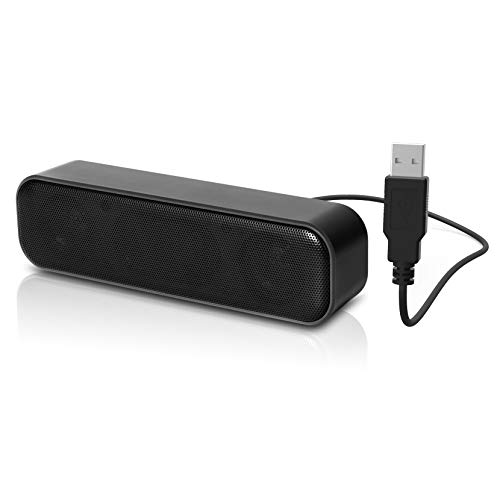
Best for Windows setups that want a single-cable audio and power solution. The upgraded LIELONGREN speaker features dual 3W drivers and a passive radiator for louder output, with a USB connection that powers and carries audio—no 3.5mm AUX needed. It’s compatible with a wide range of Windows PCs and devices via USB. Choose this if you value a tidy desk with fewer cables and straightforward setup. Limitation: may require 10W USB ports to achieve maximum volume on some systems.
Amazon Basics USB-Powered Stereo Speakers

Best for simple, plug-and-play setups. This set of two USB-powered speakers uses a front-mounted volume control and a 3.5mm headphone jack for optional private listening. It’s a practical choice for students or home offices that want a basic upgrade from built-in laptop speakers. Caution: the front control is helpful, but there is no separate power adapter option; rely on USB power from your computer. Choose this for compactness and straightforward operation.
Buying Guide
What should you consider when choosing compact computer speakers?
- Connectivity: Do you prefer USB power only, USB-C power and audio, or a 3.5mm input for legacy devices? USB-C compatibility is increasingly common and helpful for newer laptops and tablets.
- Power and drivers: Look for speakers with at least 2 active drivers and a passive radiator for better bass in a small form factor. If you need loud volume in a small space, check peak power ratings and driver size.
- Mounting and footprint: If desk space is limited, consider clip-on or monitor-clamp designs. Ensure the clamp fits your monitor thickness and screen edges.
- Voice and video clarity: For meetings and calls, prioritize products with clear dialog processing or well-balanced midrange to reduce listening fatigue.
- Ease of use: Front or side volume controls, mute, and simple plug-and-play setup help maintain focus during work or study sessions.
- Compatibility notes: Some models rely on USB power only; others require USB power from a PC or USB-C adapter for devices lacking USB-A. Confirm compatibility with your device ecosystem.
FAQ
- Do compact computer speakers require a separate power adapter?
Some models are USB-powered and do not need a separate adapter, while others may use USB-C adapters for power or require a 5V USB supply. - Can I use these speakers with a Mac or Chromebook?
Yes, many listed options support Windows, macOS, ChromeOS, and Linux via USB, USB-C, or 3.5mm input where applicable. - Will smaller speakers have good bass?
Small speakers can deliver solid bass when they have passive radiators and multiple drivers, but expect less depth than larger desktop systems. - Is a clamp-on speaker ideal for all monitors?
Clamp-on designs work best on monitors with sufficient edge thickness; verify the clamp range fits your monitor height and width. - What is the best choice for gaming on a compact desk?
Look for models with strong bass and clear dialogue; the XKX option, or Creative Pebble V3 in some setups, can offer a good balance of sound and space.