The following article highlights five popular CNC controller boards that connect via USB, support GRBL or Mach3 workflows, and are suitable for engraving, routing, and small CNC machines. Each product section covers key features, compatibility, and how it fits into a typical desktop or benchtop CNC setup. The buying guide at the end helps compare these options across essential considerations like control type, I/O, and ease of use.
Summary of chosen products:
- AceirMC Mach3 USB Interface Board — 4-axis, 100 kHz step-pulse, supports limit switches and emergency inputs.
- Makerbase MKS DLC32 Expansion Board — 32-bit control with ESP32, GRBL compatible, offline touchscreen option.
- Fafeicy USB Controller CNC Board — 100 kHz step pulses, 4-axis support, robust for engraving and milling.
- Wendry DIY CNC Controller Card — 100 kHz, supports automatic probing and emergency input.
- NYMOLABS 4-Axis USB Offline Controller — 7-inch IPS touchscreen, GRBL compatible with CH340, broad desktop-use compatibility.
ACEIRMC Mach3 USB Interface Board

The ACEIRMC Mach3 USB Interface Board functions as a motion control card within Mikto Mach3 ecosystems, offering 4-axis linkage and compatibility with both stepper and servo drives. It supports a USB connection, automatic probe tool, emergency input, and limit switches, enabling reliable homing and zeroing operations. Four general-purpose inputs accommodate limit switches, estop, probes, or zero-return devices, making it suitable for CNC engraving and small milling tasks. The maximum step-pulse frequency is 100 kHz, ensuring responsive control for precise motion profiles in hobbyist CNC projects.
Makerbase DLC32 ESP32 Expansion Board
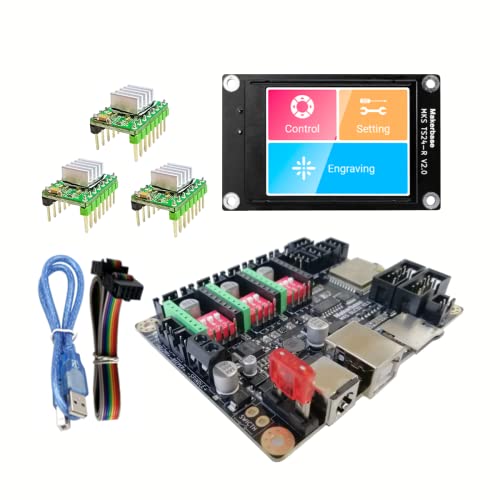
The 32-bit ESP32-based DLC32 expansion board from Makerbase extends GRBL-powered CNC capabilities with a modern 32-bit processor. This board is designed for TS-series control panels and provides offline touchscreen operation via a 2.4-inch LCD in some bundles. It’s compatible with GRBL and supports web/app control interfaces, which enhances remote interaction and configuration for offline CNC workflows. It’s an attractive option for users upgrading from older 8-bit controllers or seeking improved control responsiveness and simplicity in setup.
Fafeicy USB Controller CNC Board

The Fafeicy 100 kHz USB CNC controller supports 4-axis connections to stepper or servo drives, along with automatic probing and emergency input functions. It features four general-purpose inputs and offers robust compatibility with standard CNC engraving setups. The board’s high step-pulse rating makes it suitable for accurate motion control in engraving machines or small routers. Its emphasis on reliable signal integrity and straightforward wiring makes it a practical choice for students, hobbyists, and light workshop environments.
Wendry 4-Axis USB CNC Controller Card
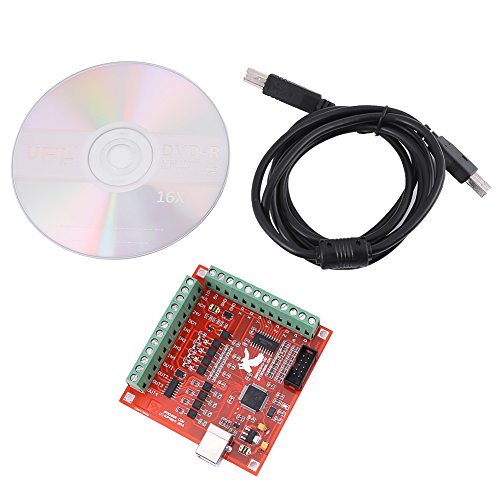
Wendry’s 4-Axis USB CNC controller card positions itself as a versatile motion control solution for USB-enabled CNC engraving. It highlights a 100 kHz maximum step-pulse frequency and supports automatic probe tools and emergency input, aligning well with precise toolpath execution. The board’s 4-axis support makes it suitable for setups with two or more stepper or servo motors, enabling straightforward 3D carving or panel cutting tasks on compact machines. It’s a practical, budget-friendly option for entry-to-mid level CNC projects.
NYMOLABS 4 AXIS USB Offline Controller

The NYMOLABS offline controller leverages a 7-inch IPS touchscreen and CH340 USB communication to run GRBL firmware on desktop CNC routers. It supports multiple standard desktop machines such as 3018 and 4040 sizes, and provides a larger, more responsive touchscreen compared to smaller display options. This setup reduces dependency on a PC during operation, enabling direct GRBL control and simpler standalone functionality for classroom, workshop, or home projects.
Buying Guide: Key Purchase Considerations
Control system compatibility: Determine whether the board runs GRBL, Mach3, or another control suite and confirm compatibility with your machine’s drive types (stepper vs servo) and connectors.
I/O and expansion: Evaluate the number of axis, limit switches, probe inputs, and whether you need 4-axis or more, plus any expansion options like LCD touch panels or external hand wheels.
Processing power and firmware: 32-bit controllers generally offer smoother performance and more robust feature sets than older 8-bit designs. Consider future-proofing and ease of firmware updates.
Communication method: USB-based boards reduce wiring complexity, but offline touchscreen options can provide standalone operation for specific workflows. Assess your workspace and PC availability.
Ease of setup and support: Check for clear documentation, user communities, and manufacturer support to minimize setup time and troubleshooting.
Safety features: Look for emergency stop inputs, limit switch wiring, and probe support to protect the machine and workpiece during operation.
Price-to-value balance: While higher-end boards may cost more, evaluate whether their features (like 32-bit processing or offline control) align with your typical projects and skill level.
How to Choose for Your Setup
For hobbyists focused on engraving or light PCB milling, a 4-axis USB controller with reliable 100 kHz pulse rate and probe support often suffices. If you’re upgrading from older control boards, a 32-bit ESP32-based option with GRBL compatibility can provide smoother motion and better interface options. If you need standalone operation, offline touchscreen controllers reduce dependency on a PC during long run sessions. Finally, ensure the selected board’s motor driver compatibility (NEMA types, current ratings) matches your motors for safe, reliable operation.
Maintenance and Upgrades
Keep firmware and drivers up to date to benefit from performance and stability improvements. Regularly inspect wiring for wear, especially around limit switches and probe inputs. When expanding to more axes, verify that the controller’s I/O handles additional devices without signal interference. For users who frequently swap machines, consider boards with easy reconfiguration and portable software profiles to speed up transitions.
In summary, the listed boards provide a range of GRBL and Mach3 options suitable for various desktop CNC tasks. Selection should balance axis count, control type, offline capabilities, and available support to match your project scope and workflow preferences.