When shopping for a Chromebook, 8GB of RAM is a solid benchmark for comfortable multitasking, better browser performance, and smoother app switching. This guide highlights five reliable options that pair 8GB RAM with solid storage and ChromeOS efficiency. Ideal buyers include students juggling multiple tabs, remote workers handling docs and spreadsheets, and casual power users who want long battery life and quick wake times.
Quick comparison table of selected products:
- ASUS CX15 CX1505CTA — 15.6″ FHD, 8GB RAM, 128GB storage, long battery life
- Lenovo IdeaPad 3i Chromebook — 15.6″ FHD, 8GB RAM, 64GB eMMC, capable performer
- ASUS Flip CX1 CX1400FKA — 14″ FHD, 8GB RAM, 128GB eMMC, 360° touchscreen
- Acer Chromebook Plus 514 — 14″ FHD+, 8GB RAM, 512GB SSD, AI features
- HP 15.6″ HD Premium Chromebook — 8GB RAM, 64GB eMMC, solid daily performer
ASUS Chromebook CX15 With 8GB RAM, 15.6″ FHD

This model offers 8GB RAM and 128GB storage on ChromeOS, with a 15.6″ FHD anti-glare display. It’s designed for longer work sessions and quick boot times. The Google AI Pro feature adds value for users who want enhanced productivity tools and NotebookLM integration as part of a promotional period. Best for: students or remote workers who need a larger screen and robust multitasking without lag.
Why chosen: It pairs a large display with dependable RAM and storage for daily tasks, plus AI-enabled tools to boost workflow. Limitation: promo features require signing up and may have time-limited access.
Lenovo IdeaPad 3i Chromebook, 15.6”

The Lenovo IdeaPad 3i Chromebook delivers 8GB RAM and a 15.6″ Full HD display, with an Intel Celeron N4500 processor and 64GB eMMC storage. Best for: budget-conscious buyers who still want solid multitasking and a large screen for productivity apps. Why chosen: strong balance of price-to-performance and a larger display for comfortable document editing. Caution: lower storage capacity means cloud or external options may be needed for large media libraries.
ASUS Chromebook Flip CX1 CX1400FKA

The ASUS Flip CX1 is a 14″ FHD NanoEdge 360-degree touchscreen with 8GB RAM and 128GB eMMC storage. Best for: users who value versatility—tablet mode for reading or sketching, plus full laptop use for writing and research. Why chosen: the 360-degree touchscreen offers flexible use cases, while ChromeOS keeps it simple and secure. Caution: 360° hinge may feel looser over time with heavy usage.
Acer Chromebook Plus 514
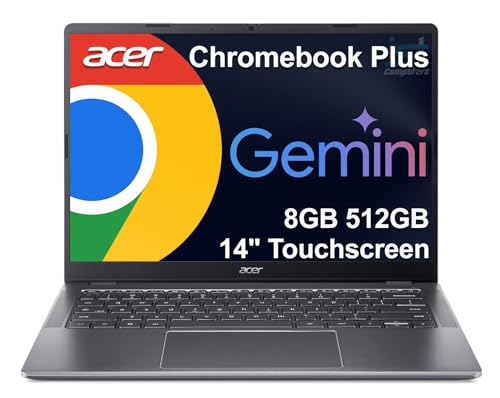
The Acer Chromebook Plus 514 features an 8-core Intel i3-N355 processor, 8GB RAM, and 512GB SSD, with a 14″ FHD+ touchscreen. Best for: students and professionals who need ample local storage and robust performance for creative or research tasks. Why chosen: the 512GB SSD gives significantly more local storage than typical Chromebooks, enabling larger offline work. Caution: higher power consumption relative to basic Chromebooks may affect battery life in heavy use scenarios.
HP Chromebook 15.6″ HD Premium

The HP 15.6″ Premium Chromebook offers 8GB RAM and 64GB eMMC storage on ChromeOS, with a vivid 15.6″ display. Best for: users who prioritize a larger display for reading or streaming and need reliable, everyday performance. Why chosen: it presents a straightforward, all-day Chromebook experience with a comfortable screen size. Caution: 64GB storage may require frequent cloud storage or external backups for media-heavy use.
Buying Guide
- RAM and multitasking needs: 8GB RAM helps manage multiple tabs and apps. If you frequently run heavy web apps or multiple browser profiles, 8GB is a practical baseline, especially with ChromeOS’ lightweight footprint.
- Storage considerations: Look for 64GB, 128GB, or 512GB options. Larger SSDs or eMMC give you more offline space. For portable media or offline work, consider models with at least 128GB.
- Display size and type: Taller tasks benefit from larger displays (15.6″) for documents and spreadsheets. For portability, 13–14″ options with strong battery life are ideal.
- Processor choice: Intel Celeron options are common in budget Chromebooks. An i3 option (like the 514) provides more headroom for multi-tab work and light creative tasks but may draw more power.
- Battery life: Read battery life specs and look for devices advertised with long use between charges. Real-world results depend on brightness, workload, and connectivity.
- AI and cloud features: Some Chromebooks offer promotional AI tools, Gemini, or Google One AI Premium plans. These can boost productivity if you rely on Google Workspace or creative tasks.
- Ports and expandability: Check USB-C/USB-A availability, microSD slots, and headphone jacks to ensure compatibility with peripherals and offline storage needs.
- Durability and portability: If you travel or commute, consider chassis weight and build quality. Some models meet military-grade standards, offering ruggedness for on-the-go use.
- Software ecosystem: ChromeOS offers robust web app support and access to Android apps via Google Play. Ensure your essential apps have ChromeOS compatibility or Android equivalents.
Frequently Asked Questions
- Are 8GB Chromebooks fast enough for everyday tasks? Yes. 8GB RAM supports multiple tabs and apps, and ChromeOS’ efficiency helps maintain speed during typical tasks like documents, spreadsheets, email, and streaming.
- Is storage important on a Chromebook? While many Chromebooks use cloud storage, a larger local storage option (128GB or more) reduces dependence on internet connectivity and improves offline performance.
- What should I consider when choosing a display size? Larger displays are better for productivity and media, while smaller screens favor portability and lighter weight for travel.
- Do Chromebooks with AI features require ongoing subscriptions? Some AI features are tied to promotional plans; check whether those plans renew after the trial period and how they affect your workflow.
- Can I run Windows programs on a Chromebook? Not natively. ChromeOS supports web apps and Android apps; some users run Linux (Beta) or use web-based equivalents to access similar functionality.
- Is touchscreen or 360-degree hinge beneficial? A touchscreen or convertible design enhances note-taking, reading, or sketching. Choose this if you value flexibility in how you use the device.