Looking for a reliable laser engraving machine from a Chinese brand that balances power, precision, and value? This guide highlights five strong choices, tailored for hobbyists, small shops, and education programs. Each option is evaluated for best use cases, material compatibility, and practicality. Read on to find which model best fits your projects, whether you engrave wood, acrylic, metal, glass, or coated surfaces.
Buyer snapshot: The top picks cover a range of power levels and features. The Twotrees TTS-55 Pro suits hobbyists seeking higher power and air-assisted cuts. BlazeX M3 targets those who need ultra-fine detail in a compact package. K15 Pro offers beginner-friendly setup with offline control. ACMER S2 delivers a true 12W capability with broad material support. CREALITY FALCON provides robust power with an integrated rotary option for cylindrical items. Use the comparison table to decide which is best for your material focus and production pace.
| Model | Best For | Key Strength | Limitations |
|---|---|---|---|
| Twotrees TTS-55 Pro | Hobbyists and small makers needing 5.5W with air assist | High power, air-assisted nozzle, precise 0.08mm spot | Requires setup for air assist |
| BlazeX M3 | Beginners who need ultra-fine detail | 0.01mm accuracy, 10W module, enclosed system | Enclosure adds size and cost |
| K15 Pro | Beginners and small businesses seeking offline control | True 10W power, offline workflow | Further setup guidance may be needed |
| ACMER S2 | Broad material projects with higher speed | 12W power, 0.01mm precision | Software ecosystem requires setup |
| CREALITY FALCON | Power users needing rotary capability | 10W+ power, rotary 4-in-1 options | Class 4 laser and safety considerations |
Twotrees TTS-55 Pro Laser Engraver
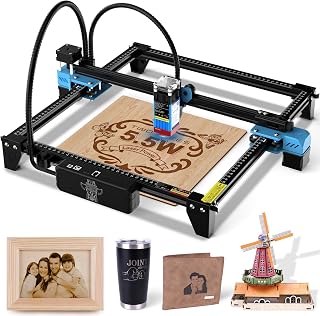
The Twotrees TTS-55 Pro offers a 5.5W laser with an air-assisted nozzle and a red laser shield for safer operation. The machine uses a 0.08×0.46mm focal spot and can engrave or cut a variety of materials, including wood, leather, acrylic, paper, stainless steel, and more. With a 300x300mm work area, it is well suited for hobbyists and small businesses focusing on detailed designs and small batch production.
- Best for: Hobbyists and makers who want deeper cuts and cleaner edges with better flame control via optional air assist.
- Why selected: The combination of higher laser power, precision, and air assist makes it versatile for multiple materials and projects.
- Caution: Integration of an air assist system requires careful setup to avoid misalignment.
BlazeX M3 10W Laser Engraver

The BlazeX M3 delivers a true 10W laser with 0.01mm precision, optimized for desktop DIY and small-batch production. It features a 2-in-1 cutter and engraver setup, with a protective enclosure and a honeycomb bed for cleaner cuts and safer operation. It supports a broad material range, including wood, metal-coated surfaces, glass, and leather, making it a flexible choice for precision-focused projects.
- Best for: Beginners and hobbyists who need ultra-fine engraving and reliable cutting on multiple materials.
- Why selected: High-detail capability and all-in-one starter kit reduce initial setup friction for new users.
- Caution: The enclosure adds footprint; ensure adequate desk space and ventilation for longer jobs.
K15 Pro Laser Engraver 10W

The K15 Pro is designed for users who want straightforward software and offline control. It ships with a free software suite, supports AI-assisted design via Snap a photo or prompt, and can operate offline from a TF card. It offers a true 10W laser, capable of processing 300+ materials and producing clean cuts, such as 12mm plywood or 8mm acrylic. This makes it a practical choice for crafters and small studios seeking reliability and simplicity.
- Best for: Beginners who value easy setup, offline workflows, and broad material support.
- Why selected: Combines user-friendly software with strong material versatility and offline autonomy.
- Caution: Some users may require time to master the software ecosystem for complex designs.
ACMER S2 Laser Engraver 12W

The ACMER S2 uses a true 12W laser and lists a 0.01mm spot with 0.01mm positioning accuracy. It supports 100+ materials and offers compatibility with ACMER Studio, LightBurn, and LaserGRBL. A higher total system power enables deeper cuts and more robust engraving, while the software compatibility helps streamline project setup and design transitions.
- Best for: Projects requiring deeper cuts and precise detailing across a wide material range.
- Why selected: High power paired with flexible software options supports varied workflows and batch work.
- Caution: True 12W power should be used with proper safety measures and ventilation.
CREALITY FALCON 10W Laser Engraver

The CREALITY FALCON focuses on high productivity with 10W power and a 12 mm wood cutting capacity in a single pass. It includes a rotary kit that handles cylindrical objects and varied shapes, expanding capabilities for tumblers, bottles, and curved surfaces. An anti-UV filter on the module and emergency-stop features emphasize safety and ease of assembly while delivering strong performance for material versatility.
- Best for: Power users who want to engrave cylindrical items and achieve faster production with reliable results.
- Why selected: Combines high power, fast operation, and a practical rotary option for everyday crafts and small businesses.
- Caution: Class 4 laser systems require strict safety practices and proper enclosure use.
Buying Guide: Key Purchase Considerations
Laser engraving machines vary in power, precision, software compatibility, and material support. Consider these questions when choosing a model from the list:
- What materials will you engrave or cut most often?
- Do you need offline control or cloud-based operation?
- Is a rotary accessory important for cylindrical objects?
- How important is ultra-fine detail versus depth of cut?
- What safety and ventilation features are essential for your workspace?
Power and precision: If you prioritize intricate details, look for 0.01mm positioning precision and a fine laser spot. If you regularly cut thicker materials, a higher wattage (10W–12W) with multiple passes may be better, but ensure your enclosure and safety setup are appropriate.
Software compatibility: Models that support common platforms like LightBurn or LaserGRBL, and that offer offline options, can save setup time and reduce learning curves. Compatibility with design tools (AI-assisted prompts or quick editing) can also boost workflow efficiency.
Safety and enclosure: For higher-power units, enclosures, anti-UV protection, emergency-stop features, and proper ventilation are critical. Ensure your workspace complies with local safety regulations and that you have appropriate protective gear.
FAQ
- Are these machines suitable for beginners? Yes, several models emphasize beginner-friendly setup and offline control, including plug-and-play software and starter kits.
- Can I engrave metal with these machines? Some models support coated metals and other specialty materials, but always verify material compatibility and required safety measures for metal engraving.
- Do these units come with safety features? Most include enclosures, emergency stops, or protective shields, especially higher-power models. Always use appropriate eye protection and ventilation.
- Is a rotary accessory necessary for engraving curved items? If your projects involve bottles, tumblers, or cylindrical objects, a rotary roller can be essential depending on the model.
- What software should I use? Many support ACMER Studio, LightBurn, or LaserGRBL. Choose a model that aligns with your preferred workflow and graphic design tools.
- What is the typical maintenance for these machines? Regular lens cleaning, belt tension checks, and proper calibration are common. Follow the manufacturer’s guidelines for replacements and safety checks.