If you’re shopping for affordable USB drives, this guide highlights reliable entries that deliver practical storage without breaking the bank. Ideal buyers include students needing backup for class files, travelers requiring portable storage, and casual users who want a simple, plug-and-play solution. Below, you’ll find five solid options with clear strengths, plus a concise buying guide and a short FAQ to answer common questions.
| Product | Capacity | Key Strength | Best For |
|---|---|---|---|
| SamData 8GB USB Flash Drive (1 Pack) | 8 GB | LED indicator, capless design | Everyday back-up |
| Maspen 8GB USB Flash Drive | 8 GB | Compact, easy to label | School or office use |
| MECHEER 8GB USB Drive (10 Pack) | 8 GB each | Swivel design, high quantity | Bulk gifting or classroom use |
| SamData 8GB USB Flash Drives (5 Pack) | 8 GB each | Multiple colors, LED indicator | Color-coded storage |
| Aiibe 32GB USB Drive | 32 GB | Higher capacity, 360° swivel | Media, large files |
SamData 8GB USB Flash Drive — 1 Pack
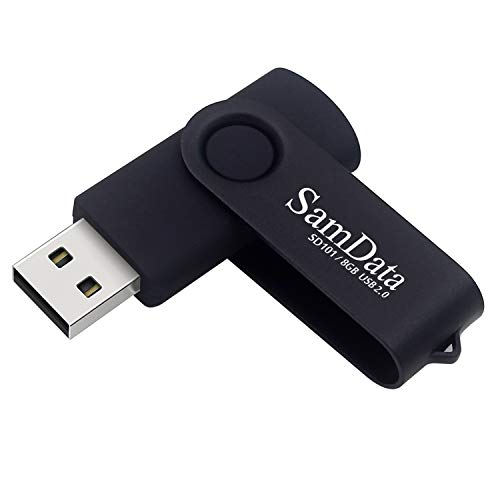
Best for: budget-conscious students or professionals who need a basic, reliable USB 2.0 drive with plug-and-play setup. This model includes a 360° swivel metal clip and a capless design to reduce loss and protect the USB port. It is widely compatible with Windows, macOS, Linux, and other operating systems, making it a versatile option for shared devices. Caution: limited to USB 2.0 speeds, which may be slower for large transfers.
Maspen 8GB USB Flash Drive

Best for: quick, inexpensive backups in classrooms or small offices. This 8 GB blue USB 2.0 drive emphasizes portability and cost-effectiveness, with a straightforward plug-and-play design. Limitation: the listing notes generic “bulk” style, so confirm package contents if you need single or multiple units for a project.
MECHEER 8GB USB Drive (10 Pack)

Best for: organizations, classrooms, or teams needing multiple drives. The 360° swivel design protects connectors and adds a clean, professional look. Better for bulk use than for a single keychain carry. Caution: a 10-pack may be more capacity than needed for casual users with limited storage needs.
SamData 8GB USB Flash Drives — 5 Pack

Best for: color-coded storage, small teams, or family use where color helps organize different project files. Each drive features a capless design and an LED indicator for transfer status. Limitation: multi-pack packaging may vary by seller; confirm the exact color mix before purchase.
Aiibe 32GB USB Flash Drive

Best for: users needing higher capacity in a compact format, such as storing media, large presentations, or design files. It uses a 360° swivel design and supports USB 2.0 and USB 1.1. Caution: not the fastest option for frequent large transfers; USB 2.0 speeds are typical for this category.
Buying Guide
What capacity do you need?
Choose 8 GB for light document storage, basic backups, and presentation files. For media or large files, consider 32 GB or more. Higher capacity often means a larger price, but more convenience for ongoing use.
What design matters most?
Swivel designs protect the port and prevent cap loss, making them better for everyday carry. Capless types reduce accessory parts but may expose the USB connector when not in use. If you carry drives on a keyring, consider a model with a sturdy clip.
Can you rely on USB 2.0 speeds?
All drives in this guide use USB 2.0, which is adequate for documents, photos, and basic media. If you frequently transfer large video files or run backups, you might prefer higher-speed USB 3.0/3.1 options not shown here.
How many drives do you need?
Bulk packs are cost-efficient for classrooms, teams, or families. If you only need a single backup or a gift, a 1-pack option keeps things simple.
Compatibility considerations
Look for drives listed as compatible with Windows, macOS, Linux, and other operating systems. This ensures plug-and-play functionality across different devices without extra software.
Practical tips for use
- Label drives with color or a small tag to keep files organized.
- Safely eject drives to avoid data corruption.
- Keep backups of critical files on a separate drive or cloud storage as an extra precaution.
Summary of key buyer information
- Best overall for budget users: SamData 8GB 1 Pack and SamData 8GB 5 Pack
- Best bulk option: MECHEER 8GB 10 Pack
- Best higher capacity value: Aiibe 32GB
FAQ
- Q: Are these drives reliable for long-term storage? A: They’re standard USB 2.0 drives suitable for everyday backups. For critical data, maintain an additional backup on another device or cloud storage.
- Q: Do they require software installation? A: No; they are plug-and-play.
- Q: Will they work with macOS or Linux?
- A: Yes, they list compatibility with multiple operating systems, including macOS and Linux.
- Q: Is 8 GB enough for photos and documents?
- A: For many users, 8 GB covers essential documents and a modest photo collection; larger needs may benefit from 32 GB or more.
- Q: Are these drives secure against data loss?
- A: Basic storage devices require careful handling; use proper ejection and maintain backups to minimize risk of data loss.