Looking for an affordable touch screen car stereo that still offers modern features like Apple CarPlay and Android Auto? This guide highlights five budget-friendly options that balance price with helpful tech. Each pick targets common buyer needs: ease of use, smartphone integration, backup cameras, and clear displays. Whether you drive a compact sedan or a larger SUV, one of these head units can upgrade your in-car experience without breaking the bank.
| Product | Display | CarPlay/Android Auto | Best For |
|---|---|---|---|
| Leadfan 7″ Double Din | 7.01″ HD touchscreen | Wireless/Bluetooth CarPlay not specified; supports Mirror Link | Families needing large display |
| GBEER 7″ Single Din (Apple CarPlay & Android Auto) | 1024×600 HD | Wireless & Wired CarPlay/Android Auto | Those who want full CarPlay/AA in a slim unit |
| arenauto Wireless CarPlay Screen, 9″ | 1280×720 IPS display | Wireless CarPlay & Android Auto | Drivers seeking a portable, easy install |
| PLZ 10.1″ Wireless Car Stereo | 10.1″ IPS touchscreen | Wireless & Wired CarPlay/Android Auto | Large-screen enthusiasts |
| Sobalai 6.9″ Single Din | 6.9″ UHD touchscreen | Wireless CarPlay/Android Auto | Compact dash apps with strong audio controls |
Leadfan 7inch Car Stereo Double Din

The Leadfan model pairs a 7.01-inch, 1024×600 full HD touch display with a double‑din chassis. It supports screen mirroring for most Android devices and iPhones via a data cable, enabling navigation, video, and music to appear on the big screen. Bluetooth 5.0 and hands-free calling enhance driving safety, while FM radio and USB playback cover everyday entertainment needs. Best for families or those who want a larger, easily readable display in mid-size sedans.
Selected for its balance of screen size, media options, and mirror link capability. Best for drivers who prioritize a broad display and wired phone projection. Caution: ensure your vehicle’s dashboard has the appropriate double‑DIN opening to fit this unit.
GBEER 7“ Single Din with Apple CarPlay & Android Auto

This GBEER unit delivers a 7-inch HD display at 1024×600 and supports both wireless and wired CarPlay and Android Auto. It also offers wired and wireless Mirror Link for iPhone and Android, allowing you to view maps and apps on a larger screen. Notably, it does not support Netflix in mirror mode, but navigation and music apps work smoothly. Best for users who want robust CarPlay/Android Auto in a compact din size while keeping a straightforward setup. Limitation: Netflix streaming may not mirror to the screen.
arenauto Wireless CarPlay Screen, 9 Inch

This 9-inch ArenAuto portable CarPlay screen emphasizes wireless CarPlay and Android Auto, with OTA firmware updates to handle newer iOS/Android versions. It boasts a 1280×720 display, clear touch response, and voice control via Siri or Google Assistant. Best for drivers who want a large, high-visibility display that’s easy to install and upgrade. Caution: some users may want a dash-mounted option for a more integrated look.
PLZ 10.1″ Wireless Single Din Car Stereo
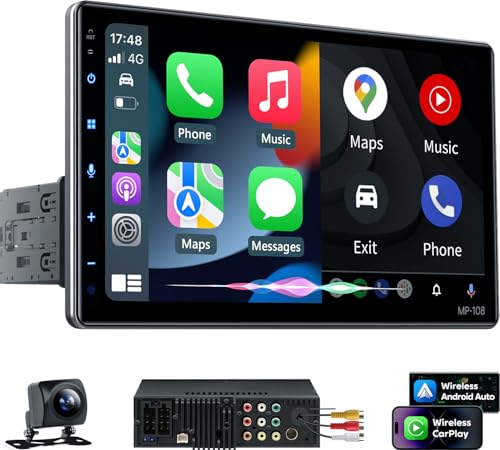
The PLZ model offers a large 10.1-inch IPS touchscreen with both wired and wireless CarPlay/Android Auto, plus built-in DSP for enhanced sound. It supports a 4.2 channel preamp and two subwoofers for deeper bass, aiming at audiophiles on a budget. Best for listeners who want a bigger display and stronger sound processing in a single head unit. Caution: physical size and dash compatibility should be checked before purchase.
Sobalai Single Din 6.9″ UHD Car Stereo

The Sobalai 6.9-inch unit focuses on wireless CarPlay/Android Auto with a UHD touchscreen, USB-C and traditional USB ports, and a strong emphasis on voice control via Siri or Google Assistant. It includes a backup camera option and features like mirror link. Best for drivers who want a compact, feature-rich single‑DIN head unit with modern connectivity. Limitation: some vehicles may experience layout conflicts if the stereo blocks vents or controls.
Buying Guide: Key Purchase Considerations
- Display size and dash compatibility: Measure your dash opening to ensure the chosen unit fits cleanly. Larger screens are easier to read but may require more space or trim adjustments.
- Smartphone integration: Decide between wired and wireless CarPlay/Android Auto. Wireless options offer convenience but may rely more on your phone’s battery and Bluetooth/WiFi stability.
- Mirror Link and app availability: Mirror Link helps project maps and media, but check which apps are supported for full-screen viewing on your screen.
- Sound processing: Units with built-in DSP and subwoofer support can improve audio quality, especially in larger vehicles. Look for EQ settings and preamp outputs if you care about sound tuning.
- Camera compatibility: If you plan to add a backup camera, verify the unit includes a camera input or supports wiring with a provided camera.
- OTA updates and future-proofing: Some models offer over-the-air updates to stay compatible with newer phone OS versions, reducing future setup friction.
FAQ
- Do these stereos require professional installation?
– Not always. Many units come with mounting kits and adapters, but double‑DIN or dash‑fit units can require a harness and dash trimming. Check your vehicle’s wiring diagrams. - Can I use CarPlay and Android Auto wirelessly?
– Several models offer wireless CarPlay/Android Auto, but some still rely on wired connections for initial setup or stability. Review the product specifics for wireless support. - Will a larger screen cause glare in sunlight?
– Display brightness and viewing angles are important. Some models use IPS panels and higher brightness to reduce glare, but direct sunlight can still affect visibility. - Are there risks with OTA updates?
– OTA updates generally improve compatibility and stability, but ensure the device stays connected to Wi‑Fi and follows manufacturer guidance during updates. - Is a backup camera included or required?
– Some units include a backup camera, others require separate purchase. If you don’t have one, choose a model that supports camera input and consider adding a camera later. - Can these units play high-resolution video?
– Many models support USB or SD playback at varying resolutions. Check supported formats and resolution limits in the product features.