If you’re building a budget-friendly home studio, a cheap multitrack recorder can simplify capturing ideas, demos, or podcasts without a computer. These options suit musicians seeking portability, podcasters who need fast setups, and students who want a straightforward workflow. Below are five affordable models that balance features and value, with quick notes on who benefits most and any limitations to consider. A quick buying table follows to help you compare at a glance.
Selected products quick reference
| Product | Best For | Why It’s Good |
|---|---|---|
| Zoom R4 | Bands and song ideas on the fly | 4-track capability with layered bouncing and undo, plus USB audio interface |
| Zoom H4 Essential | Field recording and quick interviews | Built-in mics plus two XLR/TRS inputs, versatile for on-the-go projects |
| Zoom PodTrak P4 | Remote podcasts with multiple mics | 4 XLR inputs, sound pads, and USB interface for remote setups |
| Boss BR-600 | Compact songwriting and practice demos | 8 playback tracks, built-in effects, portable |
| Zoom R12 | 8-track portable production | Touchscreen, 8 tracks, built-in drums and DAW-style editing |
Zoom R4 Multi-Track Recorder for Musicians

The Zoom R4 is built for musicians who want a compact, versatile device with 4 tracks and USB audio interface capabilities. It offers layer, bounce, and undo features, which help manage arrangements without a computer. Best for solo artists or small bands laying down ideas on the fly where you need reliable, clip-free recording.
Who it’s best for: solo performers, small bands, or guitar/bass players who need quick layering. Why selected: the bounce track helps free up channels for ongoing ideas and the XLR/TS combo inputs enable diverse sources. Limitation: using multiple bounces can increase project complexity and storage use.
Zoom H4 Essential Handheld Recorder

The H4 Essential is a handy field-recording solution with built-in stereo mics and two XLR/TRS inputs, making it a strong pick for podcasts, video shoots, and on-location music capture. It’s a practical choice when you need reliable, high-quality audio without extra gear.
Who it’s best for: journalists, podcasters, and filmmakers needing portable, reliable recording with flexible mic options. Why selected: the dual input capability and built-in mics cover most on-site scenarios. Caution: built-in mics can pick up ambient noise in busy environments, so use external mics when possible.
Zoom PodTrak P4 Podcast Recorder

The PodTrak P4 is designed for podcasters who need reliable remote interviewing capabilities. It features 4 XLR inputs, dedicated headphone outputs, sound pads, and an integrated USB audio interface. It’s well-suited for small studio setups or on-location podcast recording with multiple guests.
Who it’s best for: podcast creators and interview-based shows that require easy mic management and quick sound effects. Why selected: strong input/output options and built-in features that streamline remote recording. Caution: physical size and weight can be a consideration for ultra-compact setups.
Boss BR-600 Digital Multitrack Recorder

The Boss BR-600 offers eight playback tracks and built-in guitar effects, a compact package for creating and arranging songs with basic processing. It’s an approachable option for songwriters who want an all-in-one device that’s easy to carry to practice spaces or simple gigs.
Who it’s best for: songwriters and musicians who want a portable, all-in-one solution with effects. Why selected: solid track count and integrated effects for quick demos. Caution: fewer input options compared to models with more channels; plan for simple setups.
Zoom R12 Multi-Track Portable Recorder
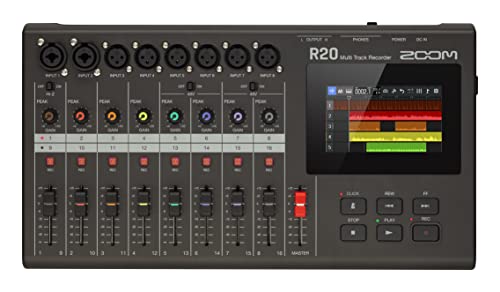
The Zoom R12 provides eight tracks, a touchscreen interface, and onboard editing, making it a versatile option for musicians who want more hands-on control without a computer. It also includes drum loops and DAW-like features for quick project development.
Who it’s best for: project-focused musicians and small studios needing a portable device with tactile editing. Why selected: balance of eight tracks, a touchscreen, and onboard editing. Caution: more features mean a slightly steeper learning curve for newcomers.
Buying Guide: Key Considerations For Choosing A Cheap Multitrack Recorder
- Track count and expandability: How many tracks do you need simultaneously, and can you bounce or layer layers without losing work?
- Inputs and compatibility: Do you need XLR inputs for mics, instrument cables, or external mixers? Consider USB audio interface capabilities for DAW integration.
- Portability vs. features: Is a compact device with basic effects enough, or do you require built-in rhythm sections, drum loops, or onboard editing?
- Playback and editing workflow: Do you prefer touchscreen controls, simple drag-and-drop edits, or traditional transport controls?
- Power options: Will you record on battery power, USB power, or both? Consider field use and battery life expectations.
- File management and export formats: What file formats does the device record in, and how easy is it to export to your computer or other devices?
Frequently Asked Questions
- What is a multitrack recorder best used for?
- Do I need a computer to use these recorders?
- Are cheap multitrack recorders suitable for podcasts?
- Can I use built-in mics for serious music recording?
- What is the benefit of bounce or layer features?
It is best for capturing multiple instruments or voices separately or in layers, and then mixing them on the device or transferring them to a computer for further production.
Not necessarily. Many devices offer onboard editing and mixing, and some also function as USB audio interfaces for direct computer connection.
Yes, especially models with multiple XLR inputs and good mic preamps. Look for devices offering headphone outputs and a straightforward workflow.
Built-in mics are convenient for quick ideas or field work, but external mics connected to XLR inputs typically yield higher quality and flexibility.
Bounce and layer features allow you to create complex arrangements by consolidating multiple tracks into a single bounce, freeing up channels for new ideas while preserving the original recordings.