Finding an affordable monitor that pairs well with a MacBook Pro doesn’t mean sacrificing display quality or productivity. The following picks focus on budget-friendly external screens and docking solutions that enhance screen real estate, support USB-C connectivity, and suit travel or office setups. Each option is evaluated for compatibility with macOS, portability, and value, helping you choose a practical second screen without breaking the bank.
| Product | Brand | Key Benefit |
|---|---|---|
| InnoView Portable Monitor 15.6″ | InnoView | Plug-and-play USB-C / HDMI with built-in speakers |
| Selore Docking Station for MacBook Pro Air | Selore&S-Global | Dual HDMI, 100W PD, multiple ports |
| Veout External Second Screen 16″ | Veout | 16:10 IPS display, lightweight travel monitor |
| cocopar Portable Monitor 15.6″ | cocopar | VESA mountable, USB-C power and display |
| BenQ MA270UP 27” 4K Monitor | BenQ | Mac color match, USB-C with 90W Power Delivery |
InnoView 15.6″ Portable Monitor

Overview: This 15.6-inch portable monitor is designed as a travel companion for laptops, desktops, and especially MacBooks. Its plug-and-play approach eliminates the need for apps or drivers. The dual USB-C ports plus an HDMI input support a wide range of devices, including MacBook and game consoles. The 1920×1080 IPS panel delivers 178-degree viewing angles, HDR support, and reduced blue light for comfortable extended use. It is suitable for remote work, presentations, and entertainment on the go. Compatibility notes indicate Thunderbolt 3/4 or USB-C DP Alt Mode is ideal, otherwise HDMI can be used with a separate power cable. Built-in speakers add value for quick conferencing or media playback.
Key features to consider: portable 15.6″ form factor, IPS 1080p resolution, HDR, eye-friendly blue-light reduction, and a simple setup with USB-C/HDMI connections. This monitor is best for users who want a lightweight extra screen that travels easily with a MacBook Pro or other laptops.
Selore Docking Station for MacBook Pro/Air

Overview: A versatile USB-C hub that turns two USB-C ports into dual HDMI displays (up to 4K@60Hz) along with a suite of other ports (USB-A, USB-C, SD/TF, 100W PD). It’s designed for MacBook Pro and Air users who need extra ports and external monitors without swapping devices. Note that Mac models with certain chipsets may limit MST functionality to SST; the host device must support Thunderbolt or DP Alt Mode. This solution is ideal for home offices or shared desks where multiple displays and accessories are needed.
Key considerations: dual HDMI outputs, high-power PD support, and expanded port variety. It’s most useful for users who require a single docking solution to connect multiple peripherals and two monitors to a MacBook.
Veout External Second Screen 16″
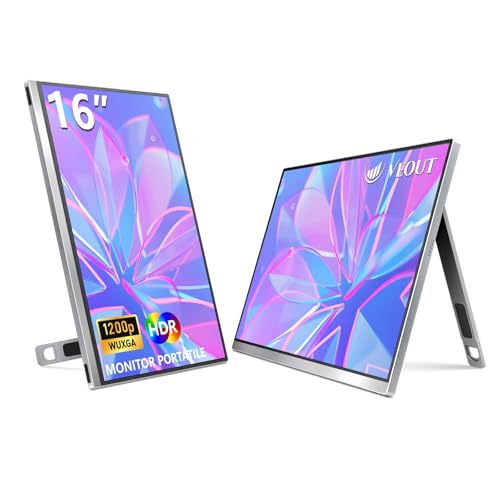
Overview: Veout’s 16-inch travel monitor emphasizes a 16:10 aspect ratio, delivering 1920×1200 resolution with a 1200:1 contrast ratio and 100% sRGB. It includes HDR support, eye-care features, and a lightweight aluminum build with a fold-out stand that supports portrait or landscape modes. The 178-degree viewing angle ensures consistent color from various positions, making it suitable for collaborative work, coding, or design reviews on the go. It’s a practical choice for MacBook users who want a larger portable screen without sacrificing portability.
cocopar Portable Monitor 15.6″

Overview: This 15.6-inch FHD USB-C portable monitor is designed for laptops, including MacBooks, with two USB-C ports and a mini HDMI input. It supports extend and mirror modes and claims easy plug-and-play setup, with power pass-through via a single USB-C cable. VESA mounting holes provide flexibility for desk setups, allowing landscape or vertical mounting. The screen features 178-degree viewing angles and a color gamut aimed at delivering vibrant visuals, making it a practical option for meetings, remote work, or presentations where extra screen space is needed.
BenQ MA270UP 27” 4K Monitor

Overview: BenQ’s 27-inch 4K monitor is calibrated to pair with Mac environments, featuring a P3 color gamut and a dedicated Mac color match workflow. It supports USB-C connectivity with 90W Power Delivery, enabling a single-cable connection for display and charging. The monitor includes a macOS-friendly control approach and integrated media controls, providing a seamless experience for MacBook Pro users who need accurate color and a larger workspace for design, editing, or development. The platform is well-suited for professionals seeking color-accurate output without paying premium for broader features that may not be essential for casual use.
Buying Guide: Key Purchase Considerations
- Device compatibility: Ensure USB-C with DP Alt Mode or Thunderbolt 3/4 is supported by your MacBook Pro for single-cable power and video, or be prepared to use HDMI with a separate power source.
- Form factor and portability: If you travel or work remotely, prioritize lightweight, compact monitors (around 15.6 inches) with a slim profile and easy setup.
- Display quality: Look for IPS panels with 1080p to 4K resolutions, accurate color reproduction, wide viewing angles, and features like HDR and eye-care technologies for long sessions.
- Color accuracy for macOS: Monitors tuned for Mac color or with broad color gamuts (sRGB, Display P3) help maintain color consistency across apps and media.
- Connectivity options: A mix of USB-C, HDMI, and USB-A ports increases versatility for laptops, desktops, phones, and game consoles; PD support simplifies charging.
- Standalone docks vs. portable displays: Docks add port variety and multiple displays at a desk; portable monitors excel for travel and quick collaboration.
- Mounting and stand flexibility: VESA compatibility and adjustable stands allow portrait or landscape orientation and ergonomic setups.
- Budget considerations: Compare total cost of ownership, including cables and adapters, to determine true value; higher resolution and better color quality may justify the price.
- Warranty and support: Choose brands with reliable customer service and longer warranties to protect your investment.
Multiple perspectives clarify trade-offs: portable monitors prioritize travel convenience and simple setups, while docking stations emphasize expandability and desk efficiency. For users requiring color-accurate work with macOS, monitors tuned for Mac color or USB-C 4K output can be a better long-term fit. When choosing among these options, weigh how often you travel, how many external devices you rely on, and whether you value screen real estate over ultimate color precision.