Discover affordable monitor arms that deliver solid ergonomics and easy adjustability. This guide highlights budget-friendly options that fit a range of screens from 13″ to 34″, with VESA mounting compatibility and smooth movement. Use the product summaries below to compare features, build quality, and range of motion, then decide which arm best fits your desk, monitor size, and work style. The goal is to improve posture, reduce neck strain, and reclaim desktop space without overspending.
Summary of chosen products:
| Product | Brand | Monitor Range | VESA | Weight Capacity |
|---|---|---|---|---|
| ErGear Single Monitor Arm (13–34 inches) | ErGear | 13″–34″ | 75x75mm / 100x100mm | Up to 19.8 lbs |
| HUANUO Single Monitor Mount (13”–32”) | HUANUO | 13″–32″ | 75x75mm / 100x100mm | Up to 17.6 lbs |
| ErGear 13–36 Inch Monitor Arm | ErGear | 13″–36″ | 75x75mm / 100x100mm | Up to 22 lbs |
| Suptek Gas Spring Monitor Arm | Suptek | Up to 35″ | 75x75mm / 100x100mm | Up to 24.25 lbs |
| WALI Dual Monitor Stand (17″–32″) | WALI | 2 monitors 17″–32″ | 75x75mm / 100x100mm | Up to 22 lbs per arm |
ErGear Single Monitor Arm 13–34 Inches

ErGear’s single monitor arm supports most 13″–34″ displays up to 19.8 lbs and offers VESA compatibility with 75x75mm and 100x100mm patterns. The arm features a wider VESA head and a tighter mounting panel for improved stability, backed by a 20,000+ cycle endurance test. It provides height adjustment up to 17.5″ and reach up to 18.1″, with tilt, swivel, and rotation to achieve an ergonomic viewing angle and reduce neck strain.
WALI Single Monitor Arm With Gas Spring

The WALI GSMP001N gas spring arm fits 17″–34″ screens with a 26.4 lb weight limit. It includes a clamp and grommet base and accommodates 75x75mm and 100x100mm mounting patterns. Full adjustability includes +180°/-180° swivel, +70°/-45° tilt, and 360° rotation. The gas spring enables up to 19.3″ extension and up to 17.3″ height, offering ergonomic positioning to reduce neck and back strain.
HUANUO Single Monitor Mount 13”–32”

HUANUO’s single monitor arm uses a solid aluminum die-cast build to support up to 17.6 lbs. It fits 13″–32″ monitors with VESA patterns 75x75mm or 100x100mm. The arm offers +/-90° swivel, +/-45° tilt, and 360° rotation, with a maximum height around 16″ to help position screens at eye level and reduce strain during long sessions.
ErGear 13–36 Inch Gas Spring Arm
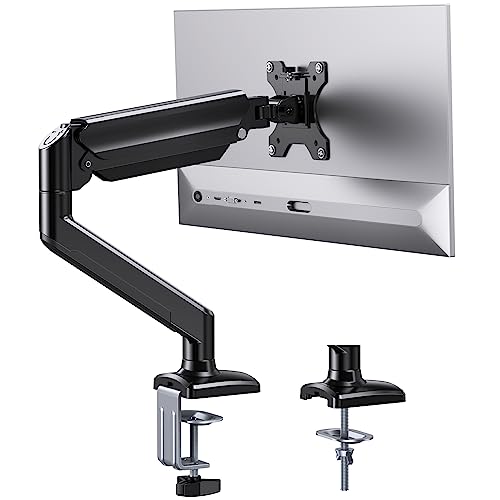
This ErGear model supports larger screens up to 36″ and 22 lbs, using aviation-grade aluminum for strength. Compatible with 75x75mm and 100x100mm patterns, it features a gas-spring system with a broad range of motion: -35° to 90° tilt, 180° swivel, and 360° rotation. It offers up to 17.5″ vertical and 15.3″ horizontal extension, designed to minimize neck strain and maximize desk space.
Suptek Gas Spring Monitor Arm

Suptek’s monitor arm is designed to fit up to 35″ displays with a 24.25 lb capacity and supports 75x75mm or 100x100mm VESA patterns. The upgraded gas spring enables a reach of up to 21.65″ and a maximum height of 18.7″. The arm rotates 360°, tilts ±80°, and swivels ±180°, offering flexible positioning to align with different seating and standing postures for improved posture and productivity.
WALI Dual Monitor Stand 17″–32″

WALI’s dual monitor stand supports two screens from 17″ to 32″ with a single- or dual-arm setup. Each arm handles up to 22 lbs, uses 75x75mm or 100x100mm mounting holes, and provides a wide range of motion: +90°/-90° swivel, +70°/-45° tilt, and 360° rotation. The design allows a maximum reach of about 19.3″ and a height adjustment up to 17.3″, enabling ergonomic multi-monitor workflows with clean cable management.
Buying Guide: Key Purchase Considerations
What to consider when choosing a budget monitor arm:
- Monitor size and weight: Ensure the arm supports your screen’s weight and VESA pattern. Many models list compatibility up to 17–22 lbs and support 75x75mm or 100x100mm.
- Motion range: Look for tilt, swivel, and rotation features to align the monitor to eye level and reduce neck strain. Gas-spring arms typically offer smoother, easier adjustments.
- Mounting options: Clamps and grommets affect desk compatibility. If desk holes or an integrated base are limited, a clamp base is often simpler, while a grommet base requires a hole in the desk.
- Build quality: Aluminum and steel frames provide better durability and stability, especially for larger or heavier monitors.
- Desk space and cable management: Some arms include integrated cable routing to maintain a tidy workspace and protect cables from snagging.
- Potential for dual monitors: If you plan to run two screens, a dual-arm setup may be more cost-effective and space-efficient than two separate arms.
- Installation effort: Tool-free or minimal assembly arms save time and reduce complexity for quick setups.
- Ergonomic alignment: Choose an arm with adequate height and reach to position the top of the monitor at or slightly below eye level to minimize neck strain.
In summary, affordable monitor arms from brands like ErGear, HUANUO, Suptek, and WALI deliver essential adjustability and sturdy builds without a premium price. When selecting, prioritize VESA compatibility, weight support, and a comfortable range of motion to match your desk and workflow needs.