Answering the search for an affordable HDMI switch, this guide highlights cost-effective options that simplify switching between multiple devices on a single display. Ideal for gamers, movie lovers, and home theater setups, these picks balance price with reliable performance. Each product is evaluated for who it’s best for, plus a clear limitation to help you decide quickly.
Summary table of selected products:
| Product | Brand | Best For | Why Selected |
|---|---|---|---|
| HDMI Switch 4k@60hz Splitter, GANA Aluminum Bidirectional HDMI Switcher 2 in 1 Out | GANA | Budget gamers and casual streaming | Balanced price, aluminum build, easy LED indicators |
| vilcome HDMI Switch 4K@60Hz, Bidirectional | vilcome | Compact setups | Slim profile, plug-and-play |
| Anker HDMI Switch, 4K@60Hz 2 in 1 Out | Anker | Reliable performance | Widely compatible, simple operation |
| HDMI Switch 2 in 1 Out 4K@60Hz, Warrky | Warrky | Low-profile setups | Fixed 3.3ft cable included |
| BD&M HDMI Switch 4k@60hz Bidirectional | BD&M | No-fuss, no-power options | No external power needed, clear LED indicators |
GANA Bidirectional 4K HDMI Switcher

The GANA HDMI Switch is a 3-port, bidirectional device that supports 2 in/1 out or 1 in/2 out configurations. It includes two LED indicators to show the active port and supports 4K at 60Hz with backward compatibility to 2K/1080p. Best for budget gamers who want a simple, solid, aluminum-case switch without extra software. Note: only one display will work at a time when using the 2-in-1-out mode.
Who it’s best for: casual gamers and home theater users seeking a compact, affordable switch with a sturdy build and straightforward operation.
Limitations: requires standard HDMI 2.0 cables; performance may vary if cables exceed recommended lengths for true 4K reliability.
vilcome 4K Bidirectional HDMI Switcher
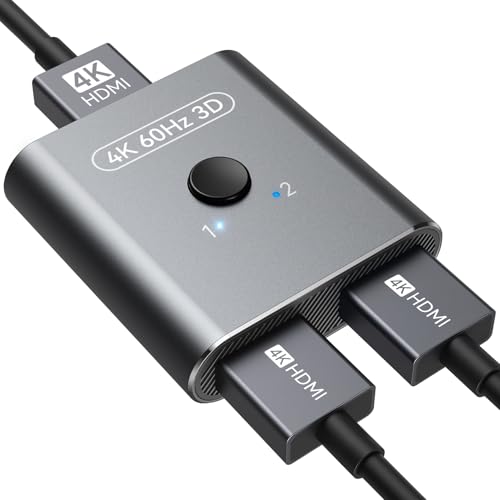
Vilcome’s bidirectional switch offers three HDMI ports for 2-in-to-1-out or 1-in-to-2-out setups. It supports 4K@60Hz and is backward compatible with 2K/1080p, making it suitable for gaming consoles, streaming boxes, and PCs. Best for ultra-slim setups that still require robust 4K support and a simple plug-and-play experience.
Who it’s best for: users who value a slim, no-fuss device with a clean look and easy switching between two sources or displays.
Limitation: does not display dual monitors simultaneously; you’ll see only one active output at a time.
Anker 4K HDMI Switcher, 2 In 1 Out

Anker’s HDMI switch offers 4K@60Hz with HDR support and 3D capability. It uses a single-button control for quick source switching across laptops, game consoles, or media players. It’s well-suited for users who prioritize reliability and broad compatibility, including compatibility with laptops and projectors.
Who it’s best for: home theater setups and gaming rigs that need easy operation with solid 4K support.
Limitation: HDMI CEC is not supported, so automatic device control features won’t be available.
SVWSUN 3 in 1 Out 4K HDMI Switch

The SVWSUN 3-in-1-out switch provides convenient remote control for seamless transitions among three HDMI sources, with 4K@30Hz and 10.2Gbps transmission. It supports backward compatibility with older HDMI standards and uses LED indicators for source visibility. Best for users who want a simple, remote-controlled switch with broad compatibility.
Who it’s best for: individuals seeking a straightforward, remote-accessible switch for multiple devices in a compact setup.
Limitation: 4K is specified at 30Hz for the 3-in-1-out configuration, which may be a consideration for fast-action gaming.
BD&M Bidirectional 4K HDMI Switch

The BD&M bidirectional switch provides three HDMI ports with LED indicators showing the active input/output. It operates without external power and emphasizes fast data transmission (3.4Gbps) to maintain high-definition visuals. This is a practical pick for minimal cable clutter and straightforward switching in small spaces.
Who it’s best for: users who prefer a power-free device that’s easy to install and use with a clear status indication.
Limitation: does not support dual monitors simultaneously; operation is limited to one active display at a time.
Buying Guide: Key Considerations For Choosing A Cheap HDMI Switch
- Number of inputs and outputs: Decide between 2×1 versus 3×1 or 2×2 configurations based on how many devices you need to switch.
- Resolution and refresh rate: If you want 4K at 60Hz, confirm that both source and display support HDMI 2.0 or higher and that the switch advertises 4K@60Hz.
- Power requirements: Some switches operate without external power, while others may require a USB power source for stable performance at higher resolutions.
- Remote vs. button control: Remote control offers convenience, especially for wall-mounted TVs or AV racks; basic button control is fine for desks or small setups.
- EDID and HDCP compatibility: Ensure compatibility with your devices’ HDCP version and EDID handling to avoid handshake issues.
- Build quality and heat: Aluminum housings tend to dissipate heat better and feel sturdier than plastic-only designs.
- Cable management: Some models include a fixed HDMI cable; others require you to supply your own cables. Shorter, high-quality cables can minimize signal loss.
Frequently Asked Questions
- Do HDMI switches affect picture quality?
Answer: A good HDMI switch should preserve original signal quality without introducing extra processing or compression. Look for switches that support 4K@60Hz and HDCP 2.2 for best results. - Is it necessary to power an HDMI switch?
Answer: Not always. Some models are plug-and-play and power-free, while others may benefit from USB power for stable performance at higher resolutions. - Can I use an HDMI switch with a gaming console and a PC at the same time?
Answer: Yes, if the switch supports multiple inputs and a single output. However, ensure it clearly states two inputs and one output in its specs. - Will an HDMI switch support HDR and 3D content?
Answer: Many budget switches support HDR and 3D, but verify that the model specifies HDR (including HDR10) and 3D compatibility in its features. - Why might one HDMI port not display?
Answer: Common causes include incompatible cables, incorrect input selection, or a need for a shorter HDMI run to maintain signal integrity at 4K. - What’s the difference between bidirectional and 2-in-1-out?
Answer: Bidirectional typically means the switch can alternate between two sources to one display or one source to two displays, but only one path is active at a time.