Whether you’re expanding phone storage, backing up photos, or transferring large files between devices, a USB-C and USB-A versatile drive makes life easier. This guide highlights five top options suited for busy students, remote workers, photographers, and casual users who want reliable, portable storage. Each pick is evaluated on compatibility, speed, and practicality, with clear notes on who benefits most and any important caveats.
Below is a quick comparison of the selected products to help you decide at a glance. All entries link to their respective Amazon product pages for full details.
| Product | Capacity | Key Benefit | Best For |
|---|---|---|---|
| Lexar JumpDrive D40E Dual | 128GB | USB-C and USB-A in one slim, swiveling design | Android and laptop users needing USB-C plus USB-A compatibility |
| Vansuny 128GB 2-in-1 | 128GB | USB 3.0 with Type-C OTG, includes keychain convenience | On-the-go Android users, quick transfers |
| Samsung MUF-256DA | 256GB | Fast USB 3.2 Gen 1 performance with sleek, modern design | Users needing fast large-file transfers on USB-C devices |
| SUDEHO MFi 256GB | 256GB | 3-in-1 design with iPhone compatibility and app-based backup | iPhone/iPad users needing Apple-ecosystem backup |
| GNASEET 256GB USB Drive | 256GB | One-click backup and encrypted file protection | Phone-first users seeking easy backup with security |
Lexar JumpDrive Dual D40E 128GB

Best for: Users who need both USB-C and USB-A compatibility in one compact unit. The 2-in-1 USB-C and USB-A design makes it versatile for smartphones, tablets, laptops, and Macs. The 360° swivel housing eliminates cap loss and keeps connectors protected between devices. Speed is up to 100MB/s in typical use, supporting quick transfers for documents, photos, and small to moderate video files. A potential limitation is that actual speeds vary by host device and usage conditions, so expect lower transfers on older hardware.
Vansuny 128GB 2-in-1 USB Flash Drive

Best for: Android and mixed-device households looking for a 2-in-1 USB-C/USB 3.0 experience. It’s designed for plug-and-play use with devices that support USB-C OTG, and it’s backward compatible with USB 2.0. Note that the default format is exFAT, which helps broad device compatibility but may require reformatting for specific apps or devices. The speed is strong for general file transfers, though extremely large video editing on mobile may benefit from larger, dedicated SSD options.
Samsung Type-C 256GB USB Drive

Best for: Users who demand fast performance and a premium build. Samsung’s NAND-based drive delivers up to 400MB/s read speeds with USB 3.2 Gen 1, enabling rapid transfers of large files. The reversible USB-C plug ensures easy connection and modern aesthetics. A caveat is that performance depends on device compatibility and cable quality; not all devices reach peak speeds, especially older USB ports.
SUDEHO MFi Certified 256GB Flash Drive
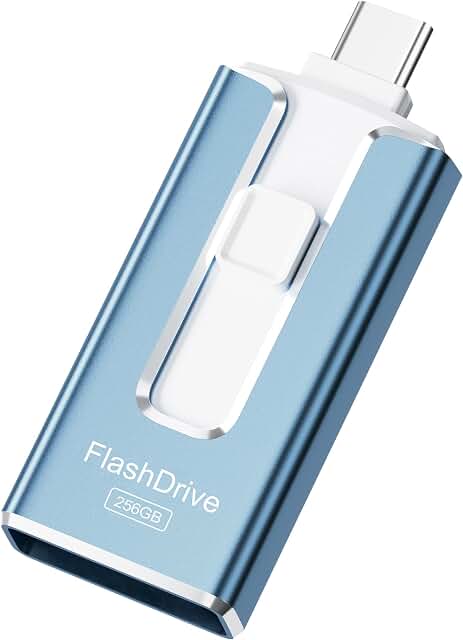
Best for: iPhone and iPad users needing cross-device backups with a 3-in-1 connector setup (Lightning, USB-C, USB). It offers MFi certification and an app-based backup workflow, making it ideal for Apple-centric workflows. The caveat is that iOS-centric apps may be required for full backup functionality, and some features might be limited by iOS permission controls.
GNASEET 256GB USB Drive For Phone

Best for: Phone-first users seeking a straightforward backup solution with encryption. The product highlights include a one-click backup and an app-based password protection feature for secure storage. A potential limitation is that encryption and app features depend on the provider’s ecosystem and app stability, which may vary by device and OS version.
Buying Guide
Choosing the right USB-C/Type-C flash drive involves balancing capacity, speed, and cross-device compatibility. Consider the following questions to guide your decision:
- What devices will you use most often with the drive? If you switch between Android, iPhone, tablets, and laptops, a 2-in-1 USB-C/USB-A drive offers the most flexibility.
- How important are transfer speeds? For large video files or daily backups, prioritize USB 3.2 Gen 1 or Gen 2 speeds and larger capacities.
- Do you need on-device encryption or app-assisted backups? If privacy is a priority, look for password protection or MFi-certified backup features.
- Is design and portability a factor? A compact, swiveling or keychain drive can reduce the risk of losing the cap or misplacing the drive.
- Will you use the drive with iOS devices? An MFi-certified option or a USB-C with robust iOS app support can improve compatibility.
Common Scenarios And Recommendations
- Best overall versatility: Lexar JumpDrive Dual D40E for mixed USB-C and USB-A environments.
- Best for on-the-go Android users: Vansuny 2-in-1 with OTG support and keychain usability.
- Best for fast large-file transfers on USB-C devices: Samsung MUF-256DA with 400MB/s read speed.
- Best for Apple devices and backups: SUDEHO MFi Certified 256GB with 3-in-1 connectors.
- Best for built-in security: GNASEET 256GB with one-click backup and encryption options.
Frequently Asked Questions
- Do these drives require software to work?
- Can I use USB-C drives with older laptops?
- Are these drives water or shock resistant?
- Is exFAT the default format on these drives?
- Can I use these drives for iPhone backups without a computer?
- Do these drives support 4K or HD video editing on mobile?
Most listed drives are plug-and-play, but some may offer companion apps for backup, encryption, or iOS backup features.
Yes, if the device has a USB-A or USB-C port and supports USB storage, though speeds may vary on older ports.
Physical durability varies by model; refer to product specs for housing and build details.
Some drives may format as exFAT by default for cross-device compatibility; others may require manual formatting for specific devices.
Several options support direct iPhone backup via companion apps; check the product’s iOS app capabilities and compatibility.
Most consumer drives are best for file transfer and storage; performance for on-device editing depends on the device and app used.