If you’re seeking reliable backup for your smartphone data, these top-rated USB flash drives and memory sticks deliver fast transfers, broad compatibility, and simple automatic backups. This guide helps you pick the right option whether you want a compact flash drive for quick file swaps or a larger-capacity solution for ongoing backups. The top picks include models for Android and iPhone users, as well as blazing-fast drives for heavy file users. The buyer intent table below highlights key details at a glance.
| Product | Best For | Capacity | Connectors |
|---|---|---|---|
| Samsung Type-C USB Flash Drive 256GB | Android and Type-C devices | 256GB | USB-C |
| ThePhotoStick Omni 128GB | Automatic photo/video backup across devices | 128GB | USB |
| SanDisk 128GB Phone Drive | Android mobile storage expansion | 128GB | USB-C, USB-A |
| Vackiit 512GB MFi-Certified | iPhone/iPad and cross-device backup | 512GB | USB-C, USB-A |
| MOVE SPEED 1TB SSD Drive | High-capacity, high-speed backups | 1TB | USB-C, USB-A |
The following sections dive into each option, highlighting who it’s best for, why it stands out, and any notable limits to consider.
Samsung Type-C USB Flash Drive 256GB

The Samsung USB Type-C drive is designed for quick mobile storage with a compact form factor. It uses Samsung NAND flash for reliable performance and fits easily in a pocket. Best for: Android users and anyone who values a reversible USB-C plug for easy device connection. Why selected: fast transfer speeds with USB 3.2 Gen 1 up to 400MB/s read, capable of moving a 4GB file in about 11 seconds. Limitation: only 256GB capacity, which may be restrictive for large video libraries.
ThePhotoStick Omni 128GB

ThePhotoStick Omni provides automatic backup for photos, videos, and other files across multiple devices. Best for: users who want a hands-off backup experience and centralized storage for a large photo library. Why selected: it automates content backup and supports cross-device usage, with a generous 128GB capacity for everyday media. Limitation: reliance on the included software for some backup features; setup may be required for full automation.
SanDisk 128GB Phone Drive

SanDisk Phone Drive offers dual connectors for Android and computer use, expanding storage with a simple plug-and-play approach. Best for: users who need cross-platform transfer between Android devices and PCs/Macs. Why selected: USB 3.2 Gen 1 support with up to 100MB/s read speeds for quick file transfers and a practical automatic backup option via the Memory Zone app. Limitation: automatic backup features require the app and may vary by device and OS version.
Vackiit MFi Certified 512GB

The Vackiit 4-in-1 USB flash drive is designed for broad compatibility with iPhone, iPad, Android devices, and computers. Best for: iPhone-centric users who want encryption-supported backups on iOS and easy cross-device transfer. Why selected: 4-in-1 design expands flexibility for mixed ecosystems. Limitation: encryption is supported primarily on iOS with dedicated apps; Android and other devices may not support encryption in the same way.
MOVE SPEED 1TB SSD Drive
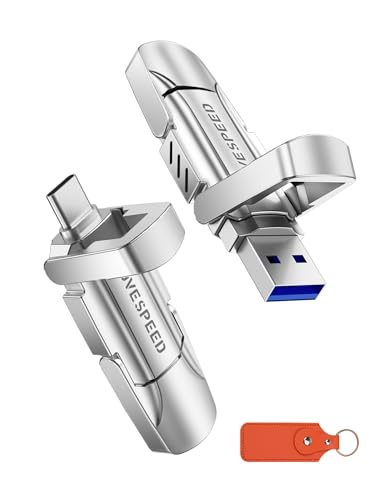
The MOVE SPEED drive combines very high transfer rates with large capacity and dual interfaces. Best for: power users who need fast backups and substantial storage for multimedia libraries. Why selected: up to 570MB/s read and 520MB/s write, with USB-C and USB-A compatibility to streamline use across devices. Limitation: larger size and higher capacity may be overkill for casual backup needs; ensure device compatibility for USB-C or USB-A ports.
Buying Guide: How To Choose The Best Cell Phone Backup
What storage size do you truly need? For light usage, 128GB-256GB options cover everyday photos, documents, and apps. For extensive media libraries or 4K video backups, 512GB or 1TB drives help avoid frequent overwrites.
What connection type works best with your devices? USB-C is common on newer Android phones and recent Apple devices. USB-A compatibility is still useful for older laptops and desktops. Dual-connector models simplify cross-device transfers.
Is automatic backup important? Some drives offer automatic backup for photos and videos, reducing manual steps. Check whether the app support is stable on your device (iOS, Android, Windows, macOS).
How fast should backing up be? High-speed USB 3.2 Gen 1 or USB 3.2 Gen 2 drives reduce transfer times, especially for large files. If you frequently move large video files, prioritize higher read/write speeds and consider a larger capacity.
What about security? Encryption options vary. Some drives offer hardware or software encryption on specific platforms. If privacy matters, choose models with built-in encryption support compatible with your device ecosystem.
What are the practical limitations to expect? Some features depend on device compatibility and software availability. Automatic backup can require app installation and permissions. Battery-free, cable-free operation depends on direct device support and port availability.
FAQ
- What’s the main difference between USB-C and USB-A drives?
USB-C drives connect to newer devices with Type-C ports and often offer faster transfer speeds, while USB-A drives are compatible with older devices. - Can I use one drive for both Android and iPhone backups?
Many drives support multi-device use, but encryption and backup apps may differ by platform. Check compatibility for your intended devices. - Is automatic backup available for all drives?
Not all drives offer automatic backup. When available, it typically requires an app and device permissions to run automatically. - Do I need encryption on a USB backup drive?
Encryption helps protect personal data, especially on shared devices. Choose a model with built-in or app-based encryption if security matters to you. - How do I estimate capacity needs for backups?
Count current media size and expected growth. For photos and videos, 256GB to 512GB covers most light-to-moderate users; 1TB suits heavy media collectors. - Are these drives hot-swappable?
Most USB flash drives are plug-and-play, but it’s best to safely eject drives before removing them to avoid data loss.