Looking for reliable CD-R discs for data backup, photo storage, or music backups? This guide highlights five solid options that balance capacity, compatibility, and durability. Each pick is best for specific uses—whether you need archival-grade performance, audio-dedicated media, or inkjet printable surfaces for labeling. Use the choices below to match your needs with clear advantages and practical caveats.
Quick lookup table
| Product | Capacity | Speed | |
|---|---|---|---|
| Verbatim CD-R Blank Discs, 100pk | 700 MB | 52x | Data backup and multimedia projects |
| Verbatim Music CD-R, 25pk | 700 MB | 40x | Audio recording and music mixes |
| Verbatim CD-R Blank Discs, 50pk Silver | 700 MB | 52x | General data storage with simple labeling |
| Maxell CD-R 100 Pack | 700 MB | 2x–48x | Versatile storage with clean playback |
| Verbatim CD-R White Inkjet Printable, 100pk | 700 MB | 52x | Fully printed, color-friendly labeling |
Verbatim CD-R Blank Discs, 100 Pack

Best for: data backups and multimedia archiving for general use. These blank CD-R discs offer reliable recording with a high-speed capability. They’re well-suited for users who need to store images, videos, and music with straightforward playback later on standard CD players and drives.
Why selected: The 100-pack spindle provides ample quantity for ongoing projects, and the discs are designed for fast recording with 52x drives. This makes batch backups efficient and convenient for households or small offices.
Limitations to note: These discs are blank and non-rewritable; plan carefully before recording since content cannot be erased or re-edited after finalization.
Verbatim Music CD-R, 25 Count

Best for: audio recording projects where playback compatibility in CD players is essential. These discs are optimized for audio recorders and PC-based CD recorders, with clean digital sound and broad compatibility after finalization.
Why selected: Designed for music and audio projects, they ensure reliable, clean playback across a wide range of devices once finalized, making them a solid pick for DJs, hobbyists, or home studios.
Limitations to note: The 25-pack is smaller; for larger music archives you may want a larger pack to reduce reordering frequency.
Verbatim CD-R Blank Discs, 50 Pack Silver

Best for: general data storage with a simple, economical option. The silver surface version balances readability and cost for everyday backups and file transfers.
Why selected: With a 50-pack, it’s a practical mid-range choice for users who want dependable discs without committing to a larger quantity. The 52x speed supports quick backups.
Limitations to note: While versatile, this option isn’t specifically inkjet printable, which may limit labeling aesthetics compared to printable surfaces.
Maxell CD-R 100 Pack
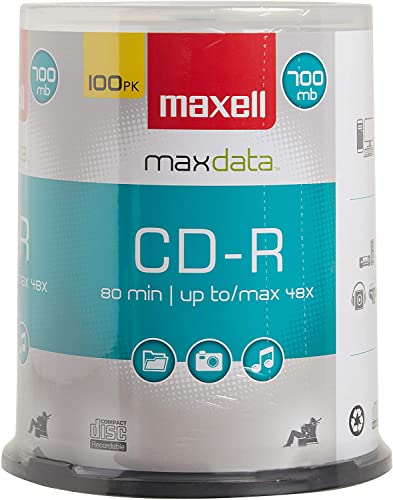
Best for: versatile storage and archival projects that require broad compatibility with multiple players and recorders. These discs are suitable for a range of media types, including data and music.
Why selected: Maxell’s discs are noted for clean surfaces and reliable playback, which helps ensure that stored content remains accessible over time.
Limitations to note: The write speed range (2x to 48x) means slower archival batches if you’re recording many discs at lower speeds; plan accordingly to optimize workflow.
Verbatim CD-R White Inkjet Printable, 100pk

Best for: users who want fully printable discs for color labeling and presentation-ready backups. The white inkjet surface supports high-resolution printing up to 5,760 DPI on compatible printers.
Why selected: This option combines archival-grade reliability with professional labeling capabilities, making it ideal for photo albums, media archives, and branded backups.
Limitations to note: Inkjet-printable surfaces require compatible printers and proper labeling practices to prevent misalignment or smudging during printing.
Buying Guide
Choosing the right CD-R discs depends on your primary use case, device compatibility, and labeling needs. Consider the following factors to tailor your selection.
- : Most consumer CD-Rs store 700 MB or 80 minutes. Choose capacity based on the size of your files, photos, or audio collections.
- Write speed: Higher speeds shorten recording time but may impact compatibility with older players. If you use legacy devices, prioritize discs with broad compatibility and verified write speeds around 40–52x or lower.
- Printable surfaces: Inkjet-printable discs are ideal for organized labeling and presentations. White printable surfaces offer the most versatility for color printing.
- Audibility and playback: For music or audio projects, a disc with clean surface quality reduces playback artifacts. Look for low-noise surfaces for reliable sound reproduction.
- Packaging and quantity: Larger packs reduce reordering but require more upfront storage. Spindle and slim cases affect portability and protection during handling.
- Durability and archival life: Some Verbatim discs advertise archival life concepts; verify that your storage needs align with their labeling and labeling longevity claims for long-term preservation.
- Compatibility: Ensure discs work across your CD players, drives, and any hardware intended for reading or playback. Some discs are optimized for audio recorders; others are multipurpose data discs.
FAQ
- What is the difference between CD-R and CD-RW? CD-R discs record once and are not erasable, while CD-RW discs can be erased and re-recorded multiple times. For long-term archiving, CD-R is typically preferred.
- Are printable CD-Rs compatible with all printers? Printable discs are designed for inkjet printing and require an inkjet-compatible printer. Laser printers generally do not work with inkjet-specific surfaces.
- Can I store audio on data discs? Yes, you can store music or audio files on CD-R data discs, but they won’t be playable as audio unless burned in an audio CD format on disc-authoring software.
- How long do CD-R discs last? Archival longevity varies by brand and storage conditions. Proper storage in a cool, dry place away from direct sunlight helps preserve data integrity over time.
- Is 52x faster always better? Faster write speeds can speed up backups, but older players and drives may have compatibility issues with very high-speed discs. If you use older devices, prioritize compatibility over peak speed.
- Do inkjet printable discs require special cleaning? Light cleaning with a soft, lint-free cloth helps maintain print quality. Avoid harsh chemicals on printable surfaces to prevent smudging or adhesion issues.