Looking to capture streaming video with minimal latency and clear detail? This guide highlights five reliable capture cards ideal for gamers, creators, and educators. Each option is ranked for different setups—whether you’re streaming from a console, PC, or camera, and whether you value plug-and-play simplicity, 4K capabilities, or ultra-low latency. The table below helps compare key options at a glance.
| Product | Resolution & Frame Rate | Interface | Best For | Notes |
|---|---|---|---|---|
| Rybozen Capture Card Nintendo Switch | 1080p60; input up to 4K30/60 | USB 3.0 | Casual streamers, console players | Plug-and-play; easy for beginners |
| Dcyfol 4K HDMI Capture Card | 1080p60; 4K input | USB 3.0 | Multiplatform streams | Loop-out support |
| Guermok 4K USB-C Capture Card | 1080p60; 4K input | USB 3.0/Type-C | Travelers, on-the-go streaming | Ultra-low latency; portable |
| Elgato 4K S External Capture Card | 4K60; 1440p120; 1080p240 | USB-C | Professional-grade content | HDR10; VRR |
| XIIXMASK Video Capture Card | 1080p60; 2K30; 4K60 loop-out | USB 3.0 | Multi-device setups | Mic-in for commentary |
Rybozen Capture Card Nintendo Switch

Features: 1080P high-quality capture; supports 4K30/60Hz input and 1080p120/144Hz output; plug-and-play with automatic input/output adjustment. Compatible with Windows and Mac OS using USB 3.0, enabling easy streaming to Twitch, YouTube, OBS, and more. Best for: console players and hobby streamers who want reliable 1080p output with simple setup. Caution: 4K input is limited to 4K30/60Hz, with output up to 2K30Hz. Not ideal for 4K120Hz native capture.
Dcyfol 4K HDMI Capture Card

Features: 4K HDMI capture with 1080p60 output; USB 3.0 plug-and-play; supports OBS Studio, Streamlabs, and XSplit. Best for: gamers and creators who want crisp 1080p60 streaming with reliable passthrough for real-time play. Caution: 4K capture supports 4K30/60 Hz input, and some users may need to adjust settings for optimal latency in live streams.
Guermok 4K USB-C Capture Card

Features: 1080P60 capture over USB 3.0/Type-C; input up to 4K@30Hz; aluminum housing aids heat dissipation; supports real-time recording and streaming with minimal latency. Best for: on-the-go creators who need a portable capture solution that works with iPad, Mac OS, Windows, and OBS. Caution: Not designed for direct monitor output; requires capture software to display on screen.
Elgato 4K S External Capture Card

Features: 4K60 capture with HDR10; supports 1440p120 and 1080p240; USB-C interface with near-zero latency; HDR tone mapping on Windows. Best for: creators needing cinematic quality and high frame-rate captures, with HDR for modern consoles and PC games. Caution: Higher-end features may require compatible software and GPU support.
XIIXMASK Video Capture Card

Features: 4K loop-out with 2K30 capture; supports 1080P60 and 2K30; mic-in for commentary; aluminum body for heat dissipation; USB 3.0 connection. Best for: multi-device setups that require loop-out and on-stream commentary. Caution: Not designed for party chat recording; external mic is for voice and not system audio alone.
Avedio Links 4K HDMI Capture Card
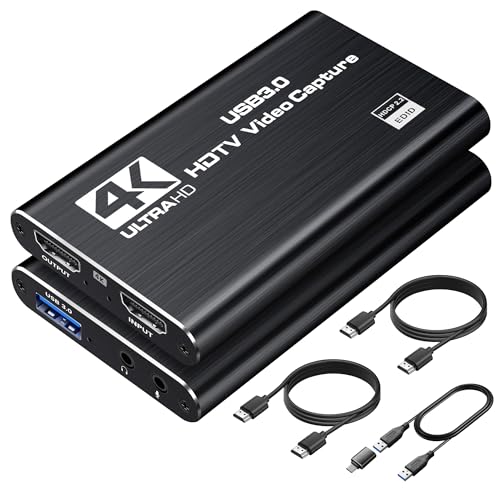
Features: 4K@60Hz input; 2K@30Hz or 1080P@60Hz capture; 4K HDMI loop-out with no-lag monitoring; plug-and-play with USB 3.0, aiming at low latency streaming. Best for: content creators who want to monitor a second display while recording or streaming. Caution: Loop-out is limited to 4K60 input; performance depends on host computer and USB bandwidth.
Audio Express AXHDCAP 4K HDMI Card

Features: 4K input with 1080P output; real-time preview with ultra-low latency; broad OS compatibility; supports streaming to platforms like OBS, Zoom, and VLC. Best for: teachers and business presenters who need reliable screen capture and real-time broadcast. Caution: 4K input may require compatible cables and software settings for optimal 30Hz output.
Generic 4K Capture Card 1080P 60FPS

Features: Full HD capture with 1080p60; supports up to 4K30 input; microphone and audio handling via 3.5mm connections; USB 3.0 for faster transfer. Best for: budget-conscious streamers needing basic capture with audio commentary. Caution: Maximum output is 1080P60; may not satisfy users requiring higher-end 4K60 capture or HDR.
Buying Guide: How to Choose the Right Capture Card
What should you consider before buying a capture card? Compatibility, performance, and your streaming goals all matter. Below are practical questions and answers to guide your decision.
- What resolution and frame rate do you need? If you primarily stream at 1080p60, look for cards that advertise 1080p60 capture with reliable passthrough. If you want 4K input, ensure the device supports 4K at an acceptable frame rate and Has a 4K loop-out option if you plan to monitor on another display.
- Which interface works best for you? USB 3.0 is common and offers broad compatibility. USB-C devices may provide lower latency and easier compatibility with modern laptops and desktops.
- Do you need loop-out or pass-through? Loop-out lets you monitor a separate display while capturing, which is valuable for live streaming and recording. Some cards offer 4K loop-out; others are limited to 2K or 1080p.
- Is portability a factor? If you travel or stream on the go, a small, aluminum-bodied capture card with low power needs is beneficial.
- Do you require a built-in microphone input? Some models include a 3.5 mm mic-in, which is helpful for live commentary without an external mixer.
- What software will you use? Most capture devices pair with OBS Studio, Streamlabs, and XSplit. Confirm compatibility if you rely on specific editing or streaming tools.
FAQ
- What is latency on a capture card? Answer: Latency depends on the device and the PC, but many devices advertise ultra-low latency when properly configured with compatible software.
- Can I use a capture card with a Mac? Answer: Yes, many capture cards support Windows and macOS. Check the product’s compatibility list and required software.
- Do I need drivers? Answer: Most modern capture cards are plug-and-play and require no external drivers, though some may need software for optimal settings.
- Is 4K hardware necessary for streaming? Answer: Not necessarily. If your streaming target is 1080p60, a 1080p-capable capture card often suffices and can reduce CPU load.
- Will a capture card improve video quality? Answer: It can, especially if your current setup bypasses internal capture limitations. Quality improvements depend on input sources and encoding settings.
- What’s the difference between USB 3.0 and USB-C capture cards? Answer: USB-C can offer lower latency and better power efficiency on modern systems, but both can provide reliable performance if the host system supports them.