Answering the question most PC owners have: which air duster is best for cleaning keyboards, fans, and internals without hazards or waste? This guide highlights five highly relevant products—ranging from reusable electric dusters to traditional cans—so you can choose the right option for your setup. It’s best for: a quick, mess-free cleanup (canned air), a sustainable daily routine (rechargeable air duster), or heavy-duty dust removal in keyboards and desktops. Below, compare best-fit uses, plus a compact buying table you can reference quickly.
| Product | Best For | Key Benefit |
|---|---|---|
| WOLFBOX MegaFlow 50 | People seeking powerful, rechargeable cleaning | 110,000 RPM with 3 speeds |
| Falcon Dust-Off (3 count) | Occasional, low-waste cleaning | Disposable cans with bitterant |
| Innovera IVR10012 | Budget, two-pack option | 2 cans per pack, ozone-safe |
| Seauto 250,000 RPM Duster | Heavy-duty, multi-use | High speed with 3 speeds |
| Dust-Off Large Disposable | Heavy workstation cleaning | Large can value |
WOLFBOX MegaFlow 50 Compressed Air Duster

The WOLFBOX MegaFlow 50 is an electric air duster designed for fast, adjustable cleaning. It reaches up to 110,000 RPM and offers three speed settings to tackle delicate keyboard dust or stubborn debris inside desktops and fans. This option is best for users who want a reusable, battery-powered tool with rapid charge and portability. A potential limitation is the battery cycle life compared with non-reusable cans, depending on usage frequency.
Falcon Compressed Gas Duster (3 Count)

Dust-Off Falcon Cans provide potent dust removal with a disposable format. Sold as a three-pack of 10-ounce cans, these are convenient for occasional cleanups where a quick burst is needed without recharging. They include a bitterant to discourage misuse. Best for: quick, disposable cleanups on keyboards, inside PC cases, and electronics. Caution: avoid direct aiming at skin or eyes; use in a well-ventilated area.
Innovera IVR10012 10 oz. Duster (2 Pack)
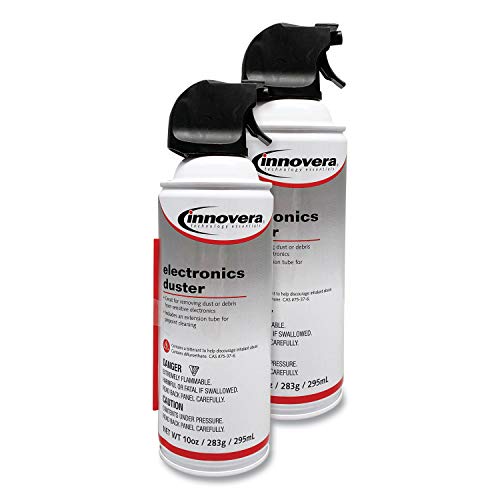
Innovera offers a budget-friendly two-pack of 10-ounce cans, a straightforward choice for occasional needs. The cans are ozone-safe and suitable for safely cleaning most equipment. Choose this if you prefer familiar, traditional canned air without extra frills. Limitation: single-use cans may generate more waste over time than rechargeable models.
Seauto 250,000 RPM Air Duster

Seauto’s duster touts a brushless motor delivering over 80+ m/s airflow at 250,000 RPM with three speeds. It’s designed for tougher tasks like cleaning keyboards, PC vents, and even air conditioner filters. It suits users who want a rechargeable, high-speed alternative to disposable cans. Caution: the device’s high speed can produce strong gusts; use with a steady, controlled hand to avoid damage to delicate components.
Dust-Off FALDE10521 Compressed Gas Duster

Falde10521 Dust-Off offers a larger-size disposable can for extended sessions. It’s a value-focused choice for workstations, labs, and on-location cleaning. Best for: bulk cleaning in spaces with dense dust, like repair benches or photography setups. Limitation: heavier usage implies more frequent can purchases and more waste compared to rechargeable options.
Staples Compressed Air Duster – 10 oz

Staples’ 10-ounce can is a reliable, no-nonsense option for electronics cleaning. It offers a precise nozzle for targeted airflow and is versatile for keyboards, printers, cameras, and other office devices. Best for: quick, controlled cleanup in a home or office environment. Caution: avoid prolonged direct application to one spot to prevent moisture buildup on sensitive components.
Meudeen Electric Air Duster

Meudeen provides a 5.74-ounce air duster with two gears and multiple attachments for broader cleaning tasks. It’s best for users seeking versatile tools with brushes and filters to tackle electronics, cameras, and even household items. Caution: check attachment compatibility with your device before use, as some ports may require specific adapters.
Ultra Duster 10 oz. (UDS-10P6)

Ultra Duster’s six-pack option offers bulk value for environments with ongoing cleaning needs. The can is ozone safe and moisture-free, suitable for most equipment. Best for: workspaces with frequent cleaning cycles and a need to stock up for long periods. Limitation: bulk cans are less portable for on-the-go cleaning than smaller cans or rechargeable devices.
Buying Guide
Key considerations when selecting a canned air or alternative duster for a PC include reliability, waste, and user safety. Here are practical questions to guide the choice.
- What is my cleaning frequency and location? If you clean a lot in a shared space, a rechargeable duster reduces waste and ongoing cost.
- Is environmental impact a priority? Rechargeable and reusable dusters minimize disposable cans; if you prefer disposables, choose cans with safe propellants and bitterants to discourage misuse.
- Do I need portability or power? Compact, lightweight devices are easier to maneuver around a PC case, while high-speed gear is better for stubborn dust.
- How important is the nozzle design? Targeted nozzles reach tight spaces, vents, and fans more effectively; adjustable nozzles expand versatility.
- Are there safety concerns? Avoid direct contact with sensitive components and ensure proper ventilation when using canisters or high-speed devices.
Comparison snapshot: For daily maintenance, an ergonomic, rechargeable option like WOLFBOX MegaFlow 50 is better for repeat use. For occasional large tasks in a workshop, large disposable cans or a bulk option from Ultra Duster offer value. If budget is the controlling factor, Innovera two-pack provides a straightforward entry. Always follow product-specific safety guidelines and use a controlled, short bursts technique to minimize moisture and potential static buildup.
Frequently Asked Questions
- Can I clean a PC with canned air? Yes, use short bursts and keep the can upright to avoid liquid propellant.
- Is a rechargeable air duster better than canned air? Rechargeable dusters reduce waste and can be more cost-effective over time, especially with frequent cleaning.
- How do I avoid moisture when using compressed air? Hold the can upright, keep the nozzle away from components, and pause to check for condensation.
- What should I use for tight spaces like keyboard gaps? A nozzle attachment with a narrow spray is ideal for precision cleaning.
- Are all propellants safe for electronics? Most are ozone-safe; always read the product’s safety notes and use in a well-ventilated area.
- How often should I replace disposable cans? Replace when empty; consider switching to a rechargeable option for daily use to reduce waste.