Answering the search for reliable, high-speed, multifunction laser printers for business use, this guide highlights five HP models ideal for small teams. Each option offers printing, scanning, copying, and often fax capabilities, with features like auto duplexing and fast color or monochrome speeds. This overview helps buyers choose by best-for scenarios, such as color document workflows, high-volume black-and-white tasks, or security-focused deployments. The table below summarizes key strengths to compare at a glance.
| Product | Best For | Notable Feature |
|---|---|---|
| HP Color LaserJet Pro MFP 3301sdw | Color-centric office teams | TerraJet toner with vivid color |
| HP LaserJet Pro MFP 4101fdw | Fast monochrome workloads | Up to 42 ppm, auto 2-sided plus ADF |
| HP LaserJet Pro MFP 3101fdw | Compact small teams | 35 ppm, auto duplex, 250‑sheet tray |
| HP Color LaserJet Pro MFP 4301fdw | Color-heavy office tasks | Color printing up to 35 ppm with auto DT |
| HP Color LaserJet Pro MFP 3301fdw | Versatile color and features | 2-sided scanning, multi-function |
Notes: All models listed are designed for small teams or office environments and emphasize network connectivity, duplex options, and document-handling capabilities. When evaluating, consider color vs. monochrome needs, document volume, security features, and whether you need fax or advanced workflow automation.
HP Color LaserJet Pro MFP 3301sdw Wireless All-in-One

Best for color-focused office workflows that require reliable color output alongside scanning, copying, and faxing. This model uses next-generation TerraJet toner for more vivid results and supports standard- and high-yield HP 218A cartridges. It is suitable for small teams that regularly produce color reports, marketing collateral, and client-ready documents. Caution: color-heavy tasks may incur higher per-page costs than monochrome models.
HP Laserjet Pro MFP 4101fdw Wireless

Best for monochrome-heavy offices needing speed and reliability. This model offers up to 42 black-and-white pages per minute and includes auto 2-sided printing plus an auto document feeder for fast scanning. It’s well-suited for teams with many internal memos, invoices, and reports. Limitation: color-only printing is not supported, so color documents must be produced on a separate device if needed.
HP LaserJet Pro MFP 3101fdw

Best for compact offices needing a balance of speed and features. This device supports up to 7 users, with auto duplex and a 250-sheet input tray. It’s a solid choice for smaller teams that require a reliable black-and-white MFP with straightforward maintenance. Caution: not ideal for large-scale color printing or media-intensive tasks.
HP Color LaserJet Pro MFP 3301fdw

Best for teams needing versatile color functionality with robust scanning and fax capabilities. It combines fast color printing up to 26 ppm with auto 2-sided printing, auto document feeder, and a 250-sheet input tray. Choose this if you want a color-capable MFP with strong document-handling features. Limitation: color speed is slower than high-end color printers on very large jobs.
HP Color LaserJet Pro MFP 4301fdw
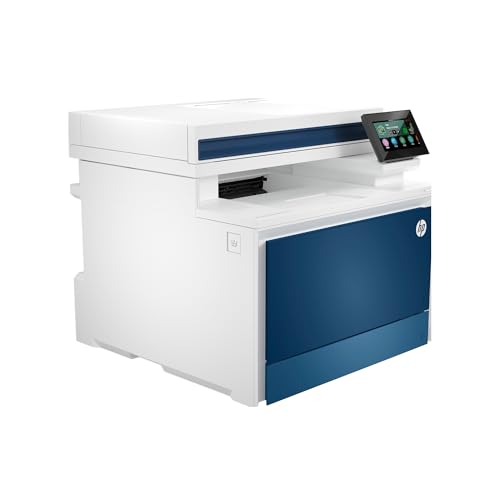
Best for color-intensive businesses needing robust all-in-one performance. It offers color printing up to 35 ppm, auto duplex, auto document feeder, and a fax option. This model suits teams producing marketing materials, client proposals, and reports with high color fidelity. Caution: higher color running costs can occur with frequent full-color jobs.
HP Color LaserJet Pro Multifunction M479fdw

Best for security-conscious offices needing comprehensive features. This model emphasizes HP Wolf Pro Security along with flexible automation for complex workflows. It supports printing, scanning, copying, and faxing with wireless connectivity. Caution: security features require careful configuration to maximize protection.
Buying Guide: Key Purchase Considerations
- Color vs. monochrome: If most documents are color-heavy, prioritize color-capable models with fast color pages per minute. For mostly internal memos and invoices, monochrome models may offer lower running costs.
- Volume and speed: Compare pages-per-minute (ppm) and duplex scanning to match your team’s daily print volume and use of double-sided documents.
- Document handling: Look for auto document feeder (ADF), duplex scanning, and paper tray capacity to support multi-page workflows and reduce reloading.
- Connectivity: Ensure robust wireless and wired networking, plus mobile printing options if your team uses laptops, tablets, or smartphones.
- Security and management: For sensitive data, consider devices with security features and centralized management options to protect information across the network.
- Running costs: Evaluate cartridge yield and cost-per-page estimates, especially for color vs. monochrome printing.
FAQ
- What is an MFP laser printer?
Multifunction printers (MFPs) combine printing, scanning, copying, and often faxing in one device, powered by laser printing technology for fast output and clear text
- Is color printing worth it for a small office?
Color printing is valuable for reports, presentations, and marketing materials. Consider your color usage and related costs when choosing a model.
- Do HP MFPs support automatic duplexing?
Yes, several listed models include auto two-sided printing (duplex) to save paper and time on large jobs.
- What should I prioritize for security?
Look for built-in security features, firmware protections, and the ability to manage permissions across devices in the network.
- Do these models require special cartridges?
Most use standard or high-yield HP LaserJet toner cartridges designed for reliability and consistent color or monochrome output.