Searching for a budget-friendly PC that can power virtual reality without sacrificing too much performance? This guide highlights five capable budget VR PCs, focusing on value, upgradeability, and VR readiness. The selections suit different buyers: entry-level VR newcomers, budget-conscious enthusiasts, and those who want a solid platform for future upgrades. A quick summary table below helps you compare at a glance.
| Product | Best For | Notes |
|---|---|---|
| CyberPowerPC Gamer Xtreme VR (RTX 4060) | Best balanced value for mainstream VR | Solid 1080p–1440p VR performance with RTX 4060 |
| CyberPowerPC Gamer Xtreme VR (RTX 5060) | Better performance for higher VR settings | RTX 5060 8GB for smoother visuals |
| CyberPowerPC Gamer Xtreme VR (RTX 3050) | Best entry-level VR build | 8GB RAM, 500GB SSD; good for lighter titles |
| CyberPowerPC Gamer Xtreme VR (i7-12700F, RTX 3060) | Best for future-proofing under budget | Higher CPU, solid GPU pairing |
| LXZ Gaming PC Core i7-14700F (RTX 5060) | Best for performance and 1440p VR | DDR5, 1TB NVMe, strong gaming core |
CyberPowerPC Gamer Xtreme VR with RTX 4060

The CyberPowerPC Gamer Xtreme VR built around an Intel Core i5-13400F and an NVIDIA GeForce RTX 4060 8GB aims to deliver steady VR performance at a respectable price. With 16GB of DDR5 RAM and a 1TB PCIe Gen4 NVMe SSD, this system supports faster load times and smooth multitasking. It includes Windows 11 Home and WiFi readiness, making it a straightforward option for new VR users and those who want a balanced setup for mixed-reality games. Best for gamers who prioritize a solid VR experience without stepping into high-cost hardware.
Who it’s best for: first-time VR enthusiasts and budget-conscious players who want reliable VR performance and a modern platform. Why selected: the RTX 4060 provides crisp visuals and stable frame rates for most modern VR titles at 1080p–1440p with comfortable room to grow. Caution: WiFi and Bluetooth could be limited by the motherboard’s integrated options, so consider a Bluetooth dongle if you need broader peripheral support.
CyberPowerPC Gamer Xtreme VR with RTX 5060

This configuration upgrades to RTX 5060 8GB, paired with an i5-13400F and 16GB DDR5, plus a 1TB PCIe 4.0 SSD. It’s designed for smoother VR experiences and higher fidelity in modern titles while staying within budget boundaries. Best for gamers who want more robust VR visuals and faster texture handling without a dramatic price jump. Choose this if you expect to play more demanding VR titles or heavier multitasking while gaming.
Who it’s best for: players seeking a noticeable boost in VR performance over entry-level GPUs. Why selected: the RTX 5060 offers improved ray tracing and higher frame rates in VR environments. Caution: PCIe 4.0 SSD and motherboard chipset are solid, but this model’s future-proofing is limited to current generation GPU paths; upcoming VR titles may require further GPU upgrades for peak settings.
CyberPowerPC Gamer Xtreme VR with RTX 3050
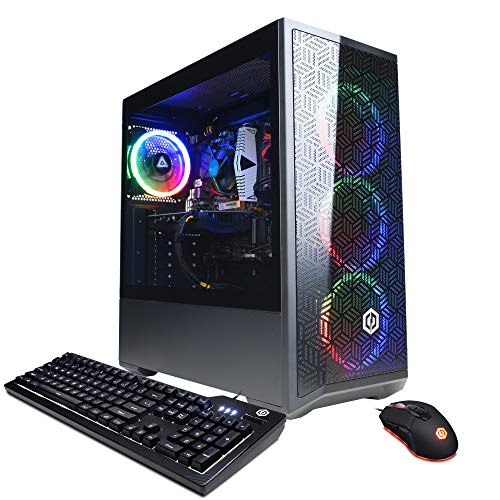
This budget option uses an Intel Core i5-12400F and RTX 3050 with 16GB DDR4 RAM, plus a 500GB NVMe SSD. It’s a practical entry point for VR gaming when price is a primary concern and game titles are not pushing the upper limits of graphics. Best for learners and casual VR players who want a reliable system that can handle a broad library of VR experiences at moderate settings. Caution: 500GB SSD may fill up quickly with large VR titles; consider adding an extra drive later.
Who it’s best for: new VR consumers and students who want a straightforward setup that performs well on a budget. Why selected: it covers VR readiness with a modern GPU and enough RAM while trimming cost. Avoid if you plan to run demanding titles at the highest VR quality settings or need extensive local storage from day one.
CyberPowerPC Gamer Xtreme VR with i7-12700F and RTX 3060
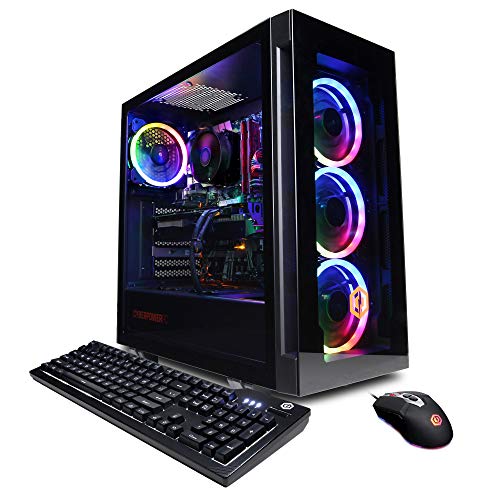
This model pairs an Intel Core i7-12700F with a GeForce RTX 3060 12GB in a 64-bit Windows environment. The system includes 16GB DDR4 RAM and a 1TB NVMe SSD, with 802.11AC Wi-Fi and Bluetooth connectivity. Best for gamers who want a stronger CPU for multitasking, streaming, or running companion software alongside VR titles. Choose this if you want noticeable performance gains in CPU-heavy VR games or multitasking while gaming. Limitation: DDR4 RAM may lag behind DDR5 options in future VR titles; budget-conscious buyers should be aware of incremental upgrade costs.
LXZ Gaming PC Core i7-14700F (RTX 5060)

The LXZ system targets higher performance with a Core i7-14700F and RTX 5060 8GB, plus 16GB DDR5 RAM and a 1TB NVMe SSD. This setup is designed for VR at higher settings and smoother 1440p gaming. Best for serious VR players who want solid 1440p performance without entering top-tier price ranges. Choose this if you demand fast load times, higher frame rates, and robust multitasking. Caution: higher-end components may require more power and better cooling; ensure your workspace can accommodate a larger chassis and cooling needs.
Buying Guide
What to consider when choosing a budget VR PC:
- GPU capability: For VR, a capable GPU is essential. Look for GPUs in the RTX 3050–RTX 5060 range for smooth mainstream VR; RTX 4060 offers a good balance of price and performance.
- CPU performance: A modern multi-core CPU helps with VR motion accuracy and multitasking. Mid-range CPUs like the i5-13400F or i7-12700F provide strong performance without breaking the bank.
- RAM and storage: 16GB RAM is a good baseline; DDR5 improves bandwidth. A 1TB NVMe SSD reduces load times and keeps room for VR libraries.
- Upgrade paths: Check for room to upgrade GPU, RAM, or storage in the future to extend the system’s VR relevance.
- Connectivity: Ensure you have sufficient USB ports, HDMI/DisplayPort outputs, Wi-Fi, and Bluetooth support for peripherals and VR headsets.
How to compare these 5 options at a glance
- Best overall VR performance under budget: RTX 5060-based builds. They balance price and higher VR frame rates.
- Best entry-level VR experience: RTX 3050 variant. Good for newcomers and lighter titles.
- Best for multitasking and future-proofing on budget: i7-12700F with RTX 3060.
- Best value for 1080p–1440p VR with strong CPU: LXZ Core i7-14700F system.
- Best starter package with balanced features: RTX 4060 option.
Frequently asked questions
- What is VR-ready in these desktops? All listed PCs include discrete GPUs and sufficient RAM to support most VR headsets and titles at moderate to high settings.
- Do I need extra peripherals? Most entries include keyboard and mouse, but you may want to add a VR headset, headset stand, and extra USB peripherals as needed.
- Is DDR5 worth it on a budget PC? DDR5 offers higher bandwidth, which can help VR workloads. If price is a constraint, DDR4 builds still provide solid VR performance.
- Will these PCs support upcoming VR titles? They’re designed for current VR ecosystems with upgrade paths. For future-proofing, consider models with stronger GPUs and DDR5 RAM.
- Should I prioritize CPU or GPU for VR? For most VR experiences, GPU impact is more immediate on frame rates, but a capable CPU helps with game logic and multitasking. Aim for a balanced system.
- Can I upgrade later? Yes. Most of these desktops support GPU, RAM, and storage upgrades, allowing you to improve performance over time without buying a new PC.