Finding a reliable, affordable multifunction printer (MFP) is essential for productive home offices or small teams. This guide highlights five budget-friendly, feature-rich options that balance print quality, speed, and ease of use. Each product below supports printing, scanning, and copying, with wireless options and mobile printing. Review the key features and then explore a practical buying guide to help you choose the right fit for your workflow.
Summary of Selected Products
| Product | Brand | Type | Key Features |
|---|---|---|---|
| Brother HL-L3300CDW | Brother | Color Laser 3-in-1 | Laser quality output, duplex, mobile printing, up to 19 ppm |
| Canon imageCLASS MF273dw | Canon | Monochrome Wireless 3-in-1 | Auto document feeder, 30 ppm, wireless |
| Xerox B305/DNI | Xerox | Black & White Wireless MFP | High speed, two-sided printing, compact |
| HP LaserJet MFP M234dw | HP | Color/Black & White MFP | Two-sided printing, mobile printing, instant ink eligible |
| Canon Color imageCLASS MF751Cdw II | Canon | Color Wireless 3-in-1 | Fast color printing, duplex, large feature set |
Brother HL-L3300CDW Wireless Color Multi-Function Printer

The Brother HL-L3300CDW is a compact 3-in-1 laser printer designed for small offices or home offices. It delivers laser-quality output with consistent performance for color documents and reports. A flatbed scan glass enables convenient copying and scanning without switching devices. With print speeds up to 19 pages per minute, it helps teams stay productive while keeping running costs lower thanks to laser efficiency. This model also emphasizes easy mobile printing and compatibility with Alexa-enabled setups for simple voice-control tasks.
Key Considerations
Ideal for teams prioritizing cost-effective color printing with reliable monochrome productivity. On the downside, color laser speed for large-color jobs may lag compared to higher-end devices.
Canon imageCLASS MF3010 VP

The Canon imageCLASS MF3010 VP is a wired monochrome multifunction laser printer that combines scanning and copying with a reliable USB connection. It features color scanning up to 600 dpi interpolation and supports ID Card Copy for easy digitization of cards and small documents. With a focus on standard office tasks, its monochrome output is well-suited for invoices, reports, and text-heavy documents. A practical choice for users who require a simple setup and dependable performance over color capabilities.
Key Considerations
Best for users who prioritize simple wired setups and strong monochrome performance. It lacks built-in wireless networking, which reduces flexibility for device sharing in some environments.
Canon imageCLASS MF273dw

The Canon imageCLASS MF273dw is a monochrome wireless laser printer with integrated scanner and copier. It includes an auto document feeder and offers robust paging throughput (up to 30 pages per minute) with quick first print times. Wireless connectivity supports mobile printing, making it suitable for small teams that need to share a single device across multiple devices. The MF273dw provides a dependable, all-in-one solution with scalability through network sharing.
Key Considerations
Strong efficiency and network sharing capabilities. It is monochrome-focused, which may be a constraint for teams needing color output on demand.
Xerox B305/DNI Multifunction Printer
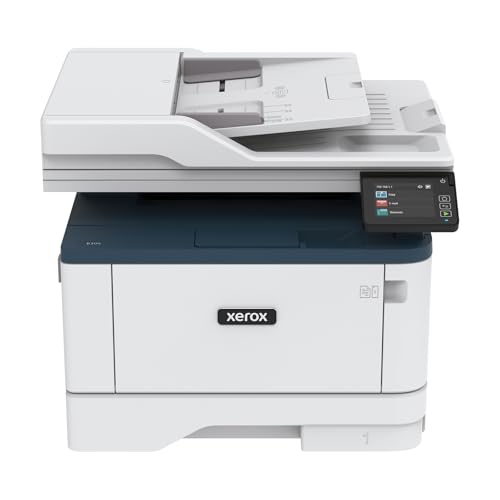
The Xerox B305/DNI is a black-and-white wireless all-in-one printer designed for compact spaces and home offices. It delivers solid print performance with speeds up to 40 pages per minute, paired with auto two-sided printing and a generous 250-sheet paper capacity. Built-in Wi-Fi supports AirPrint and Mopria, along with Chromebook printing, making it versatile for mixed-device environments. This model balances speed, ease of use, and network capability in a single, affordable package.
Key Considerations
Excellent for users who prioritize speed and wireless flexibility across multiple devices. It is monochrome-focused, so color printing isn’t available without a different device.
HP LaserJet MFP M234dw
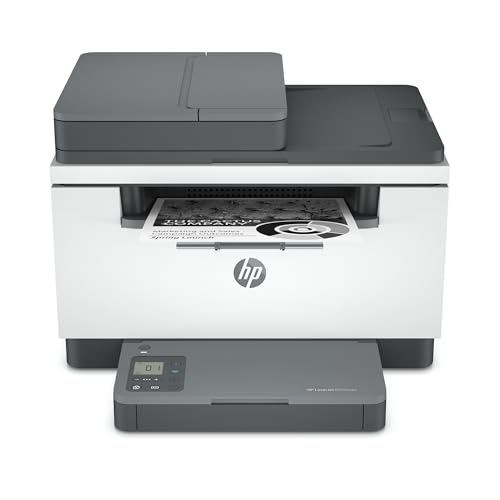
The HP LaserJet MFP M234dw is a compact color/black-and-white multifunction printer designed for small teams. It supports printing, scanning, and copying with fast two-sided performance. The device emphasizes easy setup and reliable wireless connectivity, along with mobile printing and compatibility with Instant Ink. This model is ideal for offices that need color documents and robust document management without a large footprint.
Key Considerations
Strong balance of color capability and speed for small teams. For very large color-volume workloads, higher-end color MFPs may be more efficient.
Canon Color imageCLASS MF751Cdw II

The Canon Color imageCLASS MF751Cdw II is a wireless duplex laser printer with full color capabilities, a multifunction design, and an automatic document feeder. It prints up to 35 pages per minute in color and black-and-white, with a quick first print time and straightforward wireless setup. The device is built for efficiency in small to mid-sized offices seeking reliable color output, strong security, and an expansive feature set that supports cloud and mobile workflows.
Key Considerations
Best for teams requiring color output with strong performance and a broad feature set. It may be larger and more feature-rich than strictly necessary for very small home offices.
Buying Guide: Key Purchase Considerations And Comparisons
What to prioritize when choosing a budget multifunction printer:
- Print speed and page yield: For busy environments, look for higher pages-per-minute (ppm) and a strong duty cycle to handle everyday tasks without bottlenecks.
- Color vs. monochrome: Color MFPs are necessary for marketing materials or color reports, but monochrome models can cost less per page and run faster for text-heavy work.
- Paper handling: Check the paper capacity and input trays. Larger capacities reduce the frequency of refills in busy workflows. An auto duplexer saves time and paper.
- Connectivity: Wireless is essential for shared devices in homes and small offices. Ensure compatibility with mobile printing standards (AirPrint, Mopria, Google Cloud Print) and cloud services if needed.
- Setup and ease of use: Simple initial setup, intuitive menus, and reliable driver support help minimize downtime.
- Security and reliability: Look for features such as secure print, user authentication, and reliable firmware updates to protect sensitive documents.
- Dimensions and footprint: Budget-friendly devices vary in size. Measure your space to ensure the printer fits without crowding desks or storage areas.
- Warranty and service: A reliable warranty and available local service can reduce downtime if issues arise.
In summary, the listed options provide a spectrum of capabilities—from compact, color-capable devices to fast monochrome workhorses. When assessing needs, map your typical document mix, the number of concurrent users, and preferred connectivity. Color output, speed, and paper capacity should align with your daily workflows. The right choice balances upfront cost with ongoing running costs, ease of use, and the ability to adapt as your office evolves.