For long workdays and focused typing, an ergonomic keyboard can reduce strain and improve posture without breaking the bank. This guide highlights five affordable options that balance comfort, practicality, and connectivity. Each product emphasizes natural hand alignment, built-in wrist support, or split-key designs to promote better typing form while staying budget-friendly.
| Product | Brand | Key Feature | Connectivity | Notes |
|---|---|---|---|---|
| Arteck Split Ergonomic Keyboard | Arteck | Split design with cushioned wrist rest | 2.4G USB wireless | Comfortable, easy setup |
| Logitech Ergo K860 Wireless Keyboard | Logitech | Split keyframe with memory foam wrist rest | Bluetooth/USB | Excellent posture support |
| Perixx PERIBOARD-512B | Perixx | Split keyboard, curved rows | Wired USB | Durable, traditional wired option |
| seenda Bluetooth Ergonomic Keyboard | seenda | Wave key design with soft wrist rest | Bluetooth/USB | Multi-device capable |
| Logitech Wave Keys Wireless Keyboard (Graphite) | Logitech | Compact Wave design for natural typing | Bluetooth/Logi Bolt | Multi-OS versatility |
Arteck Split Ergonomic Keyboard With Cushioned Wrist Rest

The Arteck Split Ergonomic Keyboard features a split design intended to position wrists and forearms in a natural, relaxed posture. A soft cushioned wrist rest supports the lower arms during extended typing. Setup is straightforward: insert the nano USB receiver stored at the back and begin typing. Its wireless 2.4 GHz connection helps minimize desk clutter while delivering consistent performance. This layout is suitable for Windows environments and desks where a compact footprint is valued without sacrificing ergonomic benefits.
Logitech Ergo K860 Wireless Ergonomic Keyboard

The Logitech Ergo K860 emphasizes improved typing posture through a curved, split keyframe that reduces muscle strain in the wrists and forearms. A pillowed memory-foam wrist rest delivers substantial support and helps minimize wrist bending compared to traditional keyboards. The keycaps are designed for comfortable keystrokes, with scooped shapes guiding finger placement for accuracy. It supports both Windows and Mac via Bluetooth or USB connectivity, making it a versatile option for mixed OS setups in offices or home workstations.
Perixx PERIBOARD-512B Wired Ergonomic Keyboard

The Perixx PERIBOARD-512B offers a classic wired ergonomic design with a split layout and curved key rows. This setup helps reduce wrist bending and promotes a natural typing posture. The keyboard features long key travel and tactile feedback, resembling a satisfying, almost mechanical feel. It’s built for durability, supporting up to 20 million keystrokes. A straightforward USB connection makes it a reliable, budget-friendly choice for users who prefer a wired solution without extra setup complexity.
seenda Bluetooth Ergonomic Keyboard

The seenda ergonomic keyboard combines wave-shaped keys with a soft leather wrist rest to encourage natural hand positioning. It supports multi-device connectivity, allowing pairing with up to three devices via USB, Bluetooth, or Type-C connections. Compatibility spans Windows, macOS, iPadOS, and Android, making it a flexible option for users who switch between devices. The keyboard emphasizes comfort for long typing sessions and includes easy device-switching features to streamline workflow across ecosystems.
Logitech Wave Keys Wireless Keyboard (Rose)

The Wave Keys Rose variant offers the same compact, wave-inspired design as its graphite counterpart. Its compact key layout facilitates a more natural shoulder position by bringing the mouse closer to the body. The wavy design promotes a natural typing position for hands, wrists, and forearms. It supports multitasking across Windows and Mac systems via Bluetooth and a Logi Bolt receiver, delivering reliable wireless performance with minimal desk footprint.
Logitech Wave Keys & Lift Vertical Mouse Combo
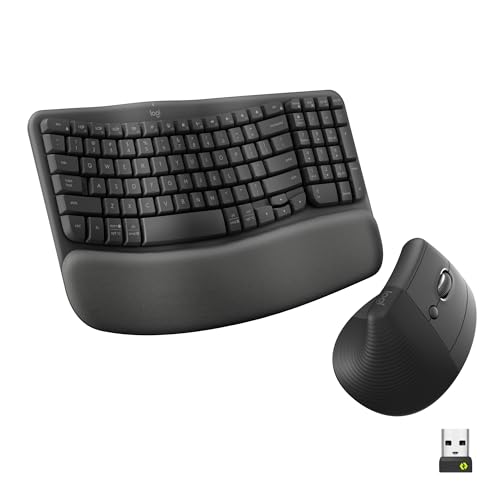
This combo pairs a Wave Keys ergonomic keyboard with a Lift vertical mouse, offering a cohesive ergonomic workspace solution. The keyboard’s compact, wave-inspired design supports natural alignment, while the palm rest reduces strain. The vertical mouse encourages a handshake posture that minimizes forearm twisting. The setup uses Bluetooth and Logi Bolt for multi-OS compatibility, suitable for users seeking a comprehensive, space-efficient ergonomic duo without a large price tag.
Buying Guide: Key Considerations for Budget Ergonomic Keyboards
- Split vs. compact designs: Split layouts encourage natural forearm alignment, while compact layouts reduce shoulder strain by bringing the mouse closer. Decide which form better fits your desk and posture goals.
- Wrist support: Built-in palm rests or memory foam cushions can dramatically increase comfort during long typing sessions. Check for removable or adjustable rests if you vary keyboard height.
- Typing feel: Some keyboards feature sculpted or scooped keycaps to guide finger placement, while others offer traditional keys with ergonomic curves. Consider your preferred feedback and travel.
- Connectivity: Wireless options (Bluetooth or 2.4 GHz) enable flexible placement, but wired keyboards offer peak reliability. If multi-device use matters, look for multi-OS compatibility and easy device-switching.
- Build quality and durability: Look for keyboards rated for millions of keystrokes and sturdy key switches. Memory foam rests and fabric coverings add comfort but may require more care.
- Multi-OS compatibility: For mixed Windows and Mac setups, verify cross-platform support and seamless switching between devices without driver requirements.
- Desk setup and space: If you have a compact workspace, prioritize a compact or split design with a small footprint. A matching ergonomic mouse can complete the posture benefits.
- Maintenance and comfort over time: Consider keyboards with easy cleaning surfaces and materials that resist staining or wear, especially if you type daily.