Boost productivity with compact, wireless numeric keypads designed for fast data entry across laptops and desktops. This guide highlights top Bluetooth numpads that pair easily, deliver reliable connectivity, and support multi-device setups for seamless switching. Each option is evaluated on compatibility, battery life, and key feel to help you choose the right model for your workflow.
| Product | Brand | Key Count | ||
|---|---|---|---|---|
| Havit Bluetooth Number Pad | havit | 26 | Bluetooth 3.0 | Windows, not Mac OS |
| Kisnt KN300BT | Kisnt | 34 | Dual Bluetooth | Windows, Mac, iOS, Android, Linux |
| Lekvey Bluetooth 34-Key | Lekvey | 34 | Bluetooth 5.0 | Mac and Windows compatible |
| Nulea Bluetooth 34-Key | Nulea | 34 | Bluetooth 5.0 + 2.4G | Windows, Mac, iOS, Android, Chrome OS |
| Macally Bluetooth 22-Key | Macally | 22 | Bluetooth | Mac-focused, compatible with Windows |
The following selections emphasize strong Bluetooth connectivity, broad device compatibility, and practical layouts for accounting, data entry, and spreadsheet work. Each product section below provides a concise overview, key features, and practical notes to help you compare options quickly.
Havit Bluetooth Number Pad Overview

The Havit Bluetooth Number Pad provides 26 keys with NumLock, Escape, Delete, and a calculator shortcut. It links via Bluetooth 3.0 and offers a rechargeable battery, reducing the need for frequent battery changes. It is designed for Windows-based devices and desktop setups. Its compact form is suitable for travel or tight workspaces, and it emphasizes plug-and-play simplicity with a practical set of function keys for quick calculations.
Kisnt KN300BT 34-Key Numpad

The Kisnt KN300BT offers a full 34-key layout for comprehensive data entry, including arrow keys, Home, End, and navigation functions. It supports dual Bluetooth connections for easy switching between devices without re-pairing, making it ideal for users who alternate between laptops, Macs, tablets, and desktop PCs. It’s designed to be OS-agnostic, with OS-specific keys and quick access to calculator functions, providing a versatile workflow for accountants and analysts.
Lekvey Aluminum 34-Key Numpad
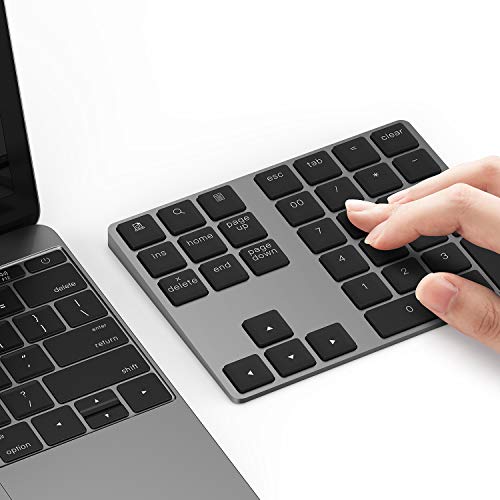
The Lekvey keypad features a slim aluminum chassis and Bluetooth 5.0 for a strong, cable-free connection with up to 10 meters of range. Its 34 keys align well with standard external number pads used for analytics, accounting, and data entry. The built-in rechargeable battery and USB-C charging minimize maintenance, and the device is designed to pair cleanly with Mac and Windows ecosystems while offering a stable, low-profile typing experience.
Nulea Bluetooth 34-Key Numpad

The Nulea keypad blends Bluetooth 5.0 with a 2.4G wireless option, enabling dual-device switching and stable transmissions for laptops, tablets, and PCs. Its 34-key layout supports versatile data-entry tasks, and the USB-C charging minimizes downtime. Compatible with Windows, macOS, iOS, Android, and Chrome OS, it suits mixed-device environments and professionals who require seamless cross-platform work tools. The auto-sleep feature conserves battery life for lengthy sessions.
Macally Bluetooth 22-Key Numpad

Designed with Mac users in mind, the Macally 22-key Bluetooth numpad offers scissor-switch keys for quiet, precise data entry. The pairing is straightforward—no drivers required—and the pad supports a comfortable ergonomic tilt to reduce wrist strain during long Excel sessions or inventory tasks. It also works with Windows systems, extending usability to mixed OS environments that prioritize portability and ease of use.
Buying Guide
Key purchase considerations when selecting a Bluetooth numeric keypad:
- Connectivity and pairing: Look for Bluetooth versions that offer stable connections (BT 4.0/5.0 preferred) and multi-device switching capabilities to move between laptops, tablets, and desktops without re-pairing.
- Key layout and size: Choose between 26-key, 34-key, or 22-key layouts based on the scope of data entry you perform. A full 34-key layout includes navigation keys, which speeds up spreadsheet work.
- Power and charging: Rechargeable batteries with USB-C charging are convenient. If a keypad uses disposable batteries, consider your setup’s maintenance needs and desk clutter.
- OS compatibility: Ensure the keypad supports your primary operating systems (Windows, macOS, iOS, Android, Linux) and note any OS-specific keys or limitations (e.g., Mac-only keys or calculator shortcuts).
- Build quality and ergonomics: Aluminum or high-quality plastics with a low-profile design improve durability and comfort. Tilt angles and key travel influence long-term use and wrist comfort.
- Special features: Multi-key shortcuts, calculator keys, or customizable F13-F15 mappings can improve efficiency for accounting, finance, and data-entry tasks.
Across these options, users should weigh device ecosystems, how often they switch machines, and whether they need a compact travel-friendly model or a robust, feature-rich pad for stationary work. The selections here emphasize reliable wireless performance, practical layouts for financial work, and cross-platform compatibility, helping professionals optimize data-entry workflows without sacrificing desk space.