Answering the question: which keyboard best fits a smart TV setup, especially for couch viewing and simple app navigation? This guide focuses on keyboards designed for TV-connected devices, mini remotes with touchpads, and multi-device compatibility. It highlights options ideal for smart TVs, media centers, Android TV boxes, and HTPC systems. The top picks are chosen for ease of pairing, built-in touchpads, backlit keys for dark rooms, and reliable wireless connections. The buyer types covered include casual streaming viewers, media-center enthusiasts, and multi-device users who want seamless typing from the living room.
| Product | Connection | Best For | Key Benefit |
|---|---|---|---|
| Arteck Universal Backlit 7-Colors | Bluetooth | Small living rooms, hands-free control | Vibrant backlight; long battery life |
| Logitech K400 Plus Wireless Touch TV Keyboard | 2.4 GHz RF (Unifying) | Straightforward TV navigation | Integrated touchpad; media controls |
| Arteck Universal 2.4G + Bluetooth | Dual wireless (BT + 2.4G) | Multi-device setups | One-key device switching |
| Logitech Wireless Touch Keyboard K400 | 2.4 GHz RF | Streaming PCs from the couch | Built-in multi-touch touchpad |
| TECKNET Keyboard KB005 | 4 modes (BT + 2.4G) | Flexible, multi-OS use | Spill-resistant; long standby |
Below are five carefully chosen keyboards that fit a smart TV or home theater PC environment. Each section includes a quick verdict on who should consider it, a brief reason for its selection, and any notable limitation to watch for during setup.
Arteck Universal Backlit 7-Colors Keyboard

Best for: Users who watch in low light and want clear visibility without sacrificing style. The Arteck 7-color backlit keys help locate keys quickly in dark living rooms. It supports a wide range of devices, including TV-connected computers and Android TV boxes, making it suitable for multi-device setups.
Why selected: It combines backlit convenience with media control keys and a built-in touchpad for on-the-couch navigation. The wide compatibility makes it versatile for many smart TV ecosystems. The auto sleep feature helps conserve battery life between viewing sessions.
Limitation: As with most all-in-one TV keyboards, extreme desk-based typing may feel larger than a dedicated handheld remote. The keyboard’s touchpad is primarily intended for navigation, not precise cursor control in desktop apps.
Logitech K400 Plus Wireless Touch TV Keyboard

Best for: Home theater enthusiasts who want a simple plug-and-play solution for their PC-connected TV. It’s well suited to casual browsing, searching, and basic streaming control from the sofa.
Why selected: It combines a compact keyboard with a built-in touchpad, reducing clutter by replacing a separate mouse. The long battery life—up to 18 months in typical use—adds convenience for frequent TV viewing.
Limitation: This model uses a 2.4 GHz Unifying receiver rather than Bluetooth, which may affect compatibility with some devices that only support Bluetooth without USB ports. Consider a Bluetooth option if your TV lacks USB inputs or USB hubs.
Arteck Universal 2.4G Wireless and Bluetooth
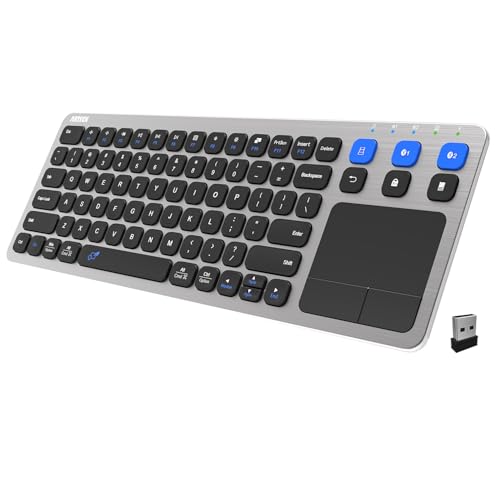
Best for: Viewers who need seamless switching between multiple devices in a single living room setup. Ideal for households with a smart TV, a PC, and a tablet or phone.
Why selected: This keyboard supports 3 devices with a single switch, plus a 10-meter wireless range. The touchpad and hot keys enhance living-room usability without needing separate peripherals.
Limitation: Like many compact keyboards, the typing experience may be less comfortable for long typing sessions. Choose this if you prioritize device versatility over extended typing comfort.
Logitech Wireless Touch Keyboard K400

Best for: Users who value the classic, proven design of a compact wireless keyboard with a built-in touchpad for couch-based control of a TV-connected PC.
Why selected: A robust choice with a long-range wireless connection (around 33 feet). The integrated multi-touch touchpad provides convenient navigation for web browsing and media apps from the comfort of the couch.
Limitation: It uses a 2.4 GHz receiver, which may require a USB port on the TV or set-top box. Bluetooth-only TVs or devices without USB input should consider a Bluetooth-enabled option.
Dual-Mode Mini With Touchpad (WirelessFinest)

Best for: Home theater setups where space is at a premium but you still want both Bluetooth and 2.4 GHz options. Great for Android TV boxes and compact HTPC rigs.
Why selected: The dual wireless setup provides flexibility, while the built-in touchpad enables laptop-like navigation from the couch. The 7-color backlight adds visibility in dim rooms and a modern look.
Limitation: The compact size means slightly smaller keys, which might require a short adaptation period for users with larger hands or those who type heavily from a distance.
Buying Guide: Key Considerations For Smart TV Keyboard Purchases
What connection type should you choose? If your TV or streaming device supports Bluetooth, a Bluetooth keyboard reduces the need for USB dongles. If your TV has USB ports but no Bluetooth, a 2.4 GHz RF keyboard with a Unifying receiver can offer reliable, low-latency control. For multi-device households, dual-mode or multi-device keyboards simplify switching between a TV, PC, and mobile devices.
Do you need a built-in touchpad?
A built-in touchpad simplifies navigation when a mouse isn’t convenient. If you primarily use apps with remote controls, a keyboard without a touchpad might save space and weight.
Is backlighting important?
Backlit keys help in dim home theater environments. If you watch late at night, backlighting improves key location without turning on room lights.
What about battery life and charging?
Long battery life reduces interruptions during binge sessions. Some models offer rechargeable batteries, which can be cheaper in the long run than frequent replacements.
How important is multi-device support?
Multi-device keyboards are beneficial in homes with several TVs, PCs, tablets, and game consoles. Check how many devices can be connected simultaneously and how easy it is to switch between them.
Are there any limitations to watch for?
Some devices rely on USB receivers; others are Bluetooth-only. Ensure compatibility with your TV’s ports and operating system. In tight spaces, the keyboard’s size and layout can affect comfort during long typing sessions.
What makes a good smart-TV keyboard?
A good smart-TV keyboard should combine easy pairing, reliable range, simple navigation, adequate key travel, and a comfortable layout. Backlighting, durability, and media-control hotkeys can further improve the living-room typing experience.
Quick tips for setup
- Check device compatibility before purchasing (BT version, USB ports, or USB dongle availability).
- Pair the device and tests responsiveness from the couch at various distances to gauge real-world performance.
- Enable any energy-saving features to maximize battery life without compromising wake-up times.
FAQ
- What is the best keyboard for Android TV boxes? – A compact keyboard with Bluetooth or dual-mode connectivity and a built-in touchpad is typically suitable, offering ease of navigation and control from the couch.
- Do smart TVs support Bluetooth keyboards? – Many do, but some require a USB receiver. Check your TV’s Bluetooth support and available USB ports.
- Is a backlit keyboard worth it for a TV setup? – If you frequently watch in dark rooms, backlit keys improve visibility and typing accuracy without turning on room lights.
- Should I choose a keyboard with a built-in touchpad? – If you prefer mouse-like control from a distance, a touchpad is convenient; otherwise, a separate wireless mouse can suffice.
- Can I use a standard PC keyboard with a smart TV? – Yes, many standard keyboards work if they support Bluetooth or a USB wireless receiver compatible with your TV or streaming device.
- Is wireless interference a concern? – In crowded 2.4 GHz environments, dual-mode or 5 GHz options may reduce interference and improve reliability.