Answering the demand for flexible, plug-and-play expansion, these Bluetooth-ready docking stations blend wireless convenience with abundant wired ports. The top picks below are suited for home offices, hybrid workers, and power users needing multiple displays, fast data transfer, and easy device charging. Each product is evaluated for best use case, portability, and potential limitations.
| Product | Best For | Key Benefit |
|---|---|---|
| Anker Nano 13-in-1 Laptop Docking Station | Home office with travel needs | Detachable hub for desk or on-the-go use |
| Acer USB-C Docking Station Dual Monitor (9-in-1) | Dual 4K productivity | Stunning dual 4K@60Hz displays |
| Azpen Fast Charging Wireless Docking Station | Wireless charging plus speakers | 4-in-1 with built-in mic and Bluetooth speakers |
| Anker Prime Docking Station (DL7400) 14-Port | High-performance multi-device hubs | 160W total output with dual 4K displays |
| Anker Nano Laptop Docking Station 8-in-1 | Compact dual-monitor work | 4K@60Hz HDMI, 10Gbps data with SD/TF |
Anker Nano 13-in-1 Docking Station With Detachable Hub

Best for: Professionals who need a single docking solution that transitions from desk to travel. The detachable 6-in-1 hub snaps off for on-the-go work, consolidating two devices into one. This setup simplifies cable clutter and supports up to three displays for a broad workspace.
- Triple display capability via 2 HDMI and 1 DisplayPort.
- 4K@60Hz single display or dual 2K@60Hz; triple 1080P@60Hz.
- Extensive port assortment: USB-C upstream, two USB-C data ports, three USB-A, SD/TF, Ethernet, audio, and 100W PD.
Best for: data analysts, traders, and content creators who value screen real estate. Caution: macOS may mirror displays on multiple external monitors, which can limit extended desktop use. The data-heavy hub may require compatible cables for optimal performance.
Acer USB-C Docking Station Dual Monitor (9-in-1)

Best for: Users who need robust dual-monitor capabilities with straightforward setup. This dock includes two 4K@60Hz HDMI outputs and a straightforward port layout for easy productivity. It’s well-suited for multitaskers who rely on dual displays at work or home.
- 9-in-1 Dock with two HDMI outputs and SD/MicroSD slots.
- 100W PD charging to keep a laptop powered during long sessions.
- Note: Ensure your laptop’s USB-C port supports video output for proper display performance.
Azpen Fast Charging Wireless Charger DockAll
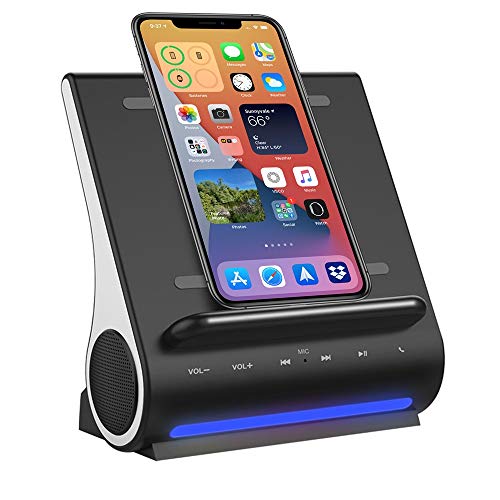
Best for: Small office setups seeking a combined wireless charging pad and Bluetooth speaker system. This station supports live hands-free calls via its built-in mic and offers 15W charging for supported devices.
- Wireless charging coils for vertical or horizontal placement.
- Dual Bluetooth speaker system with 5W per speaker and a built-in mic.
- Case-friendly charging; fits most phone cases up to 5mm thick.
Limitation: Wireless charging performance can vary by case material and phone model; metal cases or certain thick lifestyles can impede charging.
Anker Prime Docking Station (DL7400)

Best for: Advanced multi-device ecosystems requiring substantial power and display support. The 14-in-1 design delivers up to 160W total output and can drive dual 4K displays with high-speed data transfer across multiple ports.
- Two HDMI ports and a DisplayPort enable triple or dual-monitor setups depending on host capabilities.
- Three USB-C ports (up to 100W charging per port) plus USB-A, Ethernet, audio, and SD/TF slots.
- Smart display and cooling features assist with high-load workloads.
Limitation: Requires the latest DisplayLink driver for triple-monitor usage on Windows; macOS configurations may vary for certain outputs. Always use the included USB-C cable for peak performance.
Anker Nano Laptop Docking Station 8-in-1

Best for: Laptops requiring a compact yet capable expansion hub. The 8-in-1 design offers dual-monitor support via HDMI 4K@60Hz, plus 10 Gbps data transfer across multiple USB ports and SD/TF card readers.
- 2× HDMI outputs supporting 4K@60 Hz and up to two HDMI-connected displays.
- 10 Gbps USB-C and USB-A data ports for fast file transfers.
- 85W PD upstream with a separate 100W USB-C PD input option.
Limitation: Ethernet port is not included, and macOS support specifics vary for certain USB-C video outputs. Ensure compatible cables for 4K displays.
Buying Guide
What should you look for in a Bluetooth docking station?
Target your purchase by aligning with your display needs, power requirements, and travel habits. Key considerations include display outputs (HDMI, DisplayPort, and number of ports), power delivery (PD wattage), USB data bandwidth (USB-C vs USB-A, 5Gbps vs 10Gbps), wireless charging and Bluetooth features, and whether a detachable hub suits a mobile lifestyle.
Which features matter most for multi-monitor setups?
- Native support for 4K at 60Hz or multiple 1080p outputs.
- DisplayPort 1.4 or HDMI 2.0/2.1 compatibility depending on your host laptop.
- If using macOS, know that some docks mirror displays rather than extend; plan accordingly.
Power and data balance
- Choose a dock with sufficient total power (PD) to charge your laptop while running peripherals.
- High-speed data ports (10Gbps USB-C/A) reduce bottlenecks when transferring large files.
Port variety and future-proofing
- A mix of USB-C and USB-A, plus SD/TF, Ethernet, and audio jacks, helps you connect peripherals now and later.
- Consider AS/DP for color-accurate or high-refresh-rate displays if you work with video or gaming content.
Compatibility and setup tips
- Update drivers when required, especially for DisplayLink-based docks.
- Check your host device’s USB-C port capabilities (video output, power delivery, and alternate modes) before purchase.
- Use the provided cables when possible to maximize performance and avoid instability.
FAQ
- Do docking stations require Bluetooth? Some include Bluetooth or wireless charging features, but most rely on a wired USB-C connection to the host for power and data. Bluetooth in the dock is typically for audio devices or peripheral control rather than core connectivity.
- Can I run three monitors from a USB-C dock? Some models support triple monitors via HDMI and DisplayPort, but performance depends on host capabilities and the dock’s DP/HDMI configuration.
- Is PD charging always safe for laptops? When using a dock with proper PD specifications and the correct power adapter, charging is designed to be safe and regulated by the dock and device.
- Will macOS extend displays on all docks? macOS behavior varies by dock and host hardware; certain models mirror displays or only support HDMI outputs for video.
- Do I need DisplayLink drivers for triple monitors? Some triple-monitor configurations require DisplayLink drivers on Windows to function correctly.
These picks offer multiple pathways to a streamlined, capable Bluetooth docking solution. Whether you prioritize travel-ready modularity, dual 4K displays, or a compact 8-in-1 setup, there is a dock tuned to your workflow. Always verify your device’s video output capabilities and driver requirements to ensure a smooth experience.