Bluetooth air mice combine the ease of a remote with the precision of a mouse, making them ideal for presenting, browsing, and media control from the couch. This guide highlights five top options, comparing features like dual-mode connectivity, motion sensing, backlit keyboards, and IR learning. Each product is evaluated for compatibility with PCs, smart TVs, projectors, and Android/iOS devices, helping you pick a model that fits your setup and usage style.
| Product | Brand | Key Feature |
|---|---|---|
| 3-Link Air Mouse with Touchpad | 3-Link | IR PPT clicker + TikTok/Kindle use |
| Air Mouse With Voice | Miritz | 6-axis gyro, IR learning, dual-mode |
| iPazzPort Bluetooth Air Mouse | iPazzPort | Dual-sided, 2.4G/Bluetooth, QWERTY |
| Bluetooth Voice Remote With Keyboard | Dupad story | Voice input, backlit, IR learning |
| iPazzPort Mini Air Mouse With Keyboard | iPazzPort | 7-color backlight, dual-mode |
3-Link Air Mouse for PC/iOS/Android

The 3-Link model combines a fingertip air mouse with a touchpad and a rechargeable wireless presentation clicker. It supports Bluetooth 2.4G as a remote control, enabling PowerPoint and Keynote navigation from anywhere in the room. Its infrared features aim to deliver smooth PPT control for professional presentations, while its “Leisure Mode” supports casual scrolling through TikTok, reading Kindle apps, or taking photos with friends. This makes it versatile for both work and personal use in mixed-device environments.
Air Mouse With Voice and Gyroscope

This Miritz air mouse integrates voice input, a 6-axis gyroscope, and a full-features mini keyboard. It operates in Bluetooth and 2.4G modes, offering seamless cursor control in mid-air with a Wii Remote-like feel. Infrared learning lets you capture remote control codes for TVs and set-top boxes, enabling unified control of multiple devices. The device targets home-entertainment setups and smart TVs, making it a practical hub for navigating apps, streaming services, and presentations from across the room.
iPazzPort Bluetooth Air Mouse Remote Keyboard

This dual-sided 2.4G/Bluetooth device provides a compact, all-in-one input solution. On one side is a motion-controlled air mouse, while the reverse side houses a QWERTY keyboard for quick typing. It supports a wide range of devices, including Android TV boxes, laptops, projectors, HTPCs, and both Windows and Mac systems. The 6-axis gyro design supports accurate navigation from the couch, making it suitable for casual browsing and media control in living rooms and classrooms alike.
Bluetooth Voice Remote With Keyboard

This Dupad story remote combines voice input, a backlit keyboard, and dual-mode connectivity (2.4G and Bluetooth 5.0). It supports a wide array of platforms, including Nvidia Shield, PCs, projectors, and Android TV boxes. The backlit keys help you operate in dark rooms, while the touchpad supports multi-touch gestures for faster navigation. IR learning allows basic control codes to be learned for other devices, offering centralized control across multiple devices in a single handheld unit.
iPazzPort Mini Air Mouse With Keyboard
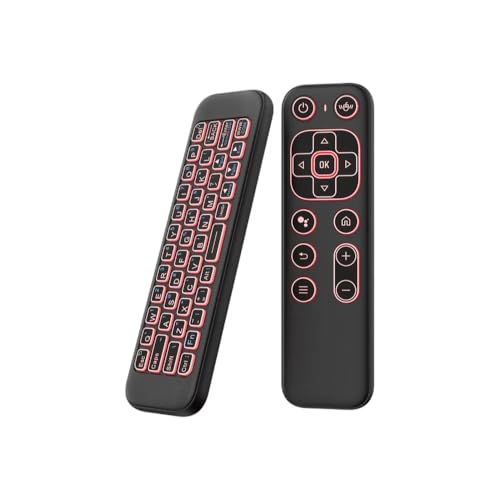
The iPazzPort mini offers 7-color backlighting and dual-mode Bluetooth/2.4G connectivity. It features a 6-axis gyroscope for smooth cursor control and a slim, ergonomic one-handed design ideal for couch navigation and typing on smart TVs or projectors. The vibrant backlight aids key visibility in low-light environments, while rechargeable operation reduces the need for frequent battery changes, making it a practical choice for entertainment centers and student dorm rooms alike.
iPazzPort Universal TV Air Mouse Keyboard

This 4-in-1 multifunction remote combines an air remote, mini keyboard, voice search, and IR learning. Its built-in microphone supports voice input where supported by apps, though mic functionality may require app compatibility. The dual-mode (Bluetooth and IR learning) approach broadens compatibility with Windows, macOS, Linux, and various smart devices. A single compact device can replace multiple remotes, offering streamlined control for home theater setups and smart home installations.
Buying Guide: Key Considerations for Choosing a Bluetooth Air Mouse
Choosing the right Bluetooth air mouse depends on how you plan to use it. Here are several purchase considerations and practical comparisons to help you decide.
- Connectivity: Look for dual-mode options (Bluetooth and 2.4G) if you switch between devices or environments. Dual-mode reduces lag and compatibility issues with Android boxes, PCs, and smart TVs.
- Input versatility: Decide between models that emphasize a full keyboard, a touchpad, voice input, or IR learning. For presentations, a model with a reliable PPT clicker and IR learning helps control multiple devices from a distance.
- Motion sensing: A precise 6-axis gyroscope improves cursor control for navigation and gaming. Gyro accuracy matters most for couch navigation and media apps.
- Backlighting: 7-color or backlit keyboards help typing in dim rooms. This feature is useful for late-night browsing or typing in home theaters.
- Battery and charging: Rechargeable batteries are more convenient than disposable ones, especially for frequent users. Check charge time and standby duration if you move between rooms.
- Compatibility: Verify device support for Windows, macOS, Android TV boxes, Linux, and specific smart TVs. Some devices have limited compatibility with certain brands (e.g., Samsung or LG TVs).
- IR learning: Remote-learning capabilities enable consolidation of multiple remotes into one device, simplifying control of TVs, set-top boxes, and AV receivers.
- Ergonomics: Consider grip, weight, and button layout. A comfortable, one-handed design is essential for long browsing sessions or classroom use.
Usage Scenarios and Recommendations
If you primarily present in meetings, prioritize a model with a reliable PPT/Keynote clicker and a long -range wireless remote. For living-room browsing and streaming, a device with a strong gyroscope, backlit keyboard, and broad device compatibility is ideal. For classrooms or offices, IR learning and universal compatibility help unify control across projectors, wall displays, and multimedia players. Finally, for mobile users, compact form factors and rechargeable batteries maximize portability without sacrificing functionality.
Performance Snapshot
Across these options, you can expect smooth motion control thanks to 6-axis gyroscopes in most models, plus the flexibility of dual-mode connectivity. Backlit keyboards aid nighttime operation, and IR learning capabilities offer a single-control solution for multiple devices. The best fit depends on whether you value a built-in keyboard, a focus on presentation control, or a compact form factor for travel or dorm-room setups.