Biometric time clocks streamline attendance, payroll, and shift management by using fingerprints, faces, RFID, or PINs. This guide explores top biometric time clocks for small businesses, highlighting standalone and cloud-based options, offline capabilities, and payroll compatibility. Below is a quick summary of five standout models to help you choose the right fit for your team.
| Product | Brand | Key Benefit | Connectivity | Notes |
|---|---|---|---|---|
| NGTeco Fingerprint & PIN Biometric Time Clock | NGTeco | Standalone, no monthly fees | USB transfer, offline | Supports up to 500 users |
| NGTeco APP-Based Time Clock | NGTeco | App-integrated scheduling and payroll prep | WiFi 2.4GHz | Real-time punch detection |
| uAttend JR2000 | uAttend | Cloud-based, real-time data | Internet | Optional payroll integration |
| Mokhike 2-in-1 Time Clock | Mokhike | Two-in-one attendance with USB export | USB only | No WiFi, zero monthly fees |
| NGTeco Cloud-Based Time Clock | NGTeco | Real-time cloud reporting | WiFi | 4-in-1 biometric options |
NGTeco Fingerprint & PIN Biometric Time Clock

The standalone NGTeco model operates without WiFi or software, making it a practical choice for small teams seeking a simple, secure punch-in system. With onboard memory capacity for up to 500 user profiles and 50,000 punch records, it handles growing teams without ongoing maintenance. Transfers to payroll-ready Excel reports are made easy via USB, enabling quick payroll processing. The design emphasizes a paperless workflow, delivering precise, instant records and reducing supplies and environmental impact. This unit is especially suitable where a local, self-contained clock is preferred over cloud-dependent options.
Key features and considerations include easy setup in minutes, true offline operation, and scalable storage that supports expansion as your business adds shifts or employees. While it does not require a subscription, users should plan for periodic USB-based data exports and ensure USB drive compatibility for transferring attendance data. The balance of independence, reliability, and straightforward payroll import makes it a compelling option for businesses prioritizing simplicity and cost control.
NGTeco APP-Based Time Clock

The APP-based NGTeco time clock emphasizes flexible scheduling and real-time attendance data, leveraging a 2.4 GHz WiFi connection. It supports multiple payroll cycles and offers instant punch detection for accurate records across shifts, including night rotations. The 0.5-second fingerprint recognition helps minimize queue times and errors during busy periods. Real-time data syncing to payroll streams provides efficiency for administrators and visibility for employees. While it relies on WiFi, the setup remains straightforward, and the system is designed to scale with growing teams by maintaining consistent performance across locations.
Considerations for this model include network reliability, which affects real-time data flow and payroll exports. It is well-suited to workplaces where cloud-based access and remote administration deliver tangible time-management benefits. Businesses should verify WiFi stability, device compatibility with existing payroll software, and whether additional mobile app features align with administrative workflows.
uAttend JR2000 Biometric Time Clock

The uAttend JR2000 offers a cloud-based attendance system with optional payroll integration, designed to streamline time tracking and payroll processes. The cloud foundation provides real-time data access from any device, enabling managers to monitor attendance and adjust schedules on the go. This model supports traditional biometric methods (fingerprint, RFID, PIN) and emphasizes flexibility, allowing employers to scale as their workforce grows and operate across multiple locations. Real-time reports and consistent data accessibility make it suitable for businesses seeking centralized control and remote oversight.
Prospective buyers should weigh the benefits of cloud-based accessibility against potential dependences on internet connectivity. The JR2000 is ideal for teams that require up-to-date attendance insights, remote management, and straightforward payroll integration, while preserving straightforward user onboarding and robust data security protocols.
Mokhike 2-in-1 Time Clock
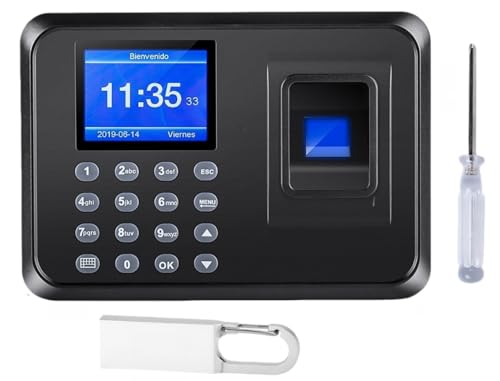
The Mokhike clock-in device combines fingerprint and digital attendance tracking in a compact, standalone unit. It requires no WiFi and no ongoing fees, appealing to small businesses that prefer a zero-subscription model. The device exports data via USB for payroll review, and it automatically calculates hours and payroll data, including breaks and overtime. With power-off data protection, it remains reliable during outages and minimizes manual entry. This model is particularly suitable for shops, studios, or offices that want a straightforward, cost-effective clock with local storage and easy data export.
When considering Mokhike, evaluate your data export needs: USB-only transfer means you’ll manage data on a single computer. If you need cloud access, you may prefer a model with online syncing and broader reporting capabilities. Overall, it offers a solid, no-fuss option for small teams prioritizing offline operation and simplicity.
NGTeco APP Time Clock with App
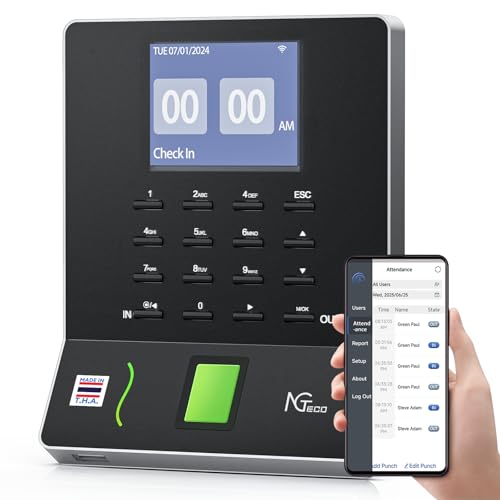
This NGTeco model blends fingerprint and PIN recognition with a mobile app for iOS/Android, delivering a cloud-connected experience without monthly fees. The 2.4 GHz WiFi connection supports real-time punch detection and flexible payroll syncing, aligning with modern HR workflows. It is designed for small businesses that want remote administration and near-instant attendance updates for managers and employees. The combination of biometric security, app-based management, and cloud storage supports dynamic scheduling and accurate timekeeping across diverse work patterns.
Key considerations include ensuring strong WiFi coverage and compatibility with existing payroll software. Businesses should assess whether the cloud-based approach aligns with data privacy policies and whether the on-device storage and local backups satisfy compliance needs for attendance records.
HapAttend Time Clocks

HapAttend emphasizes standalone operation with robust privacy, eliminating the need for internet access. It includes 0 monthly fees and digital hour calculations that automate payroll-ready data without complicated network setups. The device transfers data via USB, reducing administrative steps and keeping sensitive information on-site. This model suits small businesses that prioritize data security and simplicity, particularly when internet reliability or IT resources are limited. It offers a straightforward, plug-and-play solution that reduces administrative overhead while maintaining accurate clock-in and clock-out records.
Consider the capacity for user profiles and punch logs, as well as the ease of exporting payroll data via USB. For teams prioritizing offline operation and predictable costs, HapAttend presents a solid choice with clear value in workflow automation and payroll readiness.
Buying Guide: Key Purchase Considerations
- Deployment model: Choose between standalone (USB export, no internet) and cloud-based (real-time syncing, remote access). Standalone models reduce IT demands but may require manual data transfers, while cloud-based options enable centralized oversight and easier payroll integration.
- Biometric modality: Fingerprint is common, but options may include RFID, PIN, facial recognition, or palm/vein scans. Consider your team’s user population, hygiene concerns, and the likelihood of spoofing attempts when selecting modalities.
- Data accessibility and export: Ensure the device supports your payroll software and preferred export format (CSV, Excel) and that data can be retrieved without friction during audits or payroll cycles.
- Storage capacity and scalability: Review the number of user profiles and punch logs the device can hold. Plan for future growth if your business adds shifts or locations.
- Reliability and security: Look for devices with secure local storage, encryption, and robust data protection policies. Cloud-based solutions should offer strong authentication and data protection standards.
- Installation and maintenance: Consider ease of setup, software updates, and whether the vendor provides ongoing support. Evaluate ongoing costs like monthly fees and whether there are optional add-ons.
- Connectivity requirements: If you prefer offline operation, ensure USB export is reliable and that the device can operate without wireless connectivity. If you need real-time data, confirm WiFi stability and network coverage.
- Multi-location needs: For businesses with several sites, cloud-based clocks can simplify centralized management, scheduling, and reporting across locations, while standalone clocks can be deployed where network access is limited.
- Security and privacy: Ensure biometric data is stored securely and in compliance with relevant regulations. Look for devices with local data control and transparent privacy settings for employees.
In summary, selecting the best biometric time clock depends on your operational priorities: offline independence and simplicity, cloud-based visibility and payroll automation, or a mixed approach that uses biometric security with flexible reporting. Compare devices based on data export options, scalability, and the balance between upfront costs and recurring fees. Evaluate your team size, shift patterns, and location count to identify the model that offers the most reliable attendance data, smoother payroll processing, and the lowest total cost of ownership over time.