Finding beginner-friendly FPV goggles means prioritizing comfort, ease of use, and reliable video transmission. This guide highlights five options well-suited for first-time pilots, each chosen for simple setup, stable feeds, and practical features. Best for: new flyers who want comfortable wear, decent image quality, and straightforward controls; best for learners seeking built-in recording or flexible power options; best for those who want a ready-to-fly kit with included goggles.
| Product | Best For | Key Benefit |
|---|---|---|
| Most comfort-focused beginners | Long battery life and built-in recording | |
| All-in-one starter setup | Gesture controls and easy palm takeoff/landing | |
| Budget-friendly learning kit | Low-latency, beginner mode, wide FOV | |
| High-quality image and head tracking | 1080p, wide FOV, multi-interface support | |
| Entry-level, growth-ready | Real FPV feed with Betaflight tuning |
BETAFPV VR04 FPV Goggles With DVR Function

Best for comfort and built-in recording. The VR04 features a glasses-friendly interior, PU face padding, and a soft silicone nose bridge for extended sessions. It supports one-button recording to a microSD card (up to 64GB, card not included) and offers a built-in 2000mAh battery for up to about two hours of use. It can also be powered by 2–6S whoop batteries for quick swaps. This makes it an ideal choice for new pilots who want immersive viewing without frequent recharges.
Who it’s best for: beginners who value comfort during long practice sessions and want on-the-fly flight footage. Caution: built-in battery life may vary with transmitter power and display brightness.
DJI Neo 2 Motion Fly More Combo With RC Motion 3 & Goggles N3

Best for an all-in-one starter experience. This combo emphasizes portability, palm takeoff/landing, and gesture control, making it easier for beginners to approach FPV flying with confidence. ActiveTrack and live feed features help learners stay oriented and safe. The package’s compact drone and included N3 goggles pair well with first-time pilots who want a ready-to-fly setup with strong tracking utilities.
Who it’s best for: new pilots seeking a simplified, safety-minded entry with built-in flight aids. Caution: some users may prefer a less feature-rich system as they gain piloting skill.
APEX FPV Drone Kit

Best for a beginner-friendly, low-latency 5.8G setup in a compact package. The VR70-2.0 kit emphasizes a wide 120° FPV view and a beginner mode that stabilizes flight while still offering a manual mode for growth. It’s a good choice for learners who want a simple, forgiving start with room to advance into more complex maneuvers as skills improve.
Who it’s best for: new pilots who want a sizable FPV view and a guided ramp-up into manual flight. Caution: manual modes require practice to master, and some users may outgrow it as they seek true freestyle control.
CADDXFPV Walksnail Avatar HD FPV Goggles X

Best for high-quality image and advanced features. The Avatar HD FPV Goggles X deliver a 1080p HD display with a broad field of view and built-in head tracking when used with compatible gimbals. It supports HDMI, AV, and CVBS inputs, making it adaptable to both digital and analog systems. This makes it suitable for learners who want crisp visuals and future-proof compatibility.
Who it’s best for: beginners who want strong image clarity and the option to expand to head-tracking or digital systems. Caution: head-tracking requires compatible equipment to fully utilize.
Tinyhawk Lite FPV Drone Kit
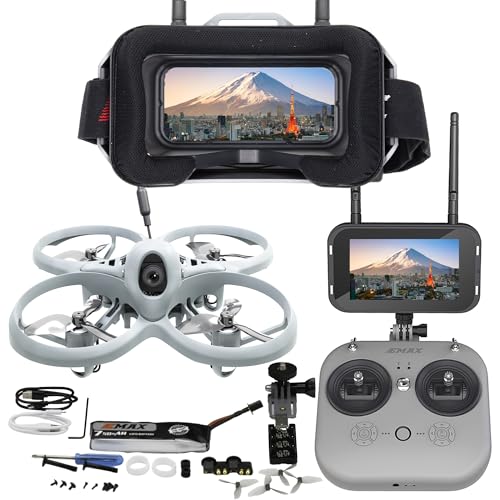
Best for a growth-ready experience. The Tinyhawk Lite RTF Kit provides a real FPV feed with minimal latency, plus Betaflight Configurator access for tuning. It uses a lightweight 1S battery setup with a compact 75mm frame, offering a balance of flight time and agility ideal for beginners who want immediate hands-on learning and the ability to customize as skills improve.
Who it’s best for: learners who want a budget-friendly, scalable system with in-platform tuning. Caution: small batteries require careful charging and storage discipline to maximize lifespan.
Buying Guide
- Comfort and fit: If you have glasses, prioritize goggles with a comfortable face seal and adjustable eye relief. Long practice sessions benefit from padded face pads and light-blocking nose bridges.
- Display quality and resolution: For beginners, a clear image helps speed up learning. Look for 1080p or high-quality 720p screens with a wide field of view to maximize situational awareness.
- Transmission type: Analog systems are common and affordable, but digital options offer crisper images and longer range. Consider your local flying zones and the drones you plan to fly.
- Power and endurance: Built-in batteries help portability, but ability to swap or power from external packs increases session length. Check battery capacity and vertical charging compatibility with your other gear.
- Head tracking and controls: Head tracking improves aiming precision but requires compatible gear. If you’re new, focus on stable basic controls before adding head tracking.
- Goggle-drone compatibility: Ensure your chosen goggles support the same video transmission protocol as your drone or kit. Some models include multiple inputs (HDMI, AV, CVBS) for flexibility.
- Recording and DVR: If you want saved flight footage, choose goggles with integrated DVR or microSD recording. Verify storage limits and file compatibility.
FAQ
- What should a beginner look for in FPV goggles?
Comfort, ease of use, reliable video transmission, and a forgiving control setup are essential for beginners.
- Are digital FPV goggles worth it for a new pilot?
Digital systems provide crisper images and longer transmission range, but analog systems are typically cheaper and more forgiving for beginners.
- Can I use beginner FPV goggles with multiple drones?
Yes, many goggles support multiple input types and can pair with different transmitters. Check compatibility with your drone’s TX/RX system.
- Do I need extra accessories to start flying FPV?
Common extras include spare microSD cards for DVR, a USB cable for firmware updates, spare antennas, and proper charging gear for batteries.
- Is head tracking necessary for beginners?
Not necessary initially. It can help with immersion, but basic flight control comes first. Add head tracking later if desired.
- What is a good beginner-friendly FPV kit?
A kit with a built-in DVR, comfortable goggles, and a beginner mode in the flight controller is recommended for a smooth start.