Choosing an automatic duplex printer can save time and paper, especially in busy home offices or small teams. This article highlights five reliable options that support two-sided printing, fast speeds, and easy setup. Each product section includes a concise overview, features, and practical use cases to help you compare performance, compatibility, and affordability. A buying guide at the end covers key purchase considerations such as print volume, connectivity, and maintenance to help you pick the best fit.
Summary of Selected Products
| Product | Key Benefit | Duplex Speed (approx.) |
|---|---|---|
| Brother MFC-J1360DW | All-in-One color inkjet with cloud apps | Up to 9 ppm color |
| Brother MFC-J1410DW | Compact home/offce friendly with 2.7″ touchscreen | Up to 9 ppm color |
| HP LaserJet M234dw | Small team laser with strong security | Up to 19 ppm two-sided |
| HP LaserJet MFP M234sdw | All-in-one with wireless and mobile printing | Up to 19 ppm two-sided |
| Canon imageCLASS D1620 | High-speed monochrome duplex with generous paper capacity | Up to 45 ppm |
Brother Work Smart 1360 MFC-J1360DW — Color Inkjet, Duplex

The Brother MFC-J1360DW is designed for home and small offices that need a compact, all-in-one device with automatic duplex printing. It provides color printing, copying, and scanning in a single unit, with a 1.8” color display for easy navigation. Cloud app integration supports printing from popular services like Google Drive and OneDrive, enabling seamless workflows. Its 20-sheet ADF supports simple document handling, and its 150-sheet paper tray keeps daily tasks moving. Fire up to 16 ppm black and 9 ppm color speeds for a practical, efficient print solution.
Brother MFC-J1410DW — Wireless Duplex, 2.7” Display

The Brother MFC-J1410DW emphasizes home office practicality with a 2.7” color touchscreen and reliable cloud connectivity. Automatic duplex printing, a 20-sheet single-sided ADF, and a 150-page paper tray help streamline daily tasks. The device is compact and easy to set up, making it suitable for small workspaces that require consistent two-sided printing and simple document management from cloud services like Google Drive, Dropbox, and OneDrive.
HP LaserJet M234dw — Wireless Monochrome Duplex

The HP LaserJet M234dw is a compact monochrome laser ideal for home offices or small teams that prioritize speed and reliability. It features automatic duplex printing, straightforward setup, and robust connectivity options via wireless and mobile printing. Aimed at productive black-and-white document workflows, it offers strong performance with fast two-sided printing, helping reduce paper usage while maintaining professional output for reports, contracts, and memos.
HP LaserJet MFP M234sdw — Wireless All-in-One
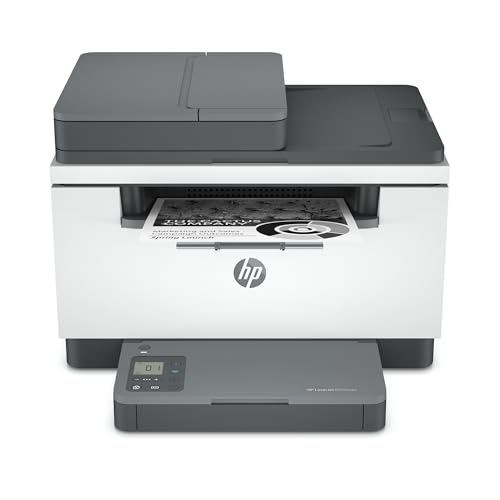
The HP LaserJet MFP M234sdw combines print, scan, and copy with two-sided efficiency and secure wireless connectivity. It’s aimed at small teams needing collaborative workflows and mobile printing. The device supports Instant Ink eligible plans and offers easy setup, plus enhanced security features to protect sensitive documents. Its fast two-sided printing and automated document feeder ensure efficient handling of multi-page jobs, making it a strong option for shared workspaces with modest to moderate volumes.
Canon imageCLASS D1620 — Monochrome Duplex Laser

The Canon imageCLASS D1620 is a high-speed monochrome multifunction printer designed for productivity-heavy environments. Its duplex capability helps reduce paper usage while handling large print jobs, with a fast 45-page-per-minute output. It supports scanning and copying, with a substantial paper capacity to accommodate bulk tasks. The D1620 is suitable for small offices or busy home offices that require quick, professional black-and-white output and a reliable, durable device.
Buying Guide: Key Purchase Considerations
- Print technology and color needs: Inkjet models offer rich color for documents and visuals, while laser printers excel in speed and durability for text. If most tasks are color-rich reports, photos, or marketing materials, a color inkjet like the Brother MFC-J1360DW may be preferable. For text-heavy documents, a monochrome laser such as the HP or Canon options can be more cost-efficient per page.
- Duplex performance and document handling: Look for automatic duplex printing, a reliable ADF, and sufficient paper capacity. ADF capacity affects multi-page scanning and copying efficiency; larger trays reduce refilling interruptions during heavy workloads.
- Connectivity and ease of use: Cloud app compatibility, mobile printing, and intuitive displays (like 2.7” or 1.8” color screens) simplify daily tasks. Consider whether you need USB, Wi-Fi, Ethernet, or cloud integration for your workflow.
- Searchability and maintenance: For document-intensive environments, laser devices with fast duplex speeds reduce turnaround times. Inkjet devices may require more frequent ink replacements; consider cost-per-page and maintenance plans (like Instant Ink) when evaluating ongoing expenses.
- Security and multi-user support: Shared office printers benefit from security features such as secure print, user authentication, and robust wireless protection. Ensure the model supports the security requirements of your workspace.
- Space, footprint, and future needs: If space is limited, prioritize compact designs or all-in-one units with a modest footprint. For growing teams, consider models with larger paper capacity and scalable performance.
- Warranty and service options: A longer warranty or accessible support can reduce downtime. Check whether replacement parts and consumables are readily available in your region.