Boost productivity on the go with attachable laptop monitors. This guide compares five highly rated portable dual-screen extenders, highlighting compatibility, display quality, and setup simplicity. Each option stacks behind your laptop using a slim profile, enabling extended workspaces without a full desk setup.
| Product | Brand | Key Benefit |
|---|---|---|
| KYY Portable Monitor 15.6″ | KYY | Ultra-slim, 1080p IPS with two USB-C/one HDMI, built-in speakers |
| QQH Z80A 15.6″ | QQH | Triple-screen alloy design, easy plug-and-play with driver |
| Zerfis 14″ | Zerfis | Ultra-light, sturdy aluminum shell, versatile modes |
| SideTrak Swivel 14″ | SideTrak | Swivel hinge for easy sharing, magnetic attachment |
| Wixzet 14″ | Wixzet | Triple-screen option with auto-adjust width and flexible mounting |
KYY Portable Monitor 15.6″ 1080P

The KYY 15.6″ portable monitor integrates a full HD IPS panel with 178° viewing angles and HDR support, delivering clear, vibrant 1080p imagery. It uses two full-function USB-C ports and a Mini-HDMI input to accommodate a wide range of devices with a single-cable setup when supported by the host. Its ultrathin 0.3-inch profile and light 1.7 lb weight make it ideal for travel, with built-in speakers and a 3.5 mm audio input for enhanced multimedia playback. No driver installation is required on compatible systems.
QQH Laptop Screen Extender, 15.6” Z80A

The QQH Z80A offers a triple 15.6″ FHD IPS display setup with a 178° viewing angle, 1920×1080 resolution, and a 1200:1 contrast ratio. It features a durable aluminum alloy frame and a simple one-cable connection via USB-C or USB-A, depending on device compatibility, with a built-in stand and 360°/90° rotation options. This design is aimed at expanding productivity without compromising laptop portability, while its compact dual-side mounting keeps your laptop’s lid intact.
Zerfis Laptop Screen Extender, 14″
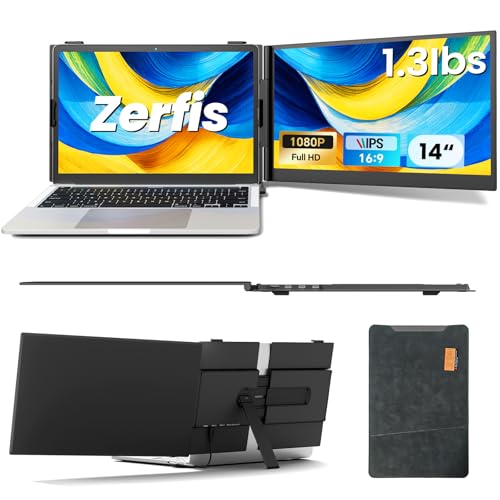
The Zerfis 14″ extender emphasizes portability with an ultra-slim 6.5 mm profile and about 1.3 lb weight. It uses a robust aluminum shell and a 1920×1080 IPS panel offering 1000:1 contrast and 300 nits brightness, delivering crisp visuals. It supports multiple display modes (extended, mirrored, portrait) and rotates up to 200% productivity. A built-in top hook and rear stand provide flexible mounting options for on-the-go multitasking.
SideTrak Swivel 14″ Attachable Monitor

The SideTrak 14″ monitor attaches magnetically with a patented 360° swivel hinge for flexible sharing and collaboration. It provides a dual-screen experience suitable for right- or left-side attachment, with a design focused on minimal desk footprint. The swivel mechanism enables quick orientation changes during meetings, presentations, or remote work scenarios, while keeping a sleek, laptop-friendly aesthetic.
Wixzet Laptop Screen Extender, 14″

The Wixzet 14″ triple-screen extender delivers up to 300% productivity with dual additional displays and a strengthened auto-stretch back panel for width adjustments. It features full HD 1920×1080 resolution across each panel, 100% sRGB, and up to 300 nits brightness. Independent brightness and volume controls per screen, along with a 180° foldable design, help maintain privacy while offering immersive viewing for work, study, or entertainment.
Buying Guide
Choosing the right attachable monitor depends on usage, device compatibility, and portability needs. Consider display quality, with IPS panels offering wide viewing angles and accurate colors. Check connectivity: USB-C is preferred for single-cable setups, but some units require USB-A, HDMI, or drivers for multi-monitor configurations. Weight and thickness matter for travel; look for sub-2 lb devices under 0.2 inches thick for easy pairing with a laptop bag. Mounting mechanics are crucial: magnetic, top-hook, or hinge-based designs affect stability and lid clearance.
Display layout should match your workflows. Dual-screen extenders work well for coding and spreadsheets, while triple-screen configurations excel in content creation and data analysis. Standout features include built-in speakers, HDR, screen rotation, and easy one-cable connections. Driver requirements vary; some models advertise driver-free use, while others need software installation for full functionality.
Durability and warranty should align with your travel needs. Aluminum frames and reinforced stands improve longevity in transit. When evaluating value, consider the total cost of ownership, including included cables and adapters. Finally, verify return policies and customer support quality in case compatibility issues arise with specific laptops or operating systems.