Finding the right Android TV dongle means prioritizing a smooth interface, strong app access, and reliable casting or streaming capabilities. This guide highlights five top options suitable for different buyers—from cord-cutters who want a single search hub to those who crave effortless wireless screen mirroring. Each entry includes who it’s best for, why it stands out, and any notable caveats. The quick comparison table after the introduction helps you scan key differences at a glance.
| Product | Best For | Key Benefit | Limitations |
|---|---|---|---|
| TiVo Stream 4K | All-in-one streaming fans | Unified search and watch list across apps | Requires integration with TiVo ecosystem |
| Xiaomi TV Stick 4K (2nd Gen) | Premium visuals on a budget | Dolby Vision HDR10+, Atmos with Google TV | Some app availability varies by region |
| BRAIDOL 2027 Upgraded Wireless HDMI Dongle | Phone-to-TV mirroring on the go | Plug-and-play, low latency wireless display | May have limited app support |
| SOCLLLife 4K Wireless HDMI Display Dongle | Office and home presentations | 4K casting with DLNA/Miracast compatibility | Note on HDCP-restricted apps |
| Ogzvhypl 2027 Upgraded Wireless HDMI Dongle | Simple screen mirroring | Low latency, privacy mode | Limited compatibility with some devices |
TiVo Stream 4K – Android TV Dongle

The TiVo Stream 4K consolidates apps and live TV on a single Android TV experience. It emphasizes a centralized search and watch list across all installed apps, reducing app-switching. This option is best for buyers who want a unified interface and voice search via Google Assistant for fast navigation and control. It is suitable for households that use multiple streaming apps and value a cohesive recommendation system across services.
Best for: Viewers who want an integrated, app-agnostic search and a live TV experience in one place. Why selected: It minimizes navigating between apps while offering voice control for hands-free operation. Caution: Some users may prefer a stock Android TV experience with broader app compatibility outside the TiVo ecosystem.
Xiaomi TV Stick 4K (2nd Gen)
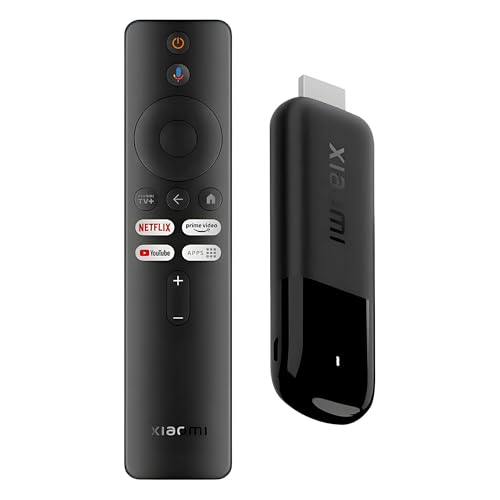
The Xiaomi TV Stick 4K (2nd Gen) delivers a high-end visual experience with Dolby Vision HDR10+ and Atmos, paired with Google TV for organized content discovery. Its 6nm processor and Wi‑Fi 6 support provide smoother navigation and snappy app performance. This dongle is better for viewers who demand cinema-grade visuals and a responsive interface without a bulky setup.
Best for: Cinephiles and power streamers who want top-tier picture quality and quick app access. Why selected: Combines advanced HDR formats with robust wireless performance. Caution: Availability of certain services or apps can vary by region, affecting access to some content.
2027 Upgraded Wireless HDMI Display Dongle (Black)

This wireless HDMI dongle focuses on seamless screen mirroring from smartphones or laptops to a TV, monitor, or projector. It supports 4K decoding and 1080p at 60Hz, making it well-suited for presentations or casual streaming from mobile devices. A key benefit is the plug-and-play design with privacy mode and a straightforward landscape/portrait switch.
Best for: People who want effortless screen mirroring without a network dependency. Why selected: Strong emphasis on easy setup and immediate casting. Caution: Some users may encounter limitations with app-specific streaming on restricted services.
SOCLLLife 4K Wireless HDMI Display Dongle (Grey)

The SOCLLLife dongle specializes in wireless casting from Android, iOS, and Windows devices to a bigger screen with 4K casting capabilities. It supports Miracast, AirPlay, and DLNA, making it versatile for mixed-device environments. It is a solid pick for presentations or home entertainment where multiple ecosystems are used.
Best for: Mixed-device households needing flexible wireless casting. Why selected: Broad compatibility with popular streaming and sharing standards. Caution: Not all apps can mirror content from HDCP-protected services on some devices.
Anytrox Wireless HDMI Display Adapter

The Anytrox dongle emphasizes straightforward, plug-and-play wireless display with 4K decoding and 1080p at 60Hz output. It uses a 5G dual-band setup and a Dynamic Stability Engine to minimize latency and interference. This option is best for users who want quick mirroring without relying on a local Wi-Fi network.
Best for: Quick, cable-free screen sharing without extra apps. Why selected: Clear focus on low-latency wireless display with stable connection. Caution: Some devices may exhibit compatibility limits or require specific display settings for optimal performance.
Wireless HDMI Display Adapter 4K by SOCLLLife

Note: This product line emphasizes 4K decoding and wireless casting from various devices to larger screens. It is designed for ease of use with no WiFi or app requirements, aiming to minimize setup steps for immediate display. It is a practical pick for straightforward mirroring tasks.
Caution: Some content, especially HDCP-protected streams, may not be viewable on all apps or devices due to licensing restrictions.
Buying Guide: Key Purchase Considerations
What should you ask before buying an android TV dongle? Start by clarifying device compatibility, streaming app availability, and whether you need built-in search and recommendations or simple screen mirroring.
- Streaming ecosystem: Do you prefer a unified interface (like Google TV) or a raw casting experience from your mobile device?
- Video quality: Is HDR support (Dolby Vision, HDR10+) and 4K decoding important for you?
- Wireless performance: Do you need Wi-Fi 6/6E, dual-band stability, or raw ethernet alternatives for steady streaming?
- Latency and gaming: Is low latency essential for gaming or live presentations?
- Privacy and control: Do you need a privacy mode or easy one-click disconnect for public displays?
- App availability and regions: Are the apps you rely on preinstalled or readily available in your region?
Buying Considerations by Use Case
- All-in-one streamer: Choose a dongle with centralized search, live TV integration, and voice control for broad app support.
- Home cinema: Favor models with Dolby Vision HDR10+ and Atmos to maximize cinema-quality visuals and sound.
- Office/motion presentations: Look for plug-and-play wireless display dongles with low latency and privacy features.
- Multi-device households: Pick a versatile dongle that supports Miracast, AirPlay, and DLNA for cross-platform casting.
Frequently Asked Questions
- What is the main difference between an Android TV dongle and a wireless HDMI dongle?
– An Android TV dongle runs a media-optimized operating system with built-in apps and search, while a wireless HDMI dongle focuses on mirroring content from other devices without a separate OS. - Can I cast from iPhone to any Android TV dongle?
– Many dongles support AirPlay, Miracast, or DLNA, but compatibility varies by device and app restrictions. - Is 4K HDR support essential for streaming?
– It enhances picture quality on compatible TVs, but the overall experience also depends on the source material and network speed. - Do these dongles require Wi-Fi?
– Some models are plug-and-play and work without Wi-Fi for mirroring, while others rely on Wi-Fi for streaming apps and features. - Are there privacy concerns with wireless display adapters?
– Some devices offer privacy modes or one-click disconnect features to limit unintended display sharing. - Which dongle is best for gaming on a TV?
– A model with low latency, strong wireless performance, and the ability to run compatible streaming apps is ideal.