Android boxes offer a compact, versatile way to transform any HDTV into a smart TV. This guide highlights five trusted options that balance 4K/8K capable visuals, robust processing, and modern connectivity. Each entry includes key specs and practical uses to help you compare performance, storage, and platform features.
| Product | Brand | Core Features |
|---|---|---|
| Xiaomi TV Box S 3rd Gen | XIAOMI | 4K, Dolby Vision, Google TV, WiFi 6, 32GB, HDMI 2.1 |
| ONN Android TV 4K UHD | ONN | 4K UHD, Android TV, Google Assistant, voice remote |
| Android Box 2026 HK1 | IDEALROYAL | Android 13, 4GB/64GB, 8K support, H.265 |
| RUPA Android TV Box 2025 | RUPA | 4K/8K, RK3518pro, WiFi 6, Bluetooth 5.0 |
| Android 14 TV Box 2026 (R69 Max) | IDEALROYAL | Android 14, RK3528, 4GB/32GB, WiFi 6 |
Xiaomi TV Box S 3rd Gen Overview

The Xiaomi TV Box S 3rd Gen delivers 4K Ultra HD visuals at 60FPS with Dolby Vision and HDR10+ for vibrant brightness and contrast. It supports immersive audio through Dolby Audio and DTS:X, pairing with a quad-core CPU up to 2.5GHz and ARM G310 V2 GPU for responsive navigation. With 2GB RAM and 32GB storage, users have room for apps and media, all running on Google TV for personalized recommendations and voice control via Google Assistant.
ONN Android TV 4K UHD Overview
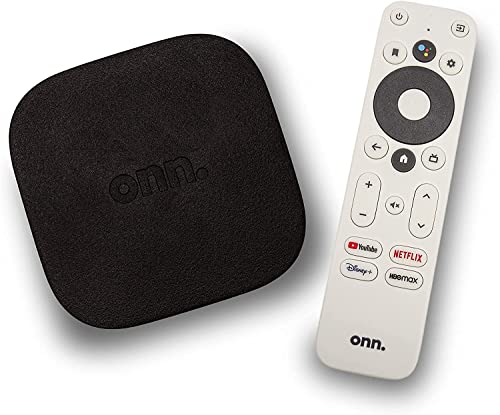
ONN’s Android TV 4K UHD device emphasizes sharp picture quality and broad app access via the Google Play Store. The Android TV platform enables easy access to streaming services, apps, and games, while the included voice remote with Google Assistant simplifies navigation and search, making it convenient to find content hands-free.
IDEALROYAL HK1 Android Box Overview
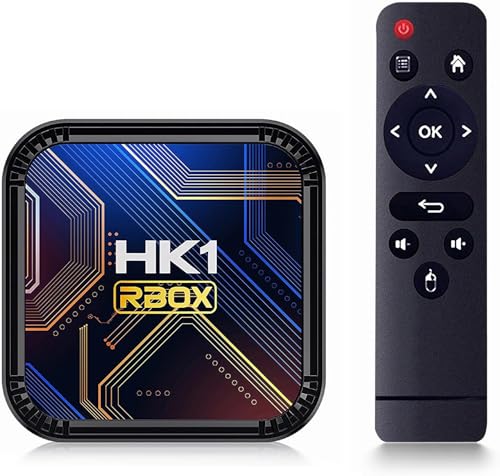
Powered by Android 13.0 and RK3528, this box features 4GB RAM and 64GB ROM for smoother operation and more installed apps. It supports 8K and 3D content with HDR10 and H.265, delivering detailed visuals and efficient streaming. Memory can be expanded via micro SD, useful for households with varied media libraries.
RUPA Android TV Box 14.0 Overview

RUPA’s Android TV Box 14.0 supports 4K and 8K output through RK3518pro, with 2GB RAM and 32GB ROM. It highlights WiFi 6 compatibility, dual-band wireless connectivity, and Bluetooth 5.0 for peripheral devices. The device emphasizes a balance of performance and expandability for multimedia streaming and light gaming.
IDEALROYAL Android 14 2026 Overview

Equipped with Android 14.0, the R69 Max Android Box focuses on performance, security, and a streamlined home interface. The RK3528 quad-core CPU and Mali-450 GPU support smooth media playback, while 4GB RAM and 32GB storage offer ample headroom. It includes a TF card slot for expanded storage and supports WiFi 6 with dual-band connectivity.
Buying Guide: Key Purchase Considerations
- Operating System and Ecosystem: Android 13/14 versions provide access to Google Play, streaming apps, and voice assistants. Newer OS versions generally offer longer software support and better privacy controls.
- Performance and Storage: Look for devices with at least 4GB RAM and 32GB storage for smooth multitasking and adequate app space. Expanded storage via SD cards or USB drives can extend usability.
- Video and Audio Capabilities: If you want premium visuals and sound, prioritize 4K/8K support, Dolby Vision, HDR10+, and audio formats like Dolby Atmos or DTS:X.
- Connectivity: WiFi 6 (802.11ax) improves buffering and streaming stability in dense networks. Bluetooth 5.0 or higher supports wireless peripherals for keyboard, controller, or speakers.
- Ports and Compatibility: HDMI 2.0/2.1, USB 3.0, and Ethernet options affect data transfer and network reliability. Ensure compatibility with your TV and home theater system.
- Remote and User Interface: A voice remote or built-in Google Assistant simplifies navigation. An intuitive launcher and fast boot times improve daily use.
- Expandability: MicroSD/TF slots and USB ports allow storage expansion and peripheral connections, aiding multimedia libraries and gaming.
- Content and App Availability: Consider which streaming apps you use most (Netflix, YouTube, Disney+, etc.) and ensure the device supports them with a stable Google TV or Android TV interface.