Answer: If you’re shopping for affordable tablets that balance performance, battery life, and portability, the products below deliver solid value for everyday tasks like browsing, streaming, and light gaming. The top picks vary by user type: students and casual readers may prefer compact, inexpensive models; families may want durable devices with parental features; and power-conscious shoppers should look for efficient processors and good battery life. The table below highlights five well-rounded options and what each is best for.
| Product | Best For | Why It Stands Out |
|---|---|---|
| Samsung Galaxy Tab A11+ 6GB RAM | All-Around Family Use | Strong performance, expandable storage, and long battery life. |
| TCL TAB 10 Gen 4 | Multitasking & Media | Large display, high RAM, Android 15, and solid endurance. |
| Like-New Amazon Fire HD 8 | Budget Entertainment | 8″ HD display with 3GB RAM and up to 1 TB expandable storage. |
| Amazon Fire 7 Kids Tablet | Children & Parental Controls | Kid-friendly bundle with parental controls and extended warranty. |
| Lenovo Tab One | Compact Travel Tablet | Lightweight with long battery life and easy portability. |
Samsung Galaxy Tab A11+ 6GB RAM — Key Features

The Samsung Galaxy Tab A11+ is best for families and multitaskers who want solid performance without a premium price. It supports tasks from streaming to light gaming with an upgraded chipset designed to stay responsive. The large battery supports long use between charges, and expandable storage near 256GB provides room for photos, apps, and offline videos. This model suits buyers who value reliability, a broad app ecosystem, and a familiar Android experience. Caution: memory options vary by region; confirm available RAM and storage before purchase.
TCL TAB 10 Gen 4 — Performance and Display
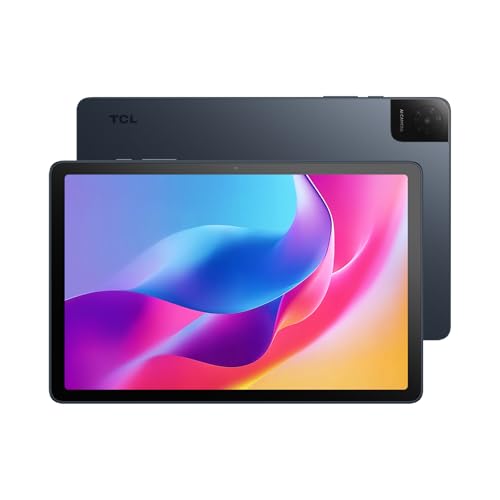
The TCL TAB 10 Gen 4 is best for multitaskers who want a bigger, clearer screen and robust Android 15 performance. Its octa-core processor and 12GB RAM configuration deliver smoother navigation and faster app switching, while the 10.1″ FHD display enhances movies and reading. 18W fast charging helps limit downtime. Choose this if you want a capable tablet at a reasonable price for work, study, and media consumption. Limitation: fast charging requires a compatible charger not always included.
Like-New Amazon Fire HD 8 — Value for Entertainment

The Like-New Fire HD 8 is best for budget-focused buyers seeking compact portability with accessible streaming. It offers an 8″ HD display, 3GB RAM, 32GB storage, and expandable memory, supporting up to 1TB via microSD. This option is ideal for casual browsing, video streaming, and light gaming. Caution: refurbished devices may ship in generic packaging, and performance is best for lighter tasks rather than intensive apps.
Amazon Fire 7 Kids Tablet — Family-Friendly
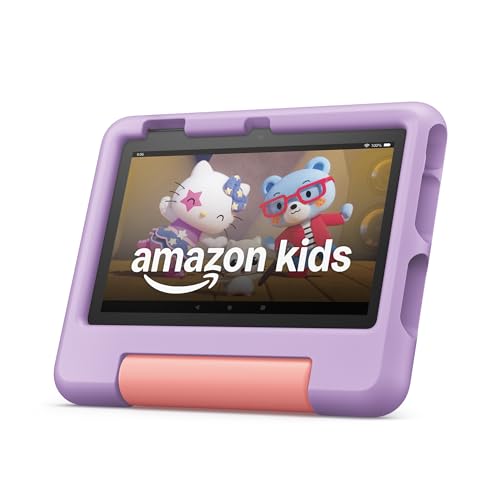
The Fire 7 Kids Tablet is best for families with children who need robust parental controls and a protected environment. It includes a kid-friendly bundle with a year of Amazon Kids+ and a protective case. The 7″ form factor makes it highly portable for travel and daily use. Caution: content access and performance are tailored for younger users; more demanding apps may require a higher-end device later on.
Lenovo Tab One — Lightweight Travel Tablet

The Lenovo Tab One is best for users who want a compact, economical option with long battery life for streaming and light productivity. It’s lightweight and easy to carry, making it suitable for travel, classrooms, or quick tasks on the go. Caution: performance is optimized for basic tasks; power users may favor higher RAM tablets for heavy multitasking.
Buying Guide
What should I look for in a cheap tablet?
Consider display size and resolution for comfortable viewing, a capable processor for smooth multitasking, RAM amount for responsiveness, storage options, and battery life. Expandable storage is a big plus if you plan to store videos or offline content.
Android vs. iPad on a budget: which is better?
Android tablets generally offer more budget options with expandable storage and flexible app ecosystems. The budget iPad category is narrower; Renewed or older models can be economical but may lack the latest features. Your choice depends on app preferences and ecosystem familiarity.
Is refurbished or “like-new” a good idea?
Refurbished devices can offer substantial savings and come with warranties. For many buyers, a like-new Fire HD 8 or similar device provides reliable performance at a lower cost. Verify warranty terms and return options before purchasing.
What about durability and kids’ use?
Durable cases and parental controls are important for children’s tablets. Bundled kid-friendly options often include protective cases and content management, making them safer for younger users while keeping prices reasonable.
How to maximize battery life on a budget tablet?
Close unused apps, dim the display, and disable unnecessary features. If fast charging is available, use a compatible charger to reduce downtime. Lower-resolution streaming can also extend battery life on budget devices.
Who should buy these tablets?
Best for students and casual readers: TCL TAB 10 Gen 4 and Lenovo Tab One. Best for families: Samsung Galaxy Tab A11+ and Like-New Fire HD 8. Best for kids: Fire 7 Kids Tablet. Best for travel or quick tasks: Lenovo Tab One and Fire HD 8 in compact usage scenarios.
Frequently Asked Questions
- What is the cheapest tablet that still runs apps well? Budget models like the Like-New Fire HD 8 offer decent app performance for everyday tasks and streaming.
- Do budget tablets support expandable storage? Many do, up to 1 TB with microSD cards, which helps with media storage on entry-level devices.
- Are refurbished tablets reliable? Refurbished devices can be reliable when purchased from reputable sources and with a warranty.
- Is a larger display better for reading? Yes, larger displays generally improve readability and reduce eye strain for reading and multitasking.
- Should I buy a kids’ tablet for my child? If parental controls and a kid-friendly ecosystem are priorities, a kids’ tablet provides safety and curated content.
- How important is RAM on a budget tablet? More RAM improves multitasking and app switching; aim for 3GB or more where possible to balance price and performance.